
Quick verdict
- What it is
- Store information collected; independent summary not yet available.
- At a glance
-
- From $3.66/mo
- Free to download
- In-app purchases
Categories and search queries
Official categories
- Entertainment
- Education
AppCorpus categories
Key functions
| Function | Availability | Access | Scope | Evidence |
|---|---|---|---|---|
| Free app | Yes | Free | — | Store published |
| In-app purchases | Yes | Limited free | — | Store published |
Screens
App Store
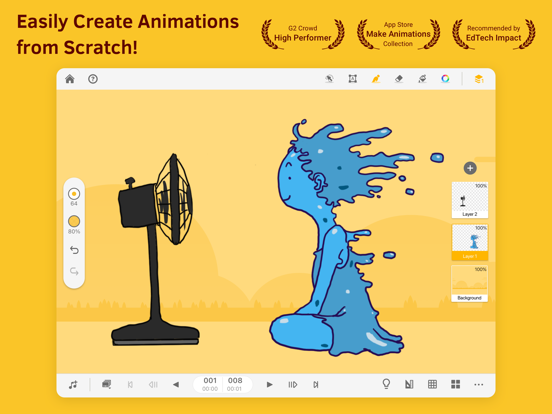
20 store screenshots



Pricing & paywalls
App Store
- Animation Desk Pro (Quarter) — $10.99/quarter
- Animation Desk Pro (Month) — $4.49/month
- Animation Desk Pro (Month) — $29.99/year ($2.49/mo)
- Animation Desk Pro (Month) — $3.99
- Animation Desk Pro (Month) — $8.99
- Animation Desk Pro (Month) — $15.99
- Creativity 365 — $9.99
- Creativity 365 — $19.99
- Creativity 365 — $59.99
- Kdan Cloud — $2.99
Ratings & reviews
App Store
-
4/5Great app, but lose the glitches
I have been using this app for a while, and the tools available from the start (without the pro version) are enough to create some decent looking art. The app does also offer optional layering for your animations, which will also enhance your drawing’s appearance. As a final pro for the app, it does pretty well tracking your finger and other makeshift pens, if you do not have pen device available for use and lag is rarely a problem. However, there are a handful of major problems with the app that should be looked at. First example, you may experience a bug that causes a section of drawing to be completely erased for no particular reason, and when the user tries to reverse the bug (with the back button) it does not work. This is a rare occasion, however it is still a major problem I have come across. To expand on the back button, I don’t understand why the button only offers a certain amount of times you may go back when it is pressed. This is a problem, because when you have a background already drawn, and you run out of back button uses, you have to erase the portion you don’t want. But, along with the erasing of the unwanted portion, it will erase the background portion as well. Please adress these problems, because I love to use this app.
Kendall. C · 30 Aug 2026
-
4/5Some REALLY helpful updates that can really improve Animation Desk:
I thought of some really helpful updates that would really help the drawing community. The first one is the pen. The pen which draws a circular line is to small at max size, and should be bigger at max size. Its hard to draw stick figures with such a small pen, and it would be amazing if it could be bigger. Also, the majority of animators who animate with this application animate on an iPad Pro, like me, and drawing with one hand on the screen and an Apple Pencil on it at the same time interrupts the drawing that were drawing. I think their should be a setting to make it so that the screen doesn’t sense my hand but only the Apple Pencil. Many other applications already have this and it would be great if this did to. Stabilizer: If you’ve ever used Paint Tools Sai, you know what I’m talking about. In Paint Tools Sai, they have an option called the stabilizer which makes lines more smooth by giving what your drawing a delay to make the drawing more curvier. In Animation Desk, my circles always turn out straight and not round. A circle looks lie 7 lines put together and if Animation Desk hade a stabilizer tool, that would be AMAZING! I really hope you read this, because it took me a long time to type, and if you did, please please please add these things to Animation desk in the next update! Thanks! 🙂
RoiBRocker · 30 Aug 2026
-
3/5A little laggy but so far I love it
Honestly I Love it’s really fun and cute I love how it’s really calming to look at the only problem I have is that it is pretty laggy, I recently just saw that 3 days ago you guys had fixed the problem but in my case after literally after a minute the app would stop and freeze and I try to push random buttons but it would still be frozen. Other then that I do have a few suggestions I would definitely give this app 5 stars because I love how the canvas is small and cute it honestly makes me want to animate with big canvases it’s really stressful for me because it makes me feel like I have to add more to the Animation. But On This App I feel very comfortable and very chill when it comes to this app but the suggestions that I have is * stabilization* It would be grate to have a stabilization pen or tool so we can have more of clean lines as I do have shaky hands it would definitely be very helpful to have. *Vector* and last is vector it helps whenever I want to scale my drawing big or small without loosing any Resolution (won’t get blurry) every time I change the size of my drawing. Other then that I really love this app if these things get fixed and if my suggestions actually go into planning this will be total Five star!!!
chandrareeves · 30 Aug 2026
-
1/5Why do I have to pay for a paintbrush
So if I’m going to be totally honest I’m not getting the tools I need to animate for example I’m limited to at least only 3 brushes and most tools honestly I feel like for people who are looking for a free drawing app this isn’t it if that’s not stated in the apps description but also for example for a free drawing app like Sketchbook I get the tools I need access to brushes that I want and to use and sure if I want access to more brushes sure I can pay but I don’t because the necessities are there but in Animation desk I am limited to very little brushes and not a great toolbox in general and this is just cause I’m not paying if you guys are willing to pay that’s fine but if you really don’t want to pay then this isn’t the right animation app honestly I just want more tools to work with and some extra tools but people who aren’t paying to so so little I really want you guys to add more just so people who want to use the free option before paying so they can try it out beforehand but giving users little to nothing is like saying “You need to pay to try it even though we have a free version” and the reason I think it’s like saying that is again because of the limited options it’s giving an opportunity to users to try it out for free but since there is so little it feels like you should or need to pay just to actually try it out yourself before knowing if you will like the app
Improve pls thx so much · 30 Aug 2026
-
1/5Good for learning the ropes, BUT way too glitchy
I’ve encountered multiple issues while working on an animation. I’ve spent over a month working on an animation, and given that it’s my very first one, I’m extremely frustrated. I will only be talking about the most recent major problems I’ve had. Earlier today I was working on my animation and it was perfectly fine. These problems occurred after a couple of hours. First of all, while I was working on adding to each of my frames, the background for one of my frames became the background for all of my frames. I was nearly finished with the line art for all of my frames when this happened. This is incredibly frustrating because I was using the background as references for the character movements, and originally each of the backgrounds were the person in different positions. Secondly, soon after, I saw that the line art for all of my frames became a previous version. What I mean by this is that I spent the last week or so darkening all of my line art, but the current version is how the line art looked before it was darkened and before I added heads to the person I was animating. The last week or two of my work are now gone. I have also filed a ticket through the app and hope to receive a response soon. I have been working on this animation since December 22nd. It is now February 2nd. I have put countless hours into this and have gotten too far to see it go to waste.
Unhappy Animator · 30 Aug 2026
Privacy & accessibility
App Store
Privacy
- Data Linked to You — Analytics — Identifiers — Device ID Developer declared
- Data Linked to You — App Functionality — Identifiers — Device ID Developer declared
- Data Linked to You — Identifiers Developer declared
- Data Not Linked to You — App Functionality — Diagnostics — Crash Data Developer declared
- Data Not Linked to You — Diagnostics Developer declared
- Data Used to Track You — Identifiers — Device ID Developer declared
- Data Used to Track You — Identifiers Developer declared
Accessibility
No accessibility labels collected yet.
Versions
App Store
-
9.1.8
Screenshot updated! Thank you jswift17! Don't forget to check out the canvas grids, the optimized selection tool, and other new features in the app.
-
9.2.0
**Animation Desk Pro Education Offer added!** Special discount for teachers and students. Check the update.
-
9.2.1
Animation Desk Pro iOS Education Offer added! Special discount for teachers and students. Check the update.
-
9.2.2
- Complete the Treasure Chest Quest and unlock all the features! - We care about your experience and privacy. This update allows you to manage your account and gives you more control of the personal data you've shared.
-
9.2.3
CDN integration - now the app has better connectivity and accessibility to in-app content and service.
-
9.2.4
- UI display unified - App main page layout changed
-
9.3.0
New tutorials added! Please view the "Learning by Doing" section. Learn more about the app and animation skills- don't forget to let us know if you like the tutorials.
-
9.3.1
- Mini quest updated. Unlock the chests and try the features for free - Layer bug fixed - Sign-up flow optimized
-
9.3.2
- Treasure chest quest updated! - Selection tool bug fixes. The preview size is now the same as the actual pasted object. - UI optimization
-
9.3.3
Here comes the update! - When adjusting the brush/eraser sizes, users can preview the effect on the canvas - Caption tool improved - textbox now resizes along with the length of the caption - Selection tool minor bug fixes
-
9.3.4
- Frame loss fixed - Stroke auto-saving failure resolved - App experience optimized
-
9.3.5
Fix the touch conflict between zooming and drawing
-
9.3.6
- Fix the touch conflict between zooming and drawing - Screenshots updated
-
9.3.7
- Fix the touch conflict between zooming and drawing - Improve user experience
-
9.3.8
- New sequence creation optimized • Customize canvas size • Preview FPS effect - User interface optimized • Working area settings • Add entry to soundtrack editing in working area • Export settings: Add export quality options - Low/ Moderate/ Original • Share to social networks
-
9.4.0
- Image copying error resolved - PSD export fixed
-
9.4.1
- Fixed image copying error - Improved stability when copying and pasting with the selection tool - Fixed error pop-up problems on iOS 17 and above
-
9.4.2
-Fixed image copying error -Resolved layer display issues when switching frames
-
9.4.3
AniZone retires on May 31st, 2024. The user interface is updated accordingly.
-
9.4.4
User interface optimization
-
9.4.5
Minor adjustments to the interface.
-
9.4.6
Bug Fix - Fixed an issue with photo album access.
-
9.4.7
User interface optimization
-
9.4.8
- Minor optimization - New subscription plan added
-
9.4.9
· 22 Jan 2026
- UI optimization
Alternatives
- Stickman: draw animation — Same category + similar ratings
- Folioscope: Animation Network — Same category + similar ratings
- Anime Maker — Same category + similar ratings
Availability by market
- US
Data quality & evidence
- Page completeness
- Live store listing
- Last verified
- 30 Aug 2026
- Sources
- App Store
- Independent summary has not been published yet.