
Quick verdict
- What it is
- Store information collected; independent summary not yet available.
- At a glance
-
- From $1.99/mo
- Free to download
- In-app purchases
Categories and search queries
Official categories
- Books
- Entertainment
AppCorpus categories
Key functions
| Function | Availability | Access | Scope | Evidence |
|---|---|---|---|---|
| Free app | Yes | Free | — | Store published |
| In-app purchases | Yes | Limited free | — | Store published |
Screens
App Store
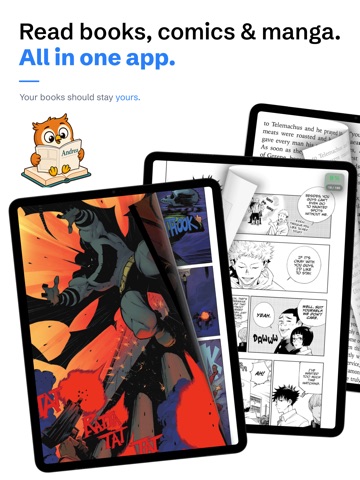
24 store screenshots



Pricing & paywalls
App Store
- Andrea Premium Monthly — $1.99/month
- Andrea Premium Monthly — $14.99/year ($1.24/mo)
- Andrea Premium Lifetime — $24.99
Ratings & reviews
App Store
No store reviews collected for App Store · US
Privacy & accessibility
App Store
Privacy
- Data Not Collected Developer declared
Accessibility
No accessibility labels collected yet.
Versions
App Store
- 1.0
-
1.0.1
What’s New in Version 1.0.1 NEW FEATURES • Added full Russian and Italian localization. Andrea Reader is now available in 12 languages. • Added a new setting to automatically reopen your last-read book whenever you launch the app. Disabled by default. • Added in-book search for finding words and text matches inside EPUB and PDF files. • Redesigned the reading menu. Chapters, highlights, widgets, and in-book search are now grouped into a native quick-access menu, with a dedicated view for each tool. • Create custom chapters in comics and manga (Premium). Add chapters directly from your current page or select their starting page using a visual thumbnail sidebar. Perfect for omnibus editions and collected volumes without a built-in index. • Organize chapters into custom parts, move chapters between them, reassign chapter pages, and experimentally detect chapter names automatically. • Added bookmarks. Mark important pages while reading and find them in the chapter view and the vertical thumbnail sidebar. • Added chapter filters to display chapters, bookmarks, or both. • Improved Auto Mode controls. You can now pause playback and adjust the speed in real time. • Completely redesigned and improved the reading widgets view. BUG FIXES & IMPROVEMENTS • Fixed the “Continue Reading” icon so it now correctly respects collection and section colors. • Fixed multiple translation and localization issues. • Fixed EPUB parsing and rendering issues affecting some books formatted or converted with Calibre. • Fixed issues opening and rendering certain PDF files, including their pages, images, and thumbnails. • Improved text selection and highlighting performance, and fixed duplicated highlights. • Improved OCR text selection and highlighting in comics and manga. • Fixed an issue on iPhone 12 where the native document picker would not open when importing local files. • Fixed missing PDF page previews when viewing favorite pages from book or collection information, including gallery view. • Significantly improved performance for the fan collection style. Collections containing many fan-style items should now scroll more smoothly and no longer cause severe lag or freezes. • Additional reading menu, stability, and performance improvements. Thank you for using Andrea Reader and for all the feedback that helped shape this update.
-
1.0.2
NEW IN ANDREA READER - Double-page mode, rebuilt. Landscape pages now show on their own, centered, instead of being squeezed into a spread. Zoom frames the full spread by default, page-turn transitions are respected, and you can adjust the spine between pages (spacing, thickness and color). Full screen keeps the image proportion without deforming it, and the reader can switch to double-page automatically when you rotate to landscape. - Sharper images. A new image rescaler for comics and manga with x2 and x4 upscaling and four processing modes: Lanczos, bicubic, sharpen lines and clean scan. It also includes an experimental AI super-resolution that can turn very low-quality images into high-definition ones. Image-based EPUBs are now handled as images, with thumbnails in the reading menu. - Reading stats when you close a book. When you finish or close a book, a quick prompt now appears showing the book you just read, with a button to jump straight to its individual reading stats and details. - Improved reading controls. Fine-tune what each tap does (advance or go back depending on the side) and use the volume buttons to turn pages. The auto page-turn play/pause control is now cleaner and sized to match the widget. - Collections, sections and bookmarks. See all the bookmarks of a collection or a section in one place, with each book, its cover and its bookmarks. You can set a specific photo as a book cover, and the limit on collections and files is now much higher. The progress widget is now free, and there's a black app icon with a new icon style selector in General Settings. - iCloud. Uploading to iCloud now automatically reconnects and re-creates the app folder if it went missing, and clearly warns you when iCloud isn't available. A new "Reset iCloud connection" option is available in Settings; it's safe and never deletes your books. - Experimental reading mode. Read a page in color first, then tap to switch it to black and white (manga style) before moving on. BUG FIXES - The file picker no longer closes by itself when importing from your device. - The reader no longer closes on its own when a tip appears underneath it. - Reading-menu thumbnails now show correctly in EPUB image mode. - Fixed lag and duplicate covers when browsing covers inside a collection. - Books offloaded to iCloud no longer lose their cover. - Fixed a crash when searching inside PDFs. - Scrolling stays smooth after switching books from the reader, including after dragging or opening the reading menu. - Comic and PDF pages now re-fit in real time when you rotate the device in double-page mode. - The startup animation stripe colors now match correctly. - Improved the fan collection style, with better performance and correct curvature. - Polished the collection info sheet on iPhone with clearer titles and separators.
-
1.0.3
NEW IN ANDREA READER - Read like a real book. Double page mode now follows the layout of a printed book: the first and last pages stand alone, with true spreads in between. Landscape pages are shown on their own and no longer get split or paired incorrectly. - Double page for EPUB. A first experimental version, free for everyone. - Tap a highlight to edit it. Change its color or delete it from a popover, in EPUB, PDF and comics, including continuous scrolling and double page. Highlighting itself is also far more reliable and precise. - Reworked reading settings. Native menus, no more cut-off text and much clearer navigation. - Hyphenation in EPUB. A new option breaks words with a hyphen at the end of a line for more even margins. - Read aloud, early access. A first experimental version for PDF and EPUB, available with Premium. - Storage per collection. A dedicated view to see what each collection takes up and free up space. - Polish is now available. BUG FIXES - Highlighting no longer gets stuck in EPUB and is much more accurate in PDF, including double page. - Much lower memory use while turning pages and with x2/x4 upscaling, preventing crashes. - Pages no longer keep flipping on their own after using the volume buttons or jumping to a chapter. - In EPUB, "see all pages" no longer shows the cover on every page and loads much faster. - Widgets no longer get in the way when highlighting, and tapping the center opens the reading menu instead of turning the page. - Turning off an experimental option now really disables its feature. - The manual order of books inside a section is saved and kept after refreshing. - Books are easier to drag between sections, all sections can be reopened after collapsing them, and the minimalist view no longer jumps. - The "view covers" gallery scrolls smoothly, even with offloaded files. - Covers of offloaded files no longer disappear inside collections. - A file downloaded from a server keeps its link, so the download can be removed later. - ZIP files imported from a server now detect the books inside, and unsupported files get a better icon. - The menu that switches the collection view opens and closes faster in large collections. - Leaving the reading menu is smoother in all three readers. - The reading profiles sheet closes smoothly when you swipe it away. - The page count updates in real time when deleting pages while editing a book or building an omnibus. - The long-press menu on a book no longer jumps upwards on iOS 26. - The system volume bar no longer flashes when leaving a book with volume-button controls on. - On iPhone, clearer separators in the collection info and the Premium screen fits without scrolling. - Fixed translations in the reading settings and other views.
-
1.0.4
· 2 Aug 2026
NEW IN ANDREA READER - Read like a real book. Double page mode now follows the layout of a printed book: the first and last pages stand alone, with true spreads in between. Landscape pages are shown on their own and no longer get split or paired incorrectly. - Double page for EPUB. A first experimental version, free for everyone. - Tap a highlight to edit it. Change its color or delete it from a popover, in EPUB, PDF and comics, including continuous scrolling and double page. Highlighting itself is also far more reliable and precise. - Reworked reading settings. Native menus, no more cut-off text and much clearer navigation. - Hyphenation in EPUB. A new option breaks words with a hyphen at the end of a line for more even margins. - Read aloud, early access. A first experimental version for PDF and EPUB, available with Premium. - Storage per collection. A dedicated view to see what each collection takes up and free up space. - Polish is now available. BUG FIXES - Highlighting no longer gets stuck in EPUB and is much more accurate in PDF, including double page. - Much lower memory use while turning pages and with x2/x4 upscaling, preventing crashes. - Pages no longer keep flipping on their own after using the volume buttons or jumping to a chapter. - In EPUB, "see all pages" no longer shows the cover on every page and loads much faster. - Widgets no longer get in the way when highlighting, and tapping the center opens the reading menu instead of turning the page. - Turning off an experimental option now really disables its feature. - The manual order of books inside a section is saved and kept after refreshing. - Books are easier to drag between sections, all sections can be reopened after collapsing them, and the minimalist view no longer jumps. - The "view covers" gallery scrolls smoothly, even with offloaded files. - Covers of offloaded files no longer disappear inside collections. - A file downloaded from a server keeps its link, so the download can be removed later. - ZIP files imported from a server now detect the books inside, and unsupported files get a better icon. - The menu that switches the collection view opens and closes faster in large collections. - Leaving the reading menu is smoother in all three readers. - The reading profiles sheet closes smoothly when you swipe it away. - The page count updates in real time when deleting pages while editing a book or building an omnibus. - The long-press menu on a book no longer jumps upwards on iOS 26. - The system volume bar no longer flashes when leaving a book with volume-button controls on. - On iPhone, clearer separators in the collection info and the Premium screen fits without scrolling. - Fixed translations in the reading settings and other views. - Resuming your last read at launch now respects the status bar: the library no longer shifts upward behind the reader. - Closing a book that was reopened automatically at launch no longer makes the interface jump back into place. - A tip appearing on screen no longer dismisses the book that opens automatically at launch. - Tips can no longer interfere with the reader or any other view opened on top of them.
Alternatives
- Sutra — eBook Reader — Same category + similar ratings
- BookShelves eBook Reader — Same category + similar ratings
- StoryCodex: WebNovel Reader — Same category + similar ratings
- EPUB Reader - justRead — Same category + similar ratings
- Absorb - for Audiobookshelf — Same category + similar ratings
- Still: for Audiobookshelf — Same category + similar ratings
Availability by market
- US
Data quality & evidence
- Page completeness
- Live store listing
- Last verified
- 6 Aug 2026
- Sources
- App Store
- Independent summary has not been published yet.