
Quick verdict
- What it is
- Store information collected; independent summary not yet available.
- At a glance
-
- $4.99
- In-app purchases
Categories and search queries
Official categories
- Photo & Video
- Education
AppCorpus categories
Key functions
| Function | Availability | Access | Scope | Evidence |
|---|---|---|---|---|
| Family Sharing | Yes | Unknown | App Store | Store published |
| In-app purchases | Yes | Limited free | — | Store published |
Screens
App Store
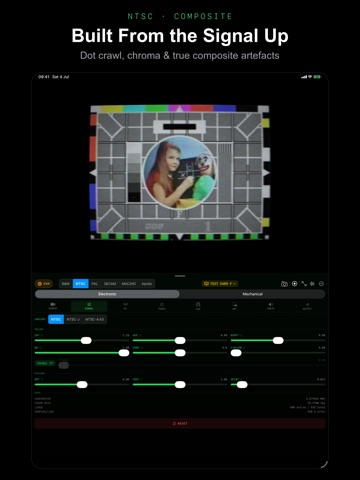
18 store screenshots


Pricing & paywalls
App Store
- Price: $4.99
- NDI Network Output & Input — $9.99
Ratings & reviews
App Store
-
5/5Amazing simulation of CRT TVs
The App Store keeps eating my review, so I’ll just say - amazing. I was able to perfectly recreate what my childhood 9” CRT looked like, terrible RF signal and all. Also, I don’t understand why, but this does a MUCH better job of properly fuzzing old console video game screenshots than any of the emulation CRT filters I’ve tried. PS1 and PS2 games are particularly well-affected. I’m very impressed. Fantastic work. Thank you.
Magic Kingdom Zeal · 6 Aug 2026
-
5/5Great
Love it! The best CRT simulation I’ve seen, extremely fun to mess with
SpeedGamer · 6 Aug 2026
-
5/5Seriously Amazing, but i’d like some more details about settings within the app.
Such a cool app for its low price tag i’ve been messing with it since the moment i got it. within a day here is a couple of minor things: 1. Will there be some information pertaining to settings within the app? i know many are easily self explanatory, but there’s a good chunk off display settings that have me asking what there purpose is. 2. some type of search bar feature, i personally don’t need it but my friends feel like it would help with user experience. 3. the ability to toggle the already integrated stabilizer on your phone. i can’t find on the app if there is a setting for this or not, (because there is little info on buttons and sliders) but having the stability somewhere feature would be awesome! 4. some sort of save file for all settings, and maybe even some presets. you could ignore the other 3 complaints because all i’d ever want would a save option. Amazing app that does exactly what it says + more and endless ways to mess around with it. (oh and i love the teletext feauture.)
AgentGuzman · 6 Aug 2026
-
5/5Feature request
Maybe I’m missing something but I’m not seeing any options to input videos via files app.
JTJTW0 · 6 Aug 2026
-
5/5Amazing but confusing
I’m loving it, but I’m having difficulty. Every video I export comes out as black and white even though I export through the NTSC channel. Please help!
Lucca lara · 6 Aug 2026
Privacy & accessibility
App Store
Privacy
- Data Not Linked to You — App Functionality — Contact Info — Email Address Developer declared
- Data Not Linked to You — App Functionality — User Content — Other User Content Developer declared
- Data Not Linked to You — Contact Info Developer declared
- Data Not Linked to You — User Content Developer declared
Accessibility
No accessibility labels collected yet.
Versions
App Store
- 1.1
-
1.2
Changes since v1.1 New Sources & Games - 5 arcade games added: Centipede, Breakout, Missile Command, Space Invaders, Snake - Pong with 2-player support, iOS touch controls, physics-accurate arena dimensions, audio, intro/game-over screens VCR Tape Simulation - Physics-accurate VCR tape processing Metal shader (luma/chroma dropout, noise, tracking errors) - Transport controls — play, pause, fast-forward, rewind with physically-modelled picture distortion per mode - VHold jump on pause (accurate tracking-loss simulation) - VCR OSD — on-screen mode indicator injected into the composite signal before encoding (so it passes through the full TV pipeline) - Format presets (VHS SP/LP/EP, Betamax, Video8) with degradation sliders - VCR audio features Audio Engine - Full analog TV audio simulation (RF carrier, intercarrier buzz, pre-emphasis) - Test tone picker: BBC 400 Hz, EBS dual-tone, SMPTE 1 kHz, and others - Video audio passthrough when source is video library - Degauss SFX with corrected PTC thermistor physics - Silent-mode bypass; audio off by default V-Hold (Vertical Hold) - Physically-accurate V-Hold oscillator model (free-running frequency, sync pull-in, proportional capture range) - Oscillator noise, VBI bar, improved pull-in behaviour Signal & Standards - Fixed Hanover bars (PAL subcarrier phase alternation artefact) - VITS (Vertical Interval Test Signal) insertion - Fixed BURST and BRT controls Test Cards - BBC Test Card F replaced with authentic BBC image asset - Crosshatch rewritten as period-accurate broadcast pattern CRT / Scanline Rendering - Scanline mask switched from hard rectangular step to sinusoidal beam envelope — eliminates moiré harmonics on NTSC - fwidth() anti-aliasing added — eliminates fundamental beat frequency moiré on PAL and all other standards - Scanline density now uses p.activeLines (broadcast line count) instead of texture pixel height — fixes B&W sub-variants showing wrong density - Magnet simulation: touch-driven Lorentz-force beam deflection, permanent shadow mask magnetisation, texture-based multi-site magnetisation Camera - Camera flip button moved from floating video overlay into the source/standard bar (always accessible) - Camera emulation stage with Plumbicon/Vidicon/IO tube types iOS - iOS 15 compatibility — replaced iOS 17 requirement - Pinch-to-zoom disabled during games Code Quality - 50+ new unit tests
-
1.3
Fix camera recording rotation and audio Improve signal domain fidelity Improve camera recording quality Improve fidelity of power on/off physics Improve fidelity of phosphor chemistry / light spectra Performance and Code Quality improvements
-
1.4
SECAM fidelity for CPU/GPU SECAM CPU Mode Performance Scope fixes 4:3 mode for camera (iPad)
-
1.5
Teletext - Full Teletext system with 8 live pages: Index (P100), Live News Headlines (P150), Weather/Hourly/5-Day via WeatherKit (P400–402), Calendar (P500), Now Playing via MusicKit (P700), System Info/clock (P900) - Fastext colour-key navigation (red/green/yellow/blue) on both iOS overlay and macOS sidebar - Level 1 character renderer with full G0 Latin charset, double-height rows, flashing text, mosaic graphics New TV Standards - NTSC-4.43 (NTSC signal at PAL subcarrier frequency — used in Middle East VCRs) - PAL-60 (PAL colour at 60 Hz field rate — common on early LCD displays) VHS Colour-Under Model - Replaced the old approximation with a true FM luma / heterodyne colour-under model matching real VHS head circuitry iOS Broadcast Extension - ReplayKit Broadcast Upload Extension — feeds the rendered output into Zoom/Teams/FaceTime screen-share Scope - Full-field waveform monitor, vectorscope, and RGB parade - Contextual Filter and Parade sub-pickers on iOS - Non-modal floating scope window on macOS Lunar Lander (new arcade game) - Added to the games source alongside Pong, Space Invaders, Breakout, Snake, Asteroids, Missile Command, Centipede Tons of bug fixes and UI improvements More to come!
-
1.6
Tons of bug fixes, UI fixes, Full Screen mode + D-MAC, D2-MAC, MUSE, and HD-MAC Four new standards covering late-1980s/early-1990s satellite and HD broadcasting. D-MAC and D2-MAC were used by BSB and European DBS services; MUSE was Japan's Hi-Vision HDTV standard; HD-MAC was the European HDTV proposal. All four render in 16:9 widescreen with accurate time-division multiplexed encoding. SECAM-L (System L) The French terrestrial variant of SECAM used on UHF channels in France until analogue switch-off. Distinct from standard SECAM in two ways: positive AM modulation (picture polarity inverted) and a wider 6 MHz luma bandwidth, which is now genuinely applied at the encode level — making SECAM-L visibly sharper than SECAM even with all processing options at their defaults. Newvicon Camera Tube A new camera tube emulation based on the Matsushita Newvicon — a ZnSe/ZnCdTe target used in 1980s consumer camcorders. It produces the characteristic comet-tail lag on bright moving objects, with earlier highlight compression and a more linear gamma response than the Vidicon. And more to come soon...
-
1.7
RTMP Export! - Check out the Output Tab and click on the (?) for all the details and instructions Added Flash/Light for Camera mode Moved D-MAC/MUSE formats to GPU, much better performance now Tons of bug fixes Tons of small UI improvements (e.g. on iPhone you can scroll the toolbar sideways) Lots more to come soon.
-
1.9
1. NDI® Input/Output - It's a $0.00 in-app purchase for now during soft launch. Get it now before the price goes up. 2. Tooltips to tell you what each control does - press and hold on any control to see what it does. 3. Colour Decoder Mismatch - What happens if you use an NTSC TV in Europe? Now you can see what would happen. Mismatch NTSC, PAL or SECAM in the Tuner menu 4. Presets - Remember last settings, create multiple presets, share them with others, load them from others 5. Full refactor of VCR simulation and improvements (e.g. mistracking) 6. SECAM Fire control (CPU Only) 7. Teletext: Allows any RSS feed to be the News Feed. Default to TechCrunch 8. Soviet KBH-49 TV Lens Simulation 9. Fujitsu MB88303 Title Generator - go to Camera Mode, then Camcorder section at the bottom 10. Delay Line controls for PAL 11. Many UI Improvements 12. Improved signal fidelity with more comprehensive test suite for edge cases 13. Tons of bug / crash fixes And lots more to come soon!
-
1.93
1) MASSIVE bug fixing exercise 2) PayTV scrambling and VCR copy protection is now also simulated and fully controllable
-
2.0
"AnalogCam" mode where the app becomes a camera app (but still uses the full pipeline of the original). Mechanical TV to simulate TV like it was in the 1920s before electronic TVs and CRTs Added Letterboxing. So you can do 4:3, Fill, Letterbox. This helps with 16:9 and vertical videos New source "Import from Files" which allows loading and playing .mkv, .mp4 .mov and other formats Higher quality NDI input/output Feature request by u/a55p1 - Video transport: full-screen auto-hide Video transport is now also seekable Tons of performance improvements and bug fixes
-
2.1
Complete re-write of Video Export feature to squash many bugs and issues (like B&W export of colour) Cleaned up excessive use of disk usage in some instances Improved mechanical TV mode fidelity Baird 30 should default to Vertical Scanning per original
-
2.11
Fix Audio/Video sync problems under certain circumstances Fix Video Export quality and stalling on very large videos Fix Import presets file from earlier version of AnalogTV Fix SECAM CPU-mode V-Hold sync issue Fix Full-screen mode layout issues in certain circumstances Resolve many small bugs, code quality issues and technical debt
-
2.2
We love feedback! 1) User 'Marker478' suggested adding Overscan, which we just did (check it out in the CRT section) 2) We've also added a feedback form to send anonymous (or not anonymous if you want a reply) feedback on bugs or feature requests 3) Fixed a very subtle bug to do with the magnet / degauss function which could cause a crash in rare circumstances
-
2.5
What's new in 2.50 NASA Apollo television (new) Television as it actually came back from space in 1968–72 — a complete, self-contained Apollo mode reconstructed entirely in the signal domain from the primary engineering record (NASA TN D-7476, NASA TN D-6723, and the RCA Ground-Commanded Television Assembly manual). • Lunar SSTV - the lunar-surface monochrome camera: 320 lines, 10 fps progressive, ~500 kHz, with the real 409.6 kHz burst sync and a properly lockable serrated field-sync. • Field-sequential colour - the command-module/Lunar Rover colour camera: colour from a 6-segment RGB wheel spinning at 9.99 rev/s in front of a single tube (no subcarrier), recombined on the ground, with the colour band-limited to the real ~2 MHz. • Two real camera tubes - the Westinghouse SEC vidicon (sensitive, blooms, burns, with the fixed fiber-optic faceplate specks documented in TN D-7476) and the RCA SIT vidicon from the Rover (intensifier, burn-immune, cleaner, 600-line, 32 dB). • RCA ground scan converter - the optical 10->30 fps re-scan that made the slow-scan picture broadcastable, with its contrast/brightness/resolution loss and the famous white spots - plus a raw/converted toggle. • Earth–Moon distance - a distance slider that delays the live picture by the real one-way light-time (~1.28 s at the Moon) and, near lunar range, breaks into the impulsive FM-threshold "clicks" the 85-ft dishes produced below threshold (only Goldstone's 210-ft stayed above it). A "Send to the Moon" button jumps to mean distance. Black-and-white standards fixed • 405-line (System A) and 819-line now finally emit the correct broad field-sync pulse (CCIR Report 624-2, 1982). • The 819-line standard is now correctly named "System E" • 819-line horizontal sync width corrected to 2.5 µs. D2-MAC is sharp again D2-MAC now renders at full resolution, picture-identical to D-MAC. It had been sampled at half the picture rate by mistake; in reality only its sound/data is half-rate, not its picture (ETSI ETS 300 250). MUSE / Hi-Vision Static Hi-Vision scenes now reconstruct through NHK's reference-decoder filter (ITU-R BO.786) using true 4-field quincunx interleave, so still detail "focus-pumps" crisper (genuine super-resolution rather than a frame average) - while a motion detector keeps moving areas authentically soft. Pay-TV & copy protection - broader and more accurate • New: Discret 11 (Canal+) - the French terrestrial system's per-line horizontal delay, snapping to the real Canal+ sequence; sync untouched, so the picture stays locked and keeps its colour while tearing horizontally. • New: Eurocrypt / D2-MAC - component cut-and-rotate on the MAC time slots (the first non-composite scrambler in the set). • Nagravision (Syster) uses the real 32-line sliding-window shuffle (locally shredded, globally ordered) instead of a full-field scramble. • Videocrypt cut-and-rotate snaps to the real 256-step grid. • Macrovision pulse cycling is encoded into the signal with patent-verified geometry. • Video inversion now decides per-field, as the real systems did. Signal-derived audio Intercarrier "buzz" now tracks picture brightness and sync energy - bright scenes buzz louder, just like a real set. VCR Dropouts are modelled as FM carrier loss with an authentic dropout compensator (previous-line substitution), toggleable. More physics, fewer fudges • Co-channel beat and fine-tuning derive from real frequency offsets. • MAC/MUSE lines carry true duobinary/data-burst waveforms with the correct frame-sync words and clock run-in. • Colour is band-limited before time-compression, cutting false-colour shimmer on fine detail. • Portrait (rotated) camera input now band-limits along the scan line, matching landscape sharpness. Bug fixes • iOS clips no longer record silently — audio is taken from the app's output, not the microphone. • iOS auto-hides the video transport overlay during playback, matching macOS. • Many other little minor fixes Find a bug? Use in-app feedback form.
-
2.6
Signal & CRT Fidelity Improvements: - Causal IIR IF filter, multi-octave fBm signal noise, chroma vertical blend + fBm edge wave. - Chroma loss control; geometric/hue-preserving vcrEdgeWave. Apollo & AnalogCam: - Apollo lunar-TV looks in AnalogCam (B&W SSTV + colour FSC), named One Small Step / Moonwalk; FSC colour fix. - Apollo modes now enable Ground Station NTSC Convert by default Presets & sharing: - Auto-generated machine-readable preset-schema.json. - Preset look-file format spec + samples (groundwork for a community gallery).
-
2.7
• Play live streams & video URLs - pipe any HLS or MP4 stream straight through the analog TV pipeline. • Community preset gallery - browse, search, and download looks shared by others, or publish your own with "Add to Gallery." • Smoother NDI over Wi‑Fi - a new output‑resolution control cuts bandwidth so network receivers stop stuttering. • Fresh "Live Signal" app icon - now with a Black‑and‑White variant you can choose. • AnalogCam Apollo looks - dial in "One Small Step" and "Moonwalk." • More convincing CRT magnet - the beam swirl now behaves like a real, imperfect field. Plus stability fixes and refinements throughout.
-
2.8
· 22 Jul 2026
• Community Looks gallery: browse, search, and download presets shared by other users, and publish your own with one tap. • Live streams & video URLs: pipe an HLS or MP4 stream straight through the analog pipeline and watch it the way it would've looked on the tube. • iCloud sync: your saved Looks now follow you across your devices. • New built-in game: Turbo Track, a Sprint-style overhead racer (very much beta still) • External display output: send the clean, processed picture to a second screen or projector with none of the on-screen controls. • New "Original" app icon to choose from. • Stability and bug fixes, including a crash when playing the built-in space game on certain TV standards.
Availability by market
- US
Data quality & evidence
- Page completeness
- Live store listing
- Last verified
- 6 Aug 2026
- Sources
- App Store
- Independent summary has not been published yet.