
Quick verdict
- What it is
- Store information collected; independent summary not yet available.
- At a glance
-
- Free to download
Categories and search queries
Official categories
- Social Networking
- Business
AppCorpus categories
Key functions
| Function | Availability | Access | Scope | Evidence |
|---|---|---|---|---|
| Free app | Yes | Free | — | Store published |
Screens
App Store
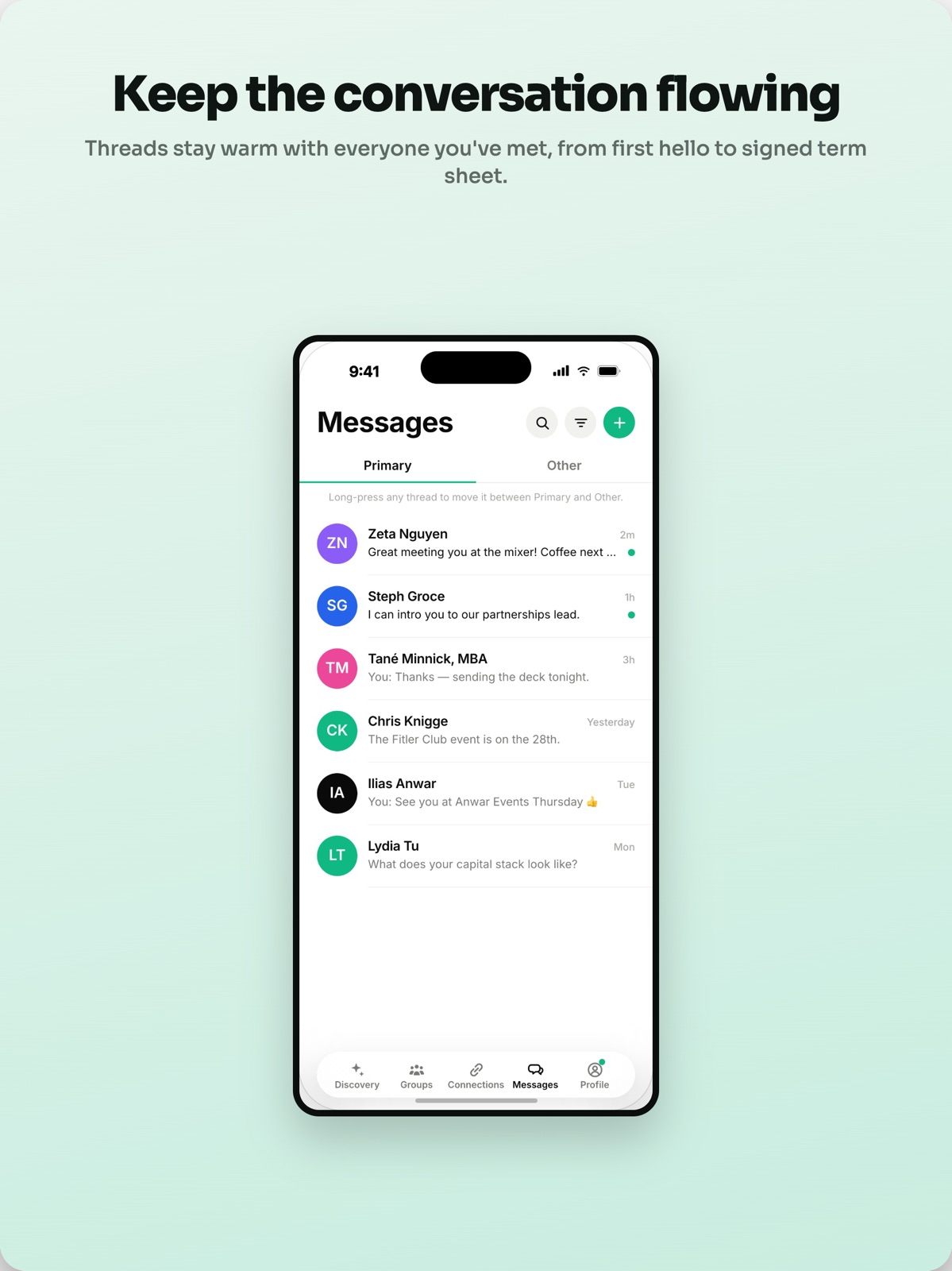
10 store screenshots


Pricing & paywalls
App Store
- Free
Ratings & reviews
App Store
-
5/5The most efficient way to network!
Most networking events I might have a plan of who I want to speak with, but especially at bigger events, it’s near impossible to find each of those people. I wish I had ALINE sooner to ensure I meet all of the people I need to IRL at the event, and it takes away the awkward ‘how should we connect/follow up’ because we can already communicate and schedule follow ups in the app. Looking forward to meeting more people through ALINE!
SPMB3 · 5 Aug 2026
-
5/5The Next era of networking
Being able to leave events without feeling like I missed out on someone is such a great relief
malikh6996 · 5 Aug 2026
Privacy & accessibility
App Store
Privacy
- Data Linked to You — Analytics — Diagnostics — Crash Data Developer declared
- Data Linked to You — Analytics — Diagnostics — Other Diagnostic Data Developer declared
- Data Linked to You — Analytics — Diagnostics — Performance Data Developer declared
- Data Linked to You — Analytics — Usage Data — Product Interaction Developer declared
- Data Linked to You — App Functionality — Contact Info — Name Developer declared
- Data Linked to You — App Functionality — Contact Info — Other User Contact Info Developer declared
- Data Linked to You — App Functionality — Contact Info — Phone Number Developer declared
- Data Linked to You — App Functionality — Diagnostics — Crash Data Developer declared
- Data Linked to You — App Functionality — Diagnostics — Other Diagnostic Data Developer declared
- Data Linked to You — App Functionality — Diagnostics — Performance Data Developer declared
- Data Linked to You — App Functionality — Identifiers — User ID Developer declared
- Data Linked to You — App Functionality — Location — Coarse Location Developer declared
- Data Linked to You — App Functionality — Location — Precise Location Developer declared
- Data Linked to You — App Functionality — Usage Data — Product Interaction Developer declared
- Data Linked to You — App Functionality — User Content — Audio Data Developer declared
- Data Linked to You — App Functionality — User Content — Other User Content Developer declared
- Data Linked to You — App Functionality — User Content — Photos or Videos Developer declared
- Data Linked to You — Contact Info Developer declared
- Data Linked to You — Diagnostics Developer declared
- Data Linked to You — Identifiers Developer declared
- Data Linked to You — Location Developer declared
- Data Linked to You — Usage Data Developer declared
- Data Linked to You — User Content Developer declared
Accessibility
No accessibility labels collected yet.
Versions
App Store
-
2.19.105
Your draft messages stay put. Start typing a message, pop over to someone's profile, and your words are right where you left them when you come back. Sharper nearby search. Your discovery range now correctly filters people you're already connected with, and the range options match what actually works in the real world. Take down your video intro. Remove your intro video without having to record a new one over it. Smoother Connections. The Connected tab loads reliably even if you have a lot of connections. Plus small fixes and polish throughout.
-
2.19.113
New: group video walls + pitch competitions · welcome walkthrough · richer trip announcements (photo/venue/link) · QR auto-join for groups Fixes: documents now show their matches · intro videos stop vanishing · group cover-photo freeze · autofill OTP · re-login re-onboarding · duplicate profile-view alerts · faster signup
-
2.19.140
New Your profile, edited in place — now fixed. One "Edit profile" toggle (or the new pencil button up top) flips the page into an editable form and back, with Cancel and Save always visible so you're never stuck, and every section shows even when empty. Watch your own intro video — play it back right from the edit screen; it also shows first in Intros with a "You" tag. A cleaner home for your settings and profile — who can find you and how now lives in one place (the gear on Discover). 25-mile default radius, silent carousel videos until you tap, and you can add your Instagram. See a city before you land — a "Heading to {city}? Explore" banner points your feed at an upcoming trip's city so you can match ahead of time. Faster onboarding — shorter, no post-signup notification flood, welcome-screen freeze fixed. Reliable sign-in codes — the text-code field autofills from Messages again, with a clear box, and you can always paste or type it. Manage a chat — share a connection's profile, and mute a thread's notifications. Group announcements that don't pile up — admins archive posts, and new ones can auto-archive on a date. Add group members and admins by name from your connections; one-tap "make admin" from the Admins screen. Group organizers can export cross-cohort match suggestions as a spreadsheet. First-run walkthrough, group invite links that survive a fresh install, Discovery new/connected filter, member search when adding to a group, and delete-for-everyone on photos/videos/voice. Improved & Fixed Editing your profile no longer traps you and no longer loses your place when you switch apps. The Discovery feed stays steady while scrolling and loads more smoothly; In-area and Elsewhere sections stay open. Shared chat links no longer break; reactions and media come back on met-in-person threads. Recaps handle a muted mic and wait for the camera so they can't capture a blank clip. Connections count holds when a connection becomes a verified meet; the "CONNECTIONS" label no longer wraps; travelers read "In town" not "Nearby, live now"; and a full-length intro no longer vanishes after upload.
-
2.19.151
What's New — 2.19.151 We cleaned up how connections work and fixed a batch of things you told us about. New & improved Meet someone in person and they're now a "Line." We retired the old "ALINED" label to make it clear: everyone you connect with is a Connection, and the people you actually meet become Lines. Your requests are simpler — "Sent" and "Received" are now a single "Pending" tab, so everyone waiting on you (and everyone you're waiting on) is in one place. A cleaner profile card: just your photo, name, hiring badge, and stats. Editing is still one tap on the pencil. The New / Connected filter now works across your whole feed — nearby and "Elsewhere on ALINE" — so it's easy to tell people you already know from new faces. Set a travel destination and the Connected tab comes with you, so you can see who you already know in that city, not just at home. Fixed Posting a video to a group works again — no more failing at the last step. Video recaps capture your audio again. The Intros carousel scrolls smoothly, the way it used to. Group cover photos show the exact crop you set — in the editor and in private-group previews. "Ask me about" tags wrap cleanly instead of splitting a word across two lines. Your Lines count stays accurate even if you have a lot of connections.
-
2.19.160
See more about every connection, and get better help writing the first message. • Connection cards now show the full picture: your match percentage, when and where you met, shared connections, and groups you're both in. • Sending a connection request now shows why you two fit — what they're looking for, side by side with what you offer — so you can write a first message that lands. • Mark any conversation as unread with a long press, so you remember to come back to it. • Discovery cards are cleaner and more compact — more people fit on each screen. • Group admins can now see a history of changes to their group's settings. • Faster fixes ahead: improved diagnostics help us spot and fix rough edges sooner. Your privacy stays protected — messages, photos, and anything you type are never part of it. • Fixed a freeze when adding a group cover photo, plus other polish and stability improvements.
-
2.19.176
Groups can post cover galleries — up to 5 photos or videos, swipeable from the group page. Documents on your profile — resume, pitch deck, or job posts show up on your profile, downloadable. Per-type privacy in Settings › Privacy › Documents (Everyone, After connect, Hidden). Messages surfaces the 2–3 conversations that need you at the top. Snooze the rest. Connections is now organized by relationship — Say hi, Talking, Out of touch — with a Lens to re-slice by role or the group where you met. Proximity notifications finally say who's nearby and why you match. Every card answers "why this person?" — match %, distance, shared connections, shared groups, all in one line. Bug fixes: pitch decks now upload as image PDFs, group cover picker no longer freezes the app, and travel notification taps open the right screen.
-
2.19.210
The dots on a person's card now tell you whether they're close enough to walk up to. Match recommendations now name the person and say what they offer and want — and they won't flood your notifications. Record a recap every time you talk with someone, not just the first time. Inviting someone to a group now asks them first instead of dropping them in. The LinkedIn profile you import now has to be yours. LinkedIn import keeps every school and stops half-importing your About — and a profile we can't read no longer dead-ends your signup. Connections: the three tabs are back, search understands more (try "fitness" or a team name), and every card shows one clear connection count. Groups: covers show the way you cropped them, cover videos have playback controls, member videos play full screen with one video per person, and tapping a Top pick opens their full profile. Messages: the unread badge matches what's in your inbox, and you can mark a conversation unread from inside it. Photos, reactions, and voice notes are back in chats with people you've met in person. Profile cards stop calling your current employer "ex-", and no one shows as "NEAR" from another state. Imported job descriptions no longer lose text the first time you edit your profile.
-
2.19.220
Messages and Connections are back to a simple layout, with a sort button on both tabs. Sort by newest or oldest, filter Messages to unread only, or group your connections by stage, role, or shared group — all from one menu that stays out of your way. Also in this update: Don't have LinkedIn? Build your profile from your resume instead, right on the signup step. Group admins can re-frame cover photos that were cropped awkwardly, and drag to reorder the gallery. Posting a video to your group works again. A longer "Looking for" no longer blocks your profile from saving. Message alerts stay quiet while you're already in that conversation.
-
2.19.225
- The dots in Discovery now show whether someone's open to being approached in person — so you know when to just walk up and say hi. - More cards show how far away someone is. - Find groups faster: search by city or category, with the biggest groups first. - No LinkedIn? You can now build your profile from your resume right from the start. - Signing up no longer gets stuck when we can't read a LinkedIn profile. - Saving your profile now points you to the field that needs fixing instead of quietly doing nothing. - Sort your Connections on every tab, and search now finds group names.
-
2.19.245
Tell ALINE who you're looking for — it's now front and center. Discovery asks right on the feed, and new members can simply type it (or dictate it) during signup. Messages, cleaned up: busy threads no longer pile up your notifications, "Newest" actually sorts newest, and you can filter your inbox by industry, city, or shared group. Your profile gets an open Link field — share your portfolio, GitHub, newsletter, or anything else alongside your other links. Recaps are reliable again: you can record one right after confirming you met, and longer video recaps keep their audio. Also in this update: group search now finds your own groups and surfaces more groups to browse, distance labels for people nearby are tighter and more honest, every connection shows why ALINE matched you two, group managers can re-frame cover photos, and a batch of smaller fixes across onboarding, saving your email, and Discovery cards.
-
2.19.252
A cleaner look and smarter meeting detection. The five main tabs got a quieter, cleaner design. Swipe between tabs, find filters and sorting in one row on Discovery, and reach notifications from your Profile and the QR scanner from Connections. ALINE is better at knowing when you actually met someone in person ; your phone can now confirm a meet automatically, even from your pocket. Mark someone as met straight from your message thread, and the confirmation sheet no longer cuts off its own text. Marked someone as met a while ago? They now move to Lines the way they should — and a single meeting can't count twice. Messages: "Pick someone" opens quickly even with hundreds of threads, and search now finds people across every tab. New privacy option: quietly hide yourself from specific people or companies, separate from blocking.
-
2.19.264
Sort and filter your messages Order your inbox by recent activity or by when you connected, then narrow by industry, city, group, or unread. One tap resets everything, and your choices stick between visits. Search that spans every tab Searching Messages now finds people in any tab, not just the one you're standing in — labelled so you know where they came from. Group invites you'll actually see Invites now notify you and show up in Messages alongside your conversations. Invites from founders and group creators add you straight to the group. Built for a bad connection Your feed appears instantly from your last visit while it refreshes, and a failed refresh keeps what's on screen instead of going blank. Videos stop autoplaying when your phone is set to save data. Chat shows "Sending" while a message is on its way, and lets you tap to retry if it never landed. Also fixed - "Newest" in Connections now sorts by when you actually connected, so someone you just accepted goes to the top - The match percentage on a card no longer flickers between two different numbers - A connection with no name set no longer shows up as "User" - The date you pick when editing where you met is the date you see - Audio recaps no longer fail with a false "Microphone unavailable" message - A group's cover video no longer plays audio on its own
-
2.19.274
New Watch back your recaps. After you meet someone and record a recap (video, voice note, or written note), you can now open it from your Line memory to watch, listen, or read it back — with the summary, topics, and next steps it captured. A new Delete recap removes a recording for both of you. Test recording each type, playing it back, and Delete recap. "Finish your profile" nudges. You may get an occasional push pointing at one thing your profile is still missing (photo, education, bio, video), with a tap-through straight to that field. Test that the push opens the right place and that filling the field stops the nudge. Fixed Onboarding no longer doubles your last name after a LinkedIn import — you now see separate First name / Last name fields. The ALINE note gives you a full writing area now (the "why you two" panel collapses once you start typing). Searching Messages takes one tap and the keyboard comes straight up. The "Connected" filter in Discovery only shows people who've actually accepted, not pending "Awaiting reply." The "Did you meet [name]?" prompt stops reappearing every launch once you've tapped Yes. Asking to join a private group twice no longer double-files the request.
-
2.19.279
peed networking is now a real event you run inside your groups. A group organizer can spin up a speed networking event, set the start time and how the rounds run, and open it to the room with a QR code on the door — anyone can scan to join, even without the app. Then everyone picks how to play it: Rounds pair the whole room for you. You and your match see the same card at the same moment, get a quick window to find each other ("red jacket, by the bar"), and a timer for the conversation. If you both say you connected, you're connected on the spot. Prefer to just work the room? Choose Free-flow and skip the choreography. Don't fear missing someone. Turn on auto-connect, set your match bar, and when the event ends we'll connect you with the people you didn't get to meet — as long as they opted in too. Also in this update: Recaps you can revisit. Watch, listen to, or read back any recap you've made after meeting someone — and record a new one every time you talk, not just once. A clearer read on who to meet. Discovery leads with what you're looking for, cards show whether you can just walk up or should message first, and distances are back and honest. Messages that keep up. Sort and filter your inbox by industry, city, group, or unread, search across every tab at once, and start searching in a single tap. More to your groups. Swipeable cover photos and videos, a History view of a group's highlights and past activity, and live event leaderboards — plus group invites now ask before adding you and show up in Messages. Your profile, your rules. Add any link you want, show your resume and other documents right on your profile, and hide yourself from specific people or companies without blocking them. Steadier on bad Wi-Fi. The app holds together on congested event networks and weak cell service instead of spinning, and tapping a notification takes you where you meant to go. Plus a long list of reliability fixes across sign-in, recaps, discovery distances, and group media.
-
2.19.283
We tidied up the top of a connection's profile: the status line no longer hides behind the back button, and the empty gap under it is gone. A connection's profile no longer shows the date you connected twice. A small wording fix on the boost screen.
-
2.19.302
See where people are headed. Open someone's profile and you'll see the trips they've announced: "In New York, Jul 20-24". If you're connected, you'll also see what they wrote about the trip, where they'll be, and any link or photo they added. Announce your own from your profile and the people you're connected with will know you're coming. Tap a profile photo to see it full screen. Yours or anyone else's. IMPROVED "Someone is nearby" now arrives once per encounter instead of once an hour. Sitting near the same person all afternoon no longer means a buzz every hour. Editing your profile is a pencil in the header again, where you're used to finding it. Speed networking events got a thorough pass. Rounds, pairing and connecting are all steadier. Invites to a group now actually reach the person you invited. Asking to start a group opens a proper form instead of a half-written email. FIXED "It's a Line!", the celebration when you and someone both confirm you met, wasn't reaching anyone. It does now. Your availability could be switched on but not off. "Looking for" on your profile and the goal you set in Discovery were two separate values, so editing one didn't change the other. They're one thing now. Announcing a trip could quietly post it two or three times. Some names appeared twice, like "Alec Beckman Beckman". Some groups looked like they'd lost their cover photos, and creating a group could be blocked. Recap offered to "record another" before you'd recorded any, and the audio screen showed a second header. Marking that you met someone now shows up in your own Lines, and the other person gets asked to confirm.
-
2.19.325
Speed networking, start to finish Organizers can run timed networking rounds inside a group. Join a room, check in, and the app pairs you with someone new each round, names who you're with, and shows how long you have. You get a heads-up before time's up, and everyone hears it when the room starts, a round changes, or the event ends or gets called off — even with your phone in your pocket. A round where you both tap "Connected" becomes a Line and counts as meeting in person. Record a recap with someone right there in the room. And after the event, you can still record who you actually connected with and open the list of who you met. Can't join a room? You now get told why instead of a generic error, and organizers can add or remove people from an event. Match scores everywhere Connections and Lines now show the same match score, mutual connections, and shared groups you already see in Discovery — including your Lines with the ALINE team. A history with each person Open a Line's history from anywhere — their profile or your Lines list. It's built from your messages and why you matched, not just recaps, and it always opens on how the two of you connected. Smoother everyday moments The "..." menu now opens on the exact card you tapped. Back from a notification returns you to your notifications, right where you left off.
-
2.19.362
This is a big update. Here's what's new. NEW Speed networking events: run structured, timed rounds inside any group, with a door QR for walk-ups and an auto-connect sweep so you still connect with everyone you didn't get to meet. See your discovery range on a map and widen it up to 50 miles. Same-room detection stays on no matter how wide you set it. Group events: say you're going, see who's actually coming, and get an attendee list separate from the group's members. Search the members of any group you're in by name, role, or company. Search your connections and your messages by keyword, across anything on someone's profile. Open a connection's Line history from anywhere. It's built from your real messages and why you matched, not just recaps. Watch, listen to, or read back any past recap, plus everything it wrote up. Private groups can show a one-line header, so you can tell what a group is for before you join. In-app support: the Settings feedback link is now a real form with screenshots, and you actually hear back. Discovery cards show someone's intent as a few short pills instead of a cut-off sentence. See the trips someone's announced right on their profile. Tap a profile photo to see it full screen. IMPROVED "Did you meet?" is no longer an interruption in the moment. It's a notification you get later that tells you where and when you met, with the place pre-filled so confirming takes a tap. Match scores now show on Connections and Lines, and every list that shows a person uses the same card. Connection cards show the date you met (08/01) instead of a ticking "4d / 21h" countdown. Messages can sort unread to the top, not just filter to unread-only. Distance to someone now shows an approximate range: ~20 feet, ~50 feet, ~100 feet, then GPS miles. One "X is nearby" per encounter, instead of one every hour. The same actions live behind the same menu wherever you find a person. Your QR code moved to the Profile tab, and your achievements, travel, and 60-second video moved to the top of your profile. Editing is a pencil in the header again. A message thread now opens straight to your newest messages instead of landing partway up. FIXED You can type again right after viewing a profile from a chat. The keyboard was up but not accepting input. Deleting a message "for everyone" now shows a "This message was deleted" line instead of a blank bubble. "It's a Line!" — the notification for the moment two people actually meet — now gets delivered. "Mark as met in person" works again for anyone who had once answered "No" to a "Did you meet?" prompt. The "one year ago you met X" nudge fires on the right day. Document-match notifications open the document instead of spinning forever. Announcing a trip no longer says it failed and then posts it twice. Discovery stays fast when more than one person is using the app at once. Match percentages are accurate again. They were near-zero for almost everyone. Your "Looking for" and your Discovery goal are the same sentence again. Documents on a profile now open, and their owners can re-upload a lost file.
-
2.19.370
· 5 Aug 2026
Form event teams in seconds. If you run a group, just tell ALINE what you want — "four teams for a mixer, balanced by what people do" — and it sorts everyone into compatible teams. Each person sees their team, their teammates, and a quick note on why they were matched. Group Album. Post photos and videos to any group to capture the moment. Portrait, landscape, or square, they now always show up right side up. Also in this update: Change your mind on a connection request? Cancel it and you can send it again right away. Groups you've left or that were deleted no longer linger as empty cards. Small polish in your line history.
-
2.19.45
Your profile now builds itself. Onboarding starts by importing from LinkedIn — name, photo, bio, work history, and education fill in automatically. Plus a smarter, clearer matching experience throughout. New LinkedIn import as the default first step — paste your handle, profile ready in seconds Structured Education section — match with fellow alumni, same major, and same-era classmates Import your resume by photo (Claude reads it straight into your profile) "Who they know" network summaries and a "Why you matched" breakdown on profiles "New | Lined" filter in Discovery — switch between meeting new people and revisiting existing connections Message people you're already connected with right from Discovery Redesigned Send screen with clearer intents and an AI-drafted opener Improved Match % now reflects real fit, and "Why you two" names the people and groups you share Faster, more accurate "who's right here" using Bluetooth proximity Groups: post announcements, add co-managers, remove members, transfer ownership, control who can join More relevant, better-timed notifications — proximity alerts only when someone's genuinely nearby Fixed Phone sign-in: autofilled codes no longer vanish on a rejected code Account deletion completes reliably, even on very active accounts Video intro recording now reports failures instead of silently hanging "Aline User" names in Messages, plus many polish fixes
-
2.19.53
New - Share a group with a link or QR code so people can join in a tap. - Filter Discovery between new people and your existing connections. Improved - Add your intro video straight from your photo library, not just by recording, and hear the sound when you play it back. - Search your connections when adding people to a group, instead of scrolling one long list. - The LinkedIn import step now shows you exactly where to find your handle. - Invite a co-admin to your group with a shareable link, and set what you're looking for in each group (it now saves reliably). Fixed - Chats that used to show "Chat unavailable" now open. - Auto-filled phone codes now sign you in even when you tap them quickly. - The New and Lined switch in Discovery now shows the right people under each tab.
-
2.19.57
Groups get clearer and more polished in this update: Set a group cover photo and position it exactly how you want — drag and zoom to frame it, and it always fits the banner instead of getting cropped. Group admins now show their real name and photo, so you can see who's running a group at a glance. Announcements you post to a group now reach every member. Your "crossed paths" count reflects real meetups — time together at one event counts once, not once for every time you passed each other. Accepting an invite to help manage a group is smoother, with no confusing "expired" message when you've already accepted.
-
2.19.77
This update brings a cleaner look across the whole app, plus more control over your messages. - A fresh, more consistent design across Discovery, Groups, Profile, Settings, and more - Edit a message you sent for up to 15 minutes - Delete a message - text, photo, or video - for everyone - Your Messages list now updates live, with real-time unread counts - Snappier, more responsive taps throughout - Swipe from the left edge to go back - Group announcements now notify you instead of landing silently Also fixed: importing an intro video from your library, re-importing from LinkedIn and saving your Company, group member names showing correctly, and a false "jailbroken" warning when running on a Mac.
-
2.19.93
ALINE 2.19.93 — What's new New • Start faster. Onboarding now lets you jump straight into discovering people, or take a guided path to finish your profile first (what you offer, a short video intro, ID) whenever you're ready. • Label your connections. Add your own private labels and filter by them on both the Connections and Messages tabs. Labels are only ever visible to you. • Share a success story. If ALINE led to something good, you can now send it to us from Settings. • A warmer welcome. New members hear from the founding team over their first week instead of all at once. Improved • "Lines" are now "Connections," and meeting someone in person is being "ALINED." Scanning someone's code now proposes a connection they confirm, so both people opt in. • Groups now show how many real-world connections they've sparked. • "Shared connections" counts only people you're actually connected with, so the number is accurate. • Discovery has one clear Discoverable toggle, and the header count matches the tab you're viewing. • Your goal saves reliably, with a gentle prompt to add one so your match scores work. • Edit Profile puts "What I offer" above "About," plus a cleaner profile identity card. • Recording a recap of a connection now lives right on that person's profile, and the connection cards are cleaner. • Hidden now means fully off the grid: when you're hidden, you won't surface to nearby detection and you won't send proximity pushes either. Fixed • Tapping a group-match notification now opens the person who matched, not the group. • Layout and wording cleanups across Discovery, Connections, and Edit Profile.
-
2.19.99
What's New in this build New Tell your network you'll be in town. Heading somewhere? From your profile, tap "Traveling?" to announce a trip — pick a city and dates, and choose who hears about it: everyone you're connected with, or only the people already in or near that city. They get a heads-up, and tapping it opens your chat so you can make a plan. You can also choose to show up in that city's Discovery while your trip is active, with an "In town" badge — so people there can find you before you even land. Your exact location is never shared: a trip only ever shows the city and dates you chose. Tidy your inbox. You can now archive a conversation to tuck it away, and remove a connection when you need to. Filter to unread. A new "Unread" filter on the Messages tab shows just the threads you haven't caught up on. Improved Joining a group from a shared link now works reliably right after you install the app. Fixed Fixed sign-in problems for some phone numbers, and made verification codes more reliable to arrive. Group cover photos now save every time, and you can remove one if you change your mind.
Alternatives
- Ark by Arkzphere — Same category + similar ratings
Availability by market
- US
Data quality & evidence
- Page completeness
- Live store listing
- Last verified
- 5 Aug 2026
- Sources
- App Store
- Independent summary has not been published yet.