
Quick verdict
- What it is
- Store information collected; independent summary not yet available.
- At a glance
-
- Free to download
- In-app purchases
Categories and search queries
Official categories
- Music
- Entertainment
AppCorpus categories
Key functions
| Function | Availability | Access | Scope | Evidence |
|---|---|---|---|---|
| Family Sharing | Yes | Unknown | App Store | Store published |
| Free app | Yes | Free | — | Store published |
| In-app purchases | Yes | Limited free | — | Store published |
| Siri Shortcuts | Yes | Unknown | App Store | Store published |
Screens
App Store
20 store screenshots

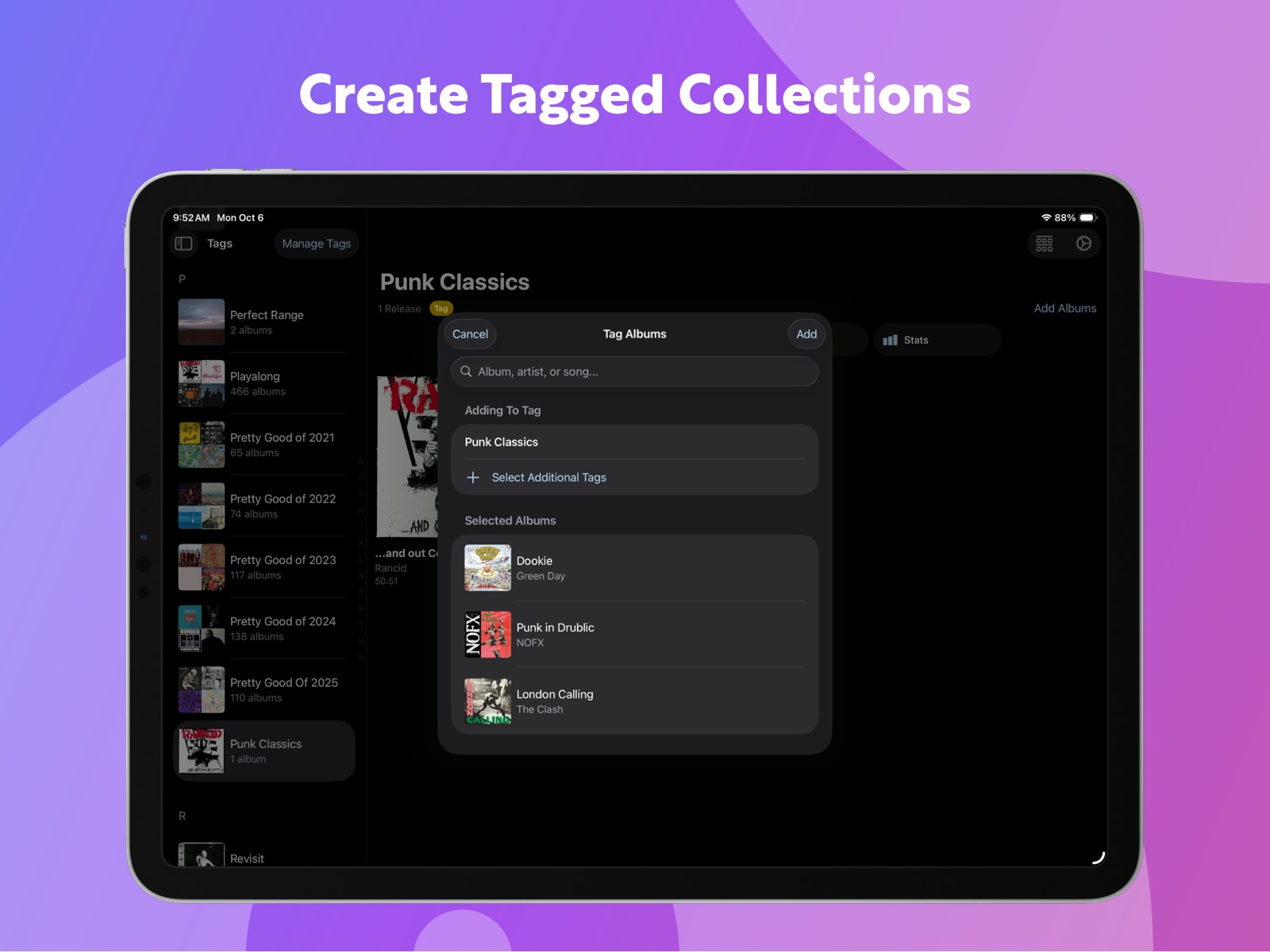


Pricing & paywalls
App Store
- Free to download
- In-app purchases
Ratings & reviews
App Store
-
5/5Dive in, spend a few minutes, and love your music more
The Albums app is something I’ve used on my iPad for a while, but now that it’s on the desktop, I FINALLY spent enough time to fully appreciate all that this app really can do. After you’re in, go to the “Insights” tab (AFTER all the data is imported and processed) and rediscover some really neat details on your library. I love the “This Day in History” insight to check out which albums came out on this same day from my library. The pre-made playlists by your age ranges are great for music lovers - it will give you a “High School,” “Twenties,” Mid-Twenties,” “Teenage,” and so on, pre-made playlists (collecting music in your library that came out during those times). I’d also recommend going to Settings > Advanced and turn on (i.e., check the box) for “Auto-Download Credits.” This was so much fun once it was downloaded (took several hours for the APIs to gather everything). Now, when I click on an album and go to the Info tab, I can see a lot of the Producers, Engineers, Art Directors, etc. that worked on that album. For example, let’s say, “Mike Michael” was an Engineer on this album, I can click on his name and see all the other albums Mike also worked on. It’s not necessary to have this info, but it’s a fun way to explore your collection and learn more about our favorite albums/artists.
T.J. · 31 Jul 2026
-
5/5Love the Focus of Albums
This app is like I’m back in the record store thumbing through the albums, looking at the covers, reading liner notes and then, back at home, I’m listening to the *entire* record . . . not a playlist, not some algorithm telling me what I want to hear next or off an album in my Library. I haven’t had as much fun with an app in ages — and I’ve already subscribed to support the developer. The UI is a tad rough and a bit clunky in parts — the reason for 4 and not 5 stars. Some actions are just not readily evident — long taps some places, not others, that sort of thing. Maybe when I get used to them my rating becomes 5 stars. What I really love: the collection of album covers, so I can visually browse albums and choose what I want to play ... just like I did at the record store or at home. There’s some smart intelligence built in, too, like how many times I’ve listened to an album, tags so I can organize beyond A-Z and Z-A, old favorites, new discoveries (added last 10 days, 30 days ...), anniversaries (of an album’s release). Data is provided by Discogs and MusicBrainz. All that’s missing are links to Wikipedia pages (for the ultimate in today’s “liner notes”). I’ve tried many replacement apps for Apple’s music player and none have stuck. This one just might. Big high five to developer Adam.
dlangendorf · 31 Jul 2026
-
5/5Useful for anyone, best for aficionados
Like Apple Music itself, this app has layers that take a while, and a desire, to discover and master. It isn’t difficult but you’ll need to be intentional. If that frustrates you, this probably isn’t your app. In an effortless algorithmic Pandora world, Apple Music offers a treasure of approaches to learn, retain, enjoy and share your world of music. The ALBUMS app brings bird’s eye organization the Apple Music app lacks. As many of us drifted into the single track $.99 focus of Apple Music we lost two things. First we lost the importance of albums as a whole creation. Second, like the great scene in Almost Famous with the albums under the bed, we’ve lost the ability to even remember what we have in our vast digital collections. ALBUMS restores both. ALBUMS can be a bit quirky but I’ve rated it 5 stars in gratitude for the great work of the developer with the confidence he will continue to improve the taming of our digital music mess.
waterboy1 · 31 Jul 2026
-
2/5Doesn’t allow local music importing into the app
The Albums app does not support direct importing or scanning of local folders/files on your computer independently. Instead, it relies on your system's music library managed by the native Apple Music app (formerly iTunes). You'll need to add your music there first, and Albums will then access and display it for playback and organization. Big question…. WHY?!?!?! I don’t use Apple Music (whatsoever). You made an incredible looking and nicely featured app, and I was so ready to purchase the lifetime license…and then I realize that for whatever weird reason, you don’t let me even import my music directly into your app (locally saved and owned music). Therefore, the app went from super-exciting, to ‘can’t even use’, and I don’t see it plainly mentioned in the app description unless I somehow missed it. Please add the feature to directly import my music folder into your app and scan the web for metadata, and if you must integrate with 3rd part music apps, then please add VLC functionality, or pretty much anything but Apple Music. I will never use Apple Music/iTunes, ever. Then it’ll go from 2 stars to 5 stars. Thanks for your consideration.
DragoX0007 · 31 Jul 2026
-
5/5Really great music player.
I’ve been using this app for less than a week and so far I’m loving it. As the name indicates, it’s a music player that is organized around albums versus individual songs. This may be in my head, but IMO the sound is better than the Apple Music app itself. (Higher res recordings sound clearer than when I play them through Apple Music.) For sure the interface is more visually arresting than Apple Music, with the album art displayed at a larger scale and distractions kept to a minimum. The paid version also displays lots of stats that you won’t find in Apple Music. Couple of caveats … 1), this doesn’t fully replace Apple Music. You can’t edit Apple Music track metadata from Albums and, in fact, you can’t even view it. 2) If you have a large library like I do, you probably don’t want to keep both apps open at the same time. I tried it and both Albums and Apple Music crashed at various times. 3) Speaking of large libraries, I noticed that some of my larger playlists don’t display in Albums. The music itself is available, but the playlists are empty. 4) Note that Albums can access Apple Music play counts but it doesn’t work in reverse, at least not for the OS version of Albums. So if I play a track in Albums, the play count in Apple Music is not incremented. However, this is not an issue on the iPhone version. In fairness, some of these issues could be due to my having an extremely large library running off an older, slower external drive. If the price for the full version were higher, these caveats might be significant enough to lower my rating. But, for the price, I find this a 5 Star Player with a captivating interface. It’s a really nice add on to Apple Music and makes it fun to listen again.
Lance Wilcox · 31 Jul 2026
Privacy & accessibility
App Store
Privacy
- Data Not Linked to You — Analytics — Identifiers — Device ID Developer declared
- Data Not Linked to You — Analytics — Purchases — Purchase History Developer declared
- Data Not Linked to You — Analytics — Usage Data — Product Interaction Developer declared
- Data Not Linked to You — App Functionality — Purchases — Purchase History Developer declared
- Data Not Linked to You — Identifiers Developer declared
- Data Not Linked to You — Purchases Developer declared
- Data Not Linked to You — Usage Data Developer declared
Accessibility
- Dark Interface — SUPPORTED Store published
- Larger Text — SUPPORTED Store published
Versions
App Store
-
6.0.1
Features - Got some thoughts about an album you want to jot down? Add a note! You can add/view notes on an album’s page, and you can also add a note to an individual listening session. Notes are searchable, too! Search the text in a note and any albums with that text in their notes will appear. - Artist pages now show an image of the artist, a biography, and similar artists along the bottom. - Browse entire discographies from Record Labels, Producers, Musicians, etc. using the new Discography Browser at the bottom of their collection pages. In addition, biographies and images for these Collections are now displayed when available. - Lots of minor and medium tweaks have been made all throughout the app to improve performance and quality of life. The album page on the iPad has also been redesigned from the ground up! - Skip forward and back by album using the new Control Center Widgets. More places outside of the app to do that! - Albums has a new icon for the first time in 5 years! There are also some new alternate icon choices, including the classic icon, which you can select on the Settings tab. - The Tag Picker now has a “Recent Tags” section at the bottom Changes: - Due to changes in the latest OS, the “Tag an Album,” “”Untag an Album,” and “”Add Album(s) to Library” Shortcut actions have been split into two actions each: one that takes an artist and album name, and one that takes an “Album” as returned from another Albums Shortcut action. - The swipe gesture between tracklist/credits/stats has been removed. You can use the segmented picker to switch. - It may take 24 hours for notes you’ve added to album sessions in previous versions to be viewable as Album Notes - Several features have been freed from behind the paywall. Sorting collections, viewing the current day’s releases on the Release Feed, and Immersive UI are now available for all! Fixes: - Improved search performance - Improved scroll performance on the Insights tab - Improved performance on the collection list page - Fixed an issue where tracks on multi-disc albums couldn’t be hidden - Fixed an issue where albums presented from an Insight Collection would dismiss when hitting the play button - More consistent handling of non-square artwork - Fixed an issue where the next album in the queue wouldn’t play after skipping albums and listening through a single-song album - Fixed an issue in the iPad app where the Collections tab would be blank if the app is opened in full view on a tab other than then Collections tab, then converted to splitview or slideover - Fixed an issue in the latest OS where music might not resume when hitting the play button - Fixed an issue on the latest OS where the skip forward/back song buttons in the Now Playing widget didn’t work
-
6.0.2
- Fixed an issue that could cause a crash when opening a pinned collection in the iPad app - Fixed an issue that could cause the app to hang when tapping the search bar on the bulk library/bulk tag screens. - Fixed an issue where the context menu for a hidden track didn’t offer an option to Unhide the song - Fixed an issue where the Add Note context menu action could hang the app - Fixed an issue where an artist’s bio wouldn’t show if you had all of their Apple Music releases in your library - Fixed an issue where unplayable tracks didn’t display correctly in the tracklist on iPad - Fixed an issue where setting an album’s tint color manually was still behind the paywall - Fixed an issue where the text field didn’t show up when adding a filter on notes content - Fixed an issue where the app could navigate to the wrong page when switching between pinned collections in the iPad app
-
6.0.3
- Fixed a crash where the iPad app could crash when opening a Pinned Collection from the Now Playing screen on iOS 18 - Fixed various navigation issues in the iPad app - Fixed an issue introduced in 6.0.2 where buttons in the tracklist table on iPad weren’t tappable - Fixed an issue where buttons in the tracklist table weren’t visible for the selected song - Fixed an issue where Similar Artists didn’t display on iOS 16
-
6.0.4
Features: - Well look who’s back: the pre-6.0 iPad layout for the album page has returned! You can now pick between that view (Art View) and the 6.0 layout (Detail View). - Tap the info icon next to an album’s play count on the stats tab for more information about why Albums chose that play count. - Okay, fine, widgets now support tinting! Fixes: - Fixed a couple of issues where widgets could crash on iOS 18 - Fixed an issue where changes to Quick Collection names didn’t sync across iCloud - Fixed an issue where an album’s duration might not be updated when all its tracks become available - Sidebar visibility is now remembered across iPad app launches - Fixed an issue where if the iPad app was last closed on the Now Playing screen, relaunching it could show incorrect now playing information - Fixed an issue where track ratings might not appear for users not subscribed to Apple Music on iOS 17 and below - Fixed an issue where the Collections tab required a pull-to-refresh before a change to the Local Only Music toggle would be shown
-
6.0.5
Features: - Track Rating is now available in CarPlay! Fixes: - Fixed an issue where the iPad app might not correctly open an album or collection from a Collection widget - Actually fixed an issue where actions to rate a track on last.fm wouldn’t show up if a user wasn’t an Apple Music subscriber - Fixed an issue where the app could play the wrong album when adding a new album to play next on the last song of the current album - Fixed an issue where the current album could restart if you selected a new album in the queue while playback was paused - Fixed an issue where hiding compilations behaved incorrectly on the Collections tab - Fixed an edge case where the last.fm authentication flow could fail - Fixed a regression where tapping an album while in Apple Music search now correctly opens the catalog version, rather than library version. - Fixed an issue where the Now Playing Settings popover didn’t display on iPadOS 18 - Fixed an issue where the album page might not display correctly when using the thinnest Split View option on iPad - Improvements when syncing a device that hasn’t been used in over a week - Fixed an issue where the first several albums in a collection could load artwork at potato quality. - Fixed an issue where resuming a listening session might split into two sessions - Fixed a regression where the “Auto-Download Credits” toggle in Settings -> Advanced didn’t do anything - The tag picker is now case-insensitive when sorting tags by name - Fixed an issue where the iPad tracklist table could pick an illegible color for the selected track - The CarPlay app no longer displays the “next album” button on the last album in the queue - Fixed an issue where changing tabs on the iPad app could restore a screen you’d already navigated away from
-
6.0.6
Fixes: - Fixed an edge-case crash when loading a new album into the queue that is split between being matched/uploaded in your iCloud Music Library. - Fixed an issue where if the now playing song had a particularly long track or artist name, the text might display erratically on the tracklist as the duration counted down - Fixed an issue where the “Add to Library” track option could display even if the track was already in your library. - Fixed an issue where canceling editing a note could still save your changes :( - Added the ability to re-select an album’s original artist from the Sort Artist picker on an album’s settings page.
-
6.0.7
Fixes: - Fixed an issue where the credits download could get stuck and fail to restart on iOS 18 - Fixed an issue where credit role names could display duplicated - Improved cloud sync efficiency/reliability. Also, the Settings -> iCloud Sync screen now shows the progress of a current import. - Resuming an unfinished listening session now correctly reflects any excluded tracks from the initial session - Fixed an issue where listens to singles and incomplete albums were erroneously included in certain stats charts - Fixed an issue where the All Time stats range mistakenly only included listens to library albums while the other ranges included all listening. All ranges now reflect listens to both library and non-library albums. - Fixed an issue where Notes linked to listening sessions didn’t maintain their session link when synced over iCloud to another device - Fixed an issue where creating a new tag from Library -> Tags -> Manage Tags didn’t automatically refresh the list of tags.
-
6.0.8
Fixes: - Fixed some cloud sync issues
-
6.1.0
Features: - Actual, honest-to-goodness, playlist support! Switch between viewing and listening to playlists as a list of albums (with non-library albums now supported!), or as a list of songs, like, you know, a playlist. You can also now add songs and albums to playlists via context menu actions throughout the app (requires an Apple Music or iCloud Music Library subscription) - Go to Library -> Notes or select “Notes” from the Explore category in the iPad sidebar for a unified place to browse all the notes you’ve created. - Two new bulk collection actions: add albums to one or more playlists; add a note to multiple albums at once. - Bulk session actions! Tap the … menu on the Listening History screen to add a note, a tag, or a workout to multiple sessions at once. - The “Add Albums” screen from within a Tag or Playlist collection, plus the “Pass in and Tag an Album” and “Tag an Album” Shortcut actions have been updated to support multiple tags at once. - “Copy Text” has been added as an option to the … menu for an individual Note Fixes: - Fixed an issue where the collection selection screen could fail to display content when using the section title scrubber - Fixed an issue where renaming a quick collection didn’t update its name in the dock until the app was restarted - Fixed an issue where the alternate versions picker could show the checkmark on an album other than the selected one - Fixed issues excluding songs on multi-disc albums - The search bar now activates when tapping the Library or Search tab icon when that tab is already selected (iOS 18 only) - Fixed an edge case where a resumed session might still separate into two sessions - Standardized three-panel navigation presentation behavior in the iPad app - Fixed an issue where resuming an album with hidden tracks might restart the album from the first track - Fixed an issue where an artist’s bio wouldn’t display if you have all of their music on the Apple Music catalog in your library - Added an alert if scrobbling fails to the Pending Scrobbles screen - Fixed an issue where the most recent date processed by the last.fm history importer could be reset to the beginning in certain circumstances - Additional cloud sync reliability improvements - Fixed an issue where Quick Collections based on the “All Albums” source collection would open that collection rather than the correct Quick Collection when opened from the Quick Collection widget.
-
6.1.1
Features: - Added a new Shortcuts action to a play a playlist of songs in your desired sort order - Added a new Shortcuts action to add one or more albums to one or more playlists Fixes: - Fixed an issue where the Discography Browser wouldn’t display anything in “Newest First” sorting for Record Labels with less than 100 releases - Fixed an issue on iOS 16 where the What’s New in 6.1 screen would pop up every time you launched the app. After installing this update, it will pop up just one more time and then not again. - Improved matching logic in credit downloader - Fixed an issue where the Hidden Albums quick collection would always show as having 0 albums in the Library -> Quick Collections list - Setting a sleep timer when listening to a Playlist in song mode no longer crashes the app - Improved performance when loading large playlists - Reliability improvements when playing playlists with more than 100 songs. - Fixed an issue where the Now Playing widget might not update if playback was started from a widget or Shortcut when the app wasn’t already running - Fixed an issue where the album or queue repeat modes might behave inconsistently
-
6.1.2
Fixes: - Additional improvements/crash fixes when loading large Apple Music playlists - Fixed an issue where scrobble counts weren’t being used for track play counts for users logged into last.fm
-
6.1.3
Features: - Two new session-related Shortcut actions! You can now add notes to and tag listening sessions via Shortcuts. - Added the ability to filter the Find Album(s) and Find Listening Sessions Shortcuts actions by the content of Notes linked to those entities. - Library Added Date is now visible on an album’s stats Changes: - Added a tip to clarify the “Tracks Removed” Release Feed notification Fixes: - Fixed an issue where tapping the Collection Widget’s title to open its source collection wouldn’t open to the collection if the app did a cold launch - Fixed an issue where “Tracks Removed” Release Feed entries weren’t actually hidden when toggling on the setting to hide them. - Fixed an issue where the Is Single filter property in the Find Album(s) Shortcut action didn’t work - Fixed an issue where the Complete Listen filter property in the Find Listening Sessions Shortcut action didn’t work - Fixed an issue where manually scrobbled albums might scrobble out of order - Fixed an edge case where trying to share a song might fail - Fixed an issue where certain built-in Quick Collections (Hidden Albums, Today in History) were erroneously able to be deleted. These collections will be restored shortly after installing this update if they’ve previously been deleted.
-
6.1.4
Features: - Somehow filters for “Is Compilation” and “Is Complete Album” didn’t already exist, so they’ve been added. Fixes: - Fixed an issue where hiding a track on an album synced via Finder didn’t work correctly - Fixed an issue where liking a track on last.fm from an album synced via Finder would show that every song on the album had been liked - Fixed an issue where the app could get killed by the system during a background cloud sync - Fixed an issue where multi-select on the Add to Playlist screen didn’t actually let you select multiple playlists - Fixed an issue where the Add Note to Album and Add Note to Listening Session shortcuts actions didn’t properly accept input from other actions - Fixed an issue where “Play in Order” on a collection sorted by year didn’t use the same tertiary sorting as the collection itself, so albums would play in a different order than displayed - Some esoteric crash fixes
-
7.0
Features: - macOS App: The day has finally come, y’all! Albums is now available for macOS! Enjoy a seamless listening experience across all of your devices with all the features you know and love from the iOS app, plus some Mac-specific extras like MiniPlayer and Queue windows, and menu actions. - UI Refresh: Between the Mac app and the dawn of the era of Liquid Glass, nearly every screen in the app (plus CarPlay!) has gotten some attention toward improving usability across platforms, fixing design/layout bugs, and, yes, liquid-glassiness. - This update contains tons of behind-the-scenes refinements, improvements, and fixes. Most notably, iCloud sync is quicker and more robust against errors. See the change log for a full list of fixes - Menu Bar: Many actions from the app, like controlling the queue and taking actions on the currently playing album, are now available in various menus in the menu bar of the Mac and iPad app. Fixes: - Finally, finally, finally fixed an issue where an album’s release date could get reset even after manually changing it - Fixed an issue where the iPad app could lock up when expanding an album’s play history - Fixed an issue where using the search bar in the sidebar of the iPad or Mac app would obscure the player - Fixed an issue where the Find Album(s) shortcut action only returned albums in your library - Fixed an issue where Notes might not be linked correctly to their respective albums and sessions when syncing a new device with iCloud - Fixed an issue where albums with unicode characters for zero-width spaces in their names might not show up in search(!) - Fixed an issue where the sleep timer didn’t work if the queue was set to repeat a single album - The section index titles on the collection selection screen are no longer kinda janky! (iOS/macOS 26+) - Fixed an issue where the collection selection screen might not show the correct count of albums for certain credits where a single person could have multiple credit types (producers, engineers, etc) - Fixed issues where songs might not be ratable or show the correct last.fm play count when opening an album in Detail view - Fixed an issue where playlists might be duplicated for users who manually sync with Finder - Fixed an issue where resuming a session from its context menu might incorrectly create a new session - Fixed an issue where an album recently discovered by the Release Feed might show incomplete info if viewed while the Release Feed scan that discovered it is still running - Fixed an issue where shuffled songs could show the wrong album under specific circumstances
-
7.0.2
- Fixed an issue where the last.fm Settings page would only appear as logged in after playing music for the first time after launching the app fresh - The now playing slider bar now animates more pleasantly back into place after scrubbing through a song - Fixed an issue where the queue could not repeat an album when set to repeat album mode - Fixed an issue where a Release Feed notification could be sent even if you’d already seen the latest items in the feed - Various crash fixes, attempted and definite - Fixed an issue where devices that had not done a cloud sync in over 7 days might not correctly delete Quick Actions and Tags that had been deleted on other iCloud devices older than 7 days ago - Fixed an edge case where a cloud-synced queue could display mixed up metadata - Fixed an issue where an album’s play count might not correctly decrement after deleting a play session - Fixed an issue where the context menu/right-click menu wasn’t available for search results in the app’s sidebar (iPad/macOS) - Fixed an issue where the Number of Albums chart type incorrectly counted non-library albums - Fixed an issue where users without Apple Music subscriptions could only view the first track of a catalog album. - The Over the Years Insights collections now include albums with blank release dates but populated “year” metadata. - Fixed an issue where the queue replace alert would self-dismiss and prevent playback when presented from a collection chosen from Related Artists or an Insight Collection
-
7.0.3
Features: - Just in time for the 2025 listening report on January 1st (and not a moment sooner!) — the Top Albums component on full-year Listening Reports has a new option to show your top album for each month of the year Fixes: - General performance improvements following app architecture tweaks after watching a recent Apple talk about optimizing SwiftUI apps ;) - Improved logic around cloud queue syncing - Another attempt at fixing the issue where resuming a session could result in a split listening session - Fixed an issue where spooky, blank albums could show up in Quick Collections and cause an incorrect album to play. - Fixed an issue where some years may have been missing from the Sort Year picker on the per-album settings screen - Fixed an issue where an album with a known genre could also display “Unknown Genre” as one of its genres - Fixed an issue where charts on a listening report refreshed unnecessarily when changing the picker on the Top Albums component. - Fixed an issue where the CarPlay “Current Queue” collection showed the wrong title and potentially also contents once loaded - Fixed an issue that could cause iCloud sync to not try again after a certain type of failure - Fixed an issue where the collection picker in Settings -> CarPlay didn’t render correctly on iOS 26 - Fixed an issue where the “Pin to CarPlay” action in a collection would make you pick a collection to replace even if you had fewer than 6. It now correctly just pins the collection. - Fixed an issue where authenticating with last.fm wouldn't work in browsers other than Safari - Fixed an issue where listening reports could display incorrectly depending on the width of the sidebar (Mac only) - Fixed a regression where toggling between collections in the Collection Selection view (Artists, Decades, etc) could cause the app to crash (Mac only) - Fixed an issue where it was impossible to select something from the Library selection of the sidebar if you were viewing a Pinned Collection (Mac only)
-
7.0.4
Features: - Hiding artists from the long-press menu in the Release Feed now allows you pick which artist if the album has multiple. - The Import Backup functionality on Settings -> Advanced now allows you to choose to either restore from a backup (wiping your Albums library and replacing it with the backup), or merge the backup into your existing library. - Added a Shortcuts Action (App Intent) for exporting diagnostic logs Fixes: - Fixed an issue where duplicate albums might be created when enabling iCloud sync on a device with an existing Albums library or importing an Albums library backup between non-cloud-synced devices. - Fixes for a couple of iCloud sync failure modes - The add to library button now appears when viewing the catalog version of an incomplete library album, allowing you to add the remaining tracks at once, rather than one-by-one - Fixed a crash opening the Siri & Automation settings page in the iPad app - Improved performance when viewing collections as lists - Fixed an issue where widgets didn’t work until the second time launching the app after a fresh install - Fixed a hilariously longstanding issue where the displayed release types might display different Incomplete Albums with Full Albums enabled or disabled - Yet another attempted fix for an issue where resuming a session splits it - Improvements in cloud sync logic when using two iOS devices simultaneously - Polish/layout tweaks in Art View - Fixed an crash in the Mac app when scrolling the tracklist of some multi-disc albums.
-
7.0.5
Changes: - The “Open in Apple Music” context menu action has been moved back to the top level, out of the Share submenu. Fixes: - Fixed an issue where tracks hidden in Albums on iOS might not correctly be hidden or still be played on macOS - Fixed an issue where deleting previously played albums from the queue could cause incorrect albums to be played later in the queue - Fixed an issue where the next album might not play when resuming a cloud queue on the last song on an additional device - Fixed an issue where playback of the current song could restart in a scenario where you were listening to Albums on device A then paused, used Albums on device B (but didn’t listen to music), and resumed playback on device B. - Additional iCloud sync reliability tweaks - Fixed an issue where the Mac app could crash when waking from sleep on the Listening History screen - Fixed an issue where a genre might not display under certain edge case conditions - Fixed an issue where sharing songs didn’t work on the Mac app - Fixed an issue where switching to a Collection in list view might scroll the top row slightly off screen - Fixed an issue where the MiniPlayer was partially overlaid on top of the tab bar on the iPhone SE.
-
7.0.6
- Fixed an issue where library updates could be delayed
-
7.0.7
- Fixes an issue where the app can crash unexpectedly in certain versions of the OS
-
7.1.0
Features: - Stats pages for albums and collections now feature new, interactive charts. Toggle between different graph types to visualize your listening to a single album over time, or compare listening to albums within a collection as an area plot, stacked bar chart, and more. - The queue now shows individual tracks for each album. Expand an album in the queue to see its tracklist, and swipe to remove individual tracks you want to skip. In addition, the sleep timer now supports pausing when a particular track on an album finishes. - Playlist folders are now supported! Plus, several behind-the-scenes changes to make playlists less janky. - A new in-line sorting utility on Collection pages - The Top Albums listening report export has been redesigned. In addition, new Shortcuts are available to export images of Listening Reports or open them in the app. - You can now filter collections on Album Title - The new Go menu in the Mac and iPad app gives you quick access (and keyboard shortcuts) to access different screens in the app - A new button in the header of the “Today in History” section of the Insights tab to open the “Today in History” collection. Changes: - It is now possible to search for two-letter artist or album names. Congrats, U2 fans! In addition, library search is now much more permissive. For example, the string “Hungover Joyce” now brings up the album Never Hungover Again by Joyce Manor - The “Resume Playback” Shortcut action has been renamed to “Control Playback” and takes a parameter for “Play,” “Pause,” or “Toggle.” Previously, the action only “toggled” playback, which could lead to confusing behavior. The existing action should keep working, but if it doesn’t work, reconfigure any Shortcuts that use it. - The Release Feed now auto-deletes entries after 3 months, rather than 1 month Fixes: - A workaround for an issue where the app could crash unexpectedly on iOS 26.4 beta - Major performance improvements to album pages - Fixed an issue where Albums might take longer than expected to notice updates to your Apple Music library when your library was edited on another device. - Fixed an issue where the last.fm history downloader could fail repeatedly - Fixed an issue where the Now Playing widget might show the last track of a completed album rather than reset to the first track - Fixed an issue where the app might play an album removed from the queue if it was removed during the last song on the album before it would have played - Fixed a potential hang when skipping albums - Fixed an issue where queues with over 100 albums might incorrectly stop at 100 albums - Fixed an issue where some album types would not sort correctly on Insight Collection pages - Fixed an issue where deleted sessions might not be removed across all iCloud-connected devices - Fixed an issue where certain iCloud-backed settings might not be reset when resetting iCloud - Fixed an issue where the Stats page for the “Today in History” collection was empty - Fixed an issue where playback might stop or the app might hang/crash when skipping songs in a playlist - Fixed an ancient, intermittent crash when reordering Quick Collections - Actually fixed an issue where unreleased albums discovered on the Release Feed might display an incorrect duration once they’re released - Fixed an issue where playlists might fail to remove non-library albums removed from the playlist in the built-in Music app - Fixed an issue where a playlist might fail to load due to name localization differences - Fixed an issue where Quick Collections based on a Playlist might not show an up-to-date set of albums - Fixed an issue where artwork for albums where the artist or title in non western-character languages might fail to load in certain places in the app - Performance improvements loading artwork - Fixed an issue where the screen could get jittery when composing a long note
-
7.1.1
- Fixed an issue where new items might not be detected in your library on iOS 26.4 - Fixed an issue that could cause the Collection widget not to render - Fixed an issue where the header text and buttons could be slightly clipped when viewing a collection in List View - Yet another attempt at fixing an issue where a pre-release album’s duration might not update upon its release -- third time’s the charm! - Fixed an issue where the Stats Settings menu on an album’s stats pane could display incorrectly in the Mac app - Fixed an issue where the “Open Album” shortcut action might not work correctly - Fixed an issue where the “Enable Notifications” setting in Settings -> Notifications did not correctly stick when disabled - Fixed an issue where changes to the Sort Album Artist or Sort Name property were not picked up by the daily metadata refresh - Fixed an issue that could cause the Mac app to hang when skipping albums
-
7.1.2
Features: - If you’ve set a custom start or end time for a song, that custom duration will now be reflected in the app (26.4+) - The Now Playing scrubber now switches to song mode when hovering over it with the mouse (iPad/Mac only) - The new stacked graph types are now available in Listening Reports and the Library -> Statistics page Fixes: - Fixed an issue where artwork from a different edition of an album (or less likely, an incorrect album) could load at smaller sizes - Improved performance around artwork caching - Fixed an edge case where a library album could show up in the app with an incorrect name - Fixed an issue where track play counts could show an inflated number in certain situations - Fixed an issue where some built-in playlists might not show up in the app - The queue now respects your collapsed vs. expanding preference — if you close the tracklist of the now playing album, next time you launch the queue, it will launch with the current album collapsed rather than expanded - Fixed an issue where tapping a blank space in the Collections widget would show an error in app - Fixed an issue where you couldn’t change the sort order of a Quick Collection based on an Insight Collection - Fixed an issue where the app could crash if you tried to tag an album after editing its settings on the Album Settings screen - Fixed an issue where the Mac app could show the wrong now playing information due to a race condition - Fixed various issues where the app could crash or hang after interacting with a very large playlist - Fixed an issue in macOS 26.4 where a resumed track could start over - Fixed an ancient bug where an album in the Recent Searches list on the Search page might not show its artist name if the search was originally on a different device - Fixed some cloud sync and art fetching edge cases - Fixed an issue where Insight Collections may fail to generate and show placeholder text - Fixed (pretty sure!) an ancient issue where the iPad app might crash when showing/hiding the sidebar when in a collection
-
7.1.3
Features: - A new “Include non-library items” toggle has been added to the Quick Collection configuration screen when the source collection is “All Albums” and any of the added filters include collections that can display Apple Music catalog albums. Before this feature, if you had tagged non-library albums, then tried to make a Quick Collection with the source collection as “All Albums” and a filter for albums with that tag, it would only have displayed albums in your library. Fixes: - Fixed a regression introduced in 7.1.2 where playlists could appear blank in album mode - Fixes for cloud sync edge cases that could cause incorrect listening history data - Fixed an issue where the bulk library add screen displayed incorrectly on macOS - Misc. crash fixes
-
7.1.4
· 15 Jun 2026
Features: - Per-track embedded Composer data is now displayed on the Info pane Fixes: - If you make updates to your CarPlay pinned albums, pinned collections, or dock order on your phone while it’s connected to the CarPlay app, those updates will now be shown in CarPlay immediately rather than requiring you to relaunch the app - Improvements to artwork loading/performance caching - Fixed yet another edge case that could cause a resumed session to split into two. - The queue now gracefully skips to the next playable album when it encounters an album without any playable tracks - Fixed an issue where playing partial albums from the Apple Music catalog could fail on the Mac - Fixed an issue where toggling between alternate versions of an album did not update the Stats pane and kept showing the stats from the first version you viewed - Fixed an issue where the Apple Music section was empty on Artist pages in Art View - Fixed an issue where bulk adding albums to your library could fail - Fixed an issue where an album’s current tint color might not be available in the color picker in its album settings - Fixed an issue where it might take 24 hours for Albums to reflect album/song metadata changed in Music.app - Fixed an issue where the Mac app might continue displaying albums you’ve removed from your library
Alternatives
- Marvis Pro — Same category + similar ratings
- Finale for Last.fm — Same category + similar ratings
Availability by market
- US
Data quality & evidence
- Page completeness
- Live store listing
- Last verified
- 31 Jul 2026
- Sources
- App Store
- Independent summary has not been published yet.