
Quick verdict
- What it is
- Store information collected; an Apoku editorial summary is not yet published.
- At a glance
-
- Free to download
Categories and search queries
Official categories
- Education
Apoku categories
Key functions
| Function | Availability | Access | Scope | Evidence |
|---|---|---|---|---|
| Free app | Yes | Free | Context-specific | Store published |
Screens
App Store
12 store screenshots


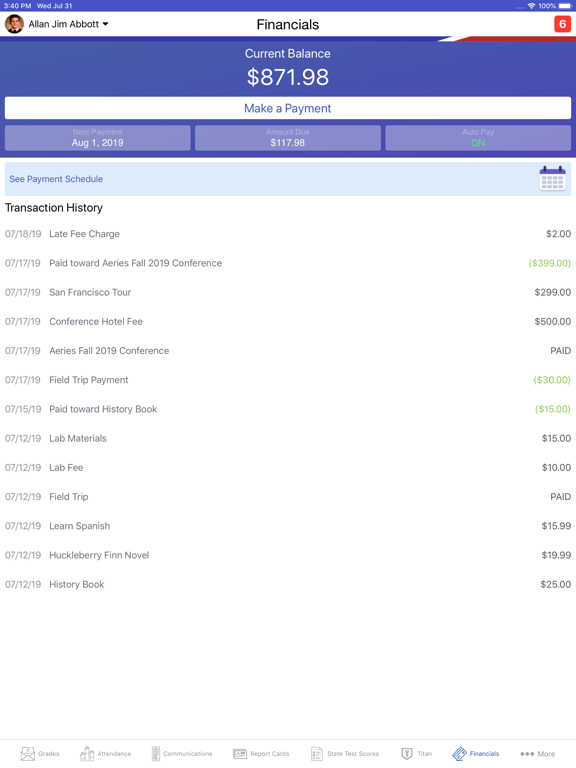
Pricing & paywalls
App Store
- Free to download
Ratings & reviews
App Store
-
1/5Consistently unreliable waste of storage
This app is genuinely the least useful thing I’ve ever had the displeasure of being forced to use. Every single update is a “bug fix” and there’s still nothing to show for it after YEARS of updates. This app is embarrassing terrible at doing its job, and the app itself is somehow pointless even in its intended existence. In order to even view most of the Aeries portal, you need to leave the app and use the web version instead. 90% of the times I’ve tried to just view my grades, the app will either crash or outright refuse to load anything, citing “Oops!: Something went wrong with the server! Please try again.” and “Error: Courses could not be retrieved.” countless times. It’s not even because the internet is slow, it refuses even with fast internet. However, using the website works just fine, so the issue isn’t even server-side. This failure of an application is only used because school districts and administrators are too lazy to use anything more complex than this failure. It likely only survives because of incompetence and inadequate funding to afford a decent grade monitoring system. Mailed paper grades would be (and are) faster than waiting for the updates to finally fix this dumpster fire of bugs and errors.
Julian Labunog · 29 Sep 2026
-
4/5Good but Little bugs
This app is a very helpful app but there are little bugs. I read through the reviews and a lot say you can’t sign in but you have to pick the right district. There are little bugs like when you look at your grade/assignment it can give you like your math ones when your looking at history (if you are not Elementary) or the app will shut down so you have to re-download it. It can also make grade worse then they are. They made a C (not a C+) almost red. Good parts are like you can see comments from teachers or see what is missing. You can also get all the information like student ID and phone numbers for like emergencies. Overall there are things they can fix but you get good Service through the app and it is very helpful for parents and kids I mean you even see your old report card so I say don’t read a lot of the bad/critical reviews because some in my opinion are kids who don’t want parents to get the app and just signing in problems which the could have been bad Service or they chose the wrong district which is not the app’s fault so it is a good app and I think it is good to get just be ready for little glitches through the app.
Maggie K. or MK · 29 Sep 2026
-
1/5FIX YOUR APP! Needs a massive bug fix update!
The app feels extremely unusable because of the sheer amount of bugs and issues the app has. I just want to look at grades and I can’t even do that most the time because of the amount of errors I’ve gotten for opening the app. I have to either sign out then sign back or I have to delete the app and reinstall it. This is extremely excruciating and needs fixing. An app this important to students and parents alike shouldn’t be this painfully unstable. A feature I really liked about this app was the ability to edit grades to see what you can do to improve them. I used to use this feature all the time, as it’s the only redeeming feature of the app. However that was on my iPhone 5, now I have an iPhone X and the feature is completely unusable because of the button placement. The button is underneath the battery symbol, which is how you access the iPhones control center. Because of that, the edit grades button is completely untouchable so it be greatly appreciated by many if you move the button lower so we can access it. Please look into these and PLEASE P L E A S E fix your app. Thank you
🛒🐋 · 29 Sep 2026
-
1/5I miss grades
I used to have the grades app but I had my phone stolen and when I got a new one, I noticed that the grades app was no longer on the App Store. I remember getting a notification from grades awhile ago saying something about how they’re shutting down and that there will be a similar app by aeries that we can use instead, so I got the aeries app. Unfortunately the aeries app is pretty awful in comparison to grades. It’s really complicated in comparison yet has less helpful features. If I wanted to see my attendance, grades from previous semesters, etc., I would go to the aeries website! I just want to easily see what grades I have without having to navigate through this confusing app. Also, probably one of the best things about grades is that it had the calculator feature which let you calculate your grades by creating mock assignments, dropping assignments, etc. Now I can’t do that and I can’t find any other app that will! Aeries, please listen to me, if you’re gonna get rid of grades (I’m assuming it’s your fault they shut down) at least try to offer the same features as them!!!
Fliberdijibet · 29 Sep 2026
-
4/5Will Not Open
I downloaded this app to check my grades more conveniently. I love the app itself and easy-to-access layout, however there is a major bug with the app right now. When I open the app, it takes me to a page where the only button is “get started”—every time I press that button, it starts to load to the screen where I would choose my school, but within less than a second it kicks me back to the opening screen with the “get started” button. I know that it is not my IOS because someone with the same phone as me has the app and has it functional. I have tried opening/closing the app, deleting/redownloading it, changing the permissions I grant it when it asks to every possible option—none of these have worked. I would love if this could be fixed, because I really would like to access the app. Thank you.
thehumanperson72 · 29 Sep 2026
Privacy & accessibility
App Store
Privacy
- Data Not Collected Developer declared
Accessibility
No accessibility labels collected yet.
Versions
App Store
-
2.4.10
- Tapping on a link in the assignment details screen will open the content in the browser. - Fixed minor bugs.
-
2.4.11
- The colors on the grades screen can now be disabled from the Settings. - Dark mode is now supported.
-
2.4.13
- An offline banner will be displayed when the device is not connected to the internet. - Fixed minor bugs.
-
2.4.14
- For iOS 13 and higher, a new option was added to the Settings screen to allow users to enable and disable dark mode.
-
2.4.15
Fixed some bugs.
-
2.4.16
A new survey is available for users to provide feedback for new features in the new Aeries Student App. The survey will be available until June 15, 2021.
-
2.4.17
In some circumstances, the What If feature was improperly disabled for students that attend two or more schools, fixed.
-
2.4.18
Enhancements were made on the Grades screen. Also the N/A mark has been replaced with blank in certain cases.
-
2.4.2
- Users can view school and district messages and teacher meeting notes on the App's home screen.
-
2.4.20
Improved Stability: We’ve made several under-the-hood improvements to boost the app’s stability and reliability.
-
2.4.21
Enhanced the app’s reliability by integrating Crashlytics, enabling efficient tracking, prioritizations, and resolution of stability issue and fixing particular issues of report card functionality—ensuring a smoother and more seamless user experience.
-
2.4.22
Resolved issues of notification and its count related issues to enhance the user experience.
-
2.4.23
Resolved tab bar controller issues that were causing application crashes, leading to improved stability and a better user experience.
-
2.4.24
Resolved several crash issues. The app is now more stable and reliable. Fixed issues affecting key screens such as Messages, Grades, Demographics, Contacts, and Home. These screens now load and function as expected.
-
2.4.25
As part of the Follett LivingTree Rebranding Project, renamed Aeries Financials to be Aeries Payments
-
2.4.26
Stability and performance improvements.
-
2.4.27
Enhanced stability on iOS 26 with important fixes for crashes and general performance.
-
2.4.28
This update improves app stability by resolving critical crashes during login and general navigation. We’ve also fixed the "Something went wrong" error and database issues occurring after app updates, ensuring a smoother transition between versions and better performance for multi-student accounts.
-
2.4.29
This update improves accessibility and enhances overall app stability. Accessibility Improvements • Improved screen reader navigation • Better button labeling and UI descriptions Stability Improvements • General bug fixes and performance enhancements
-
2.4.30
This update improves accessibility for VoiceOver users. Accessibility Improvements • Added missing button roles in What-if edit mode, Attendance, and Contacts • Added labels and value announcements for the What-if score slider • Improved focus order and announcements across the app
-
2.4.31
· 1 Jul 2026
This update improves accessibility for VoiceOver users. Accessibility Improvements • Added proper heading structure across Login, Home, Grades, Notifications, and Settings • Added missing button, dialog, and form roles in What-if edit mode, Grade Filter, and account screens • Added labels and value announcements for form fields, pickers, and the What-if score editor • Improved color contrast for text on the Home, Grades, and Notifications screens • Improved focus order and announcements across the app
-
2.4.32
· 3 Aug 2026
This update continues our accessibility improvements for VoiceOver users: • Added heading structure across Grades, Attendance, Settings, Add District & more • Correct button, dialog, link & list roles • Labels & value announcements for forms and the What-if score editor • Better color contrast for grades, text & icons (light & dark mode) • Improved focus order & status announcements
-
2.4.33
· 1 Sep 2026
This update continues our accessibility improvements for VoiceOver users: • Added heading & page structure across Login, Home, Grades, Attendance, Report Card, Demographics, Settings, Notifications, Link a Student, Add District & more • Correct button, link, list & dialog roles and states • Labels & value announcements for forms, images and the What-if score editor • Better color contrast for grades, text & icons (light & dark mode) • Improved focus order & status announcements • Fixed text spacing/overlap on Home, Login & Notification screens
-
2.4.4
- The Attendance screen has been modified to support Flex Scheduling. - Full Portal link has been added to the app to allow users to open the web portal from the app. - Locker information has been added to the Demographics screen. - Parents can now do data confirmation within the app. - System enhancement
-
2.4.5
- The app has been modified to support the new Flex Scheduling type schools - A new attendance screen was added to support Flex Scheduling type schools - Fixed bugs
-
2.4.7
1. Fixed an issue where the school message was not properly displaying when the students check in by room or scan the barcode. 2. Fixed an issue where the app would crash for certain users when going to the State Test Score screen. 3. Fixed an issue where the Contact was not visible to users with an iPad. 4. The Attendance screen now displays non-absence in green. 5. Fixed bugs.
-
2.4.8
Resolved screen issues that some phones were experiencing.
Alternatives
- 5-Star Students — Same category + similar ratings
- Minga — Same category + similar ratings
- ParentSquare — Same category + similar ratings
- Learning Genie for Parents — Same category + similar ratings
- California WIC App — Same category + similar ratings
- Canvas Parent — Same category + similar ratings
Availability by market
- US
Data quality & evidence
- Page completeness
- Live store listing
- Last verified
- 29 Sep 2026
- Sources
- App Store
- Apoku editorial summary has not been published yet.