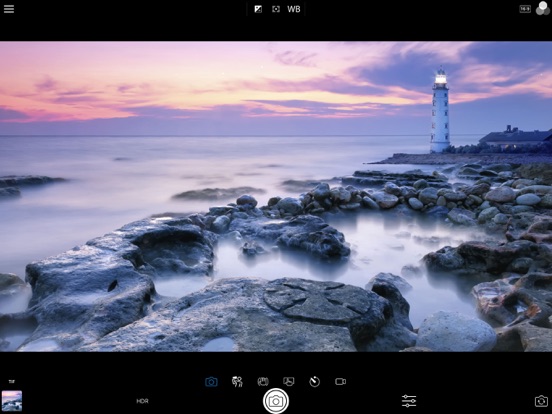
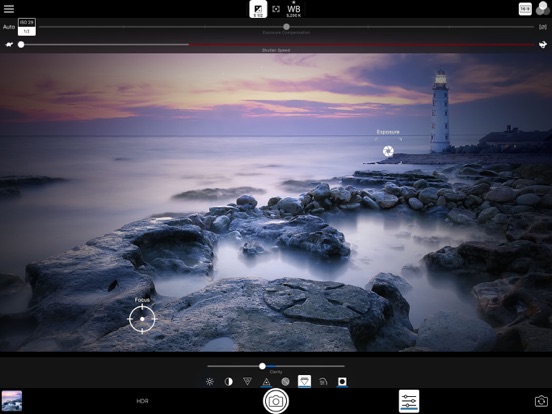
AppCorpus MCP gives your agent current app data, prices, screens, features and sources.
View JSON
GET /api/v3/apps/1122899052
{
  "app_id": 1122899052,
  "canonical_url": "https://appcorpus.com/apps/acdsee-camera-pro-1122899052",
  "identity": {
    "name": "ACDSee Camera Pro",
    "slug": "acdsee-camera-pro",
    "developer": {
      "name": "ACD Systems International Inc.",
      "url": "https://appcorpus.com/developers/acd-systems-international-inc-developer_06a89342f62202c4ef81875d018e6427"
    },
    "icon_url": "https://is1-ssl.mzstatic.com/image/thumb/Purple221/v4/f5/c4/78/f5c47848-75a2-d47b-d167-9c1d9094e464/AppIcon-0-0-1x_U007emarketing-0-10-0-85-220.png/512x512bb.jpg",
    "stores": [
      "apple"
    ],
    "platforms": [
      "iphone",
      "ipad"
    ],
    "status": {
      "state": "active",
      "label": "Active",
      "last_checked": "2026-08-07",
      "last_checked_label": "7 Aug 2026",
      "banner": null,
      "region_note": null
    }
  },
  "listings": [
    {
      "store": "apple",
      "status": "ACTIVE",
      "url": "https://apps.apple.com/us/app/acdsee-camera-pro/id1122899052?uo=4",
      "rating": 4.2,
      "rating_count": 22,
      "formatted_price": "$5.99",
      "is_free": false,
      "has_iap": false,
      "has_subscription": false,
      "version": "2.0.8",
      "updated": "2026-06-04",
      "currency": "USD"
    }
  ],
  "summary": {
    "one_liner": null,
    "summary": null,
    "best_for": [],
    "not_for": [],
    "status": "fallback",
    "at_a_glance": [
      "$5.99"
    ]
  },
  "categories": {
    "official": [
      "Photo & Video",
      "Productivity"
    ],
    "appcorpus": [
      {
        "category_id": "photo-video",
        "label": "Photo & video",
        "url": "https://appcorpus.com/categories/photo-video"
      },
      {
        "category_id": "productivity",
        "label": "Productivity",
        "url": "https://appcorpus.com/categories/productivity"
      }
    ]
  },
  "use_cases": [],
  "features": [
    {
      "capability_id": "family_sharing",
      "label": "Family Sharing",
      "availability": "yes",
      "access_level": "unknown",
      "scope": "App Store",
      "evidence": "Store published"
    }
  ],
  "pricing": [
    {
      "store": "apple",
      "formatted_price": "$5.99",
      "is_free": false,
      "has_iap": false,
      "has_subscription": false,
      "currency": "USD",
      "market": "us",
      "last_verified": "2026-08-07",
      "rows": [
        "Price: $5.99"
      ]
    }
  ],
  "screens": [
    {
      "url": "https://is1-ssl.mzstatic.com/image/thumb/Purple113/v4/41/a7/f1/41a7f1aa-01e9-4b1e-8273-118e0e3ca335/pr_source.png/1600x1600bb.jpg",
      "store": "apple",
      "platform": "ipad",
      "alt": "ACDSee Camera Pro ipad screenshot 1"
    },
    {
      "url": "https://is1-ssl.mzstatic.com/image/thumb/Purple113/v4/67/4a/fc/674afc56-8d6d-ecd2-0978-3aa54999185b/pr_source.png/1600x1600bb.jpg",
      "store": "apple",
      "platform": "ipad",
      "alt": "ACDSee Camera Pro ipad screenshot 2"
    },
    {
      "url": "https://is1-ssl.mzstatic.com/image/thumb/Purple123/v4/6d/ef/9f/6def9f2c-0eb5-ce71-5519-6b1a24434b8b/pr_source.jpg/552x414bb.jpg",
      "store": "apple",
      "platform": "ipad",
      "alt": "ACDSee Camera Pro ipad screenshot 3"
    },
    {
      "url": "https://is1-ssl.mzstatic.com/image/thumb/Purple113/v4/3a/bc/cb/3abccbd4-4718-efbd-8f02-a39bbd10fc46/pr_source.jpg/552x414bb.jpg",
      "store": "apple",
      "platform": "ipad",
      "alt": "ACDSee Camera Pro ipad screenshot 4"
    },
    {
      "url": "https://is1-ssl.mzstatic.com/image/thumb/Purple113/v4/69/a3/6a/69a36a59-1a8b-d0c0-a966-dcc6aabf6cd7/pr_source.png/1600x1600bb.jpg",
      "store": "apple",
      "platform": "ipad",
      "alt": "ACDSee Camera Pro ipad screenshot 5"
    },
    {
      "url": "https://is1-ssl.mzstatic.com/image/thumb/Purple123/v4/6d/72/3d/6d723dac-714c-958d-044e-d85910f6ac48/pr_source.png/552x414bb.png",
      "store": "apple",
      "platform": "ipad",
      "alt": "ACDSee Camera Pro ipad screenshot 6"
    },
    {
      "url": "https://is1-ssl.mzstatic.com/image/thumb/Purple113/v4/ba/74/50/ba7450f0-1315-d035-edad-7aa18a8b20da/pr_source.png/1242x1600bb.jpg",
      "store": "apple",
      "platform": "iphone",
      "alt": "ACDSee Camera Pro iphone screenshot 7"
    },
    {
      "url": "https://is1-ssl.mzstatic.com/image/thumb/Purple123/v4/ae/3f/69/ae3f698b-527e-27b0-396e-17eacbcce9d0/pr_source.png/1242x1600bb.jpg",
      "store": "apple",
      "platform": "iphone",
      "alt": "ACDSee Camera Pro iphone screenshot 8"
    },
    {
      "url": "https://is1-ssl.mzstatic.com/image/thumb/Purple113/v4/32/19/24/3219242f-d0f3-2c0b-098f-344bff786af3/pr_source.png/1242x1600bb.jpg",
      "store": "apple",
      "platform": "iphone",
      "alt": "ACDSee Camera Pro iphone screenshot 9"
    }
  ],
  "ratings": [
    {
      "store": "apple",
      "average": 4.2,
      "count": 22,
      "market": "us",
      "observed_at": "2026-08-07",
      "reviews": [
        {
          "rating": 4,
          "title": "no sound",
          "body": "after beauty mode video record no sound . can fix it ? thx",
          "author": "handdy4594",
          "date": "7 Aug 2026"
        },
        {
          "rating": 5,
          "title": "Absolutely Breathtaking",
          "body": "I would have never guessed that my iPhone would be able to deliver images that my Canon 5D Mk II with f/2.8 L Series lenses, capped by Hoya Professional filters, would struggle with. I have only just begun to delve into all the possibilities that have unfolded before me on my phone’s screen, but I am taking great delight as I explore this flexible array of adjustments and controls over the images captured by my lens! This is truly ground breaking photographically and I can’t wait to explore my world with this tool in hand, sharing my visions with all who care to gaze upon the magical photographs I’ve captured!",
          "author": "FRPJr",
          "date": "7 Aug 2026"
        },
        {
          "rating": 1,
          "title": "Does not use the current iPhone technology",
          "body": "I bought this thinking it would use all functionality of the iPhone 13. It creates 1080p videos. If that’s want you want this app is fine. I didn’t buy an iPhone 13 to use old technology. The reviews under this app are old, so it may have been fine to use at one time, but not now. Hopefully this will prevent the assumptions I made from making a poor purchase.",
          "author": "Anon_192.5",
          "date": "7 Aug 2026"
        },
        {
          "rating": 2,
          "title": "Images degraded",
          "body": "Shots not as crisp as a year ago especially macro. Used to be better than native camera software. What happened?",
          "author": "KenGyo",
          "date": "7 Aug 2026"
        },
        {
          "rating": 5,
          "title": "Love this app",
          "body": "It works very well, I highly recommended it",
          "author": "Youmeinland",
          "date": "7 Aug 2026"
        }
      ]
    }
  ],
  "privacy": [
    {
      "store": "apple",
      "declarations": [
        {
          "title": "Data Not Collected",
          "detail": "",
          "source": "Developer declared"
        }
      ],
      "accessibility": []
    }
  ],
  "changes": [
    {
      "store": "apple",
      "version": "1.0.0",
      "released_at": null,
      "notes": ""
    },
    {
      "store": "apple",
      "version": "1.0.1",
      "released_at": null,
      "notes": "Performance improvements and bug fixes"
    },
    {
      "store": "apple",
      "version": "1.0.2",
      "released_at": null,
      "notes": "Performance improvements and bug fixes"
    },
    {
      "store": "apple",
      "version": "1.1.0",
      "released_at": null,
      "notes": "Added support for iPhone 7 Plus Dual Cameras Reduced lag between exposures in Flash Bracketing mode Performance improvements and bug fixes"
    },
    {
      "store": "apple",
      "version": "1.1.1",
      "released_at": null,
      "notes": "Performance improvements and bug fixes"
    },
    {
      "store": "apple",
      "version": "1.1.10",
      "released_at": null,
      "notes": "Performance improvements and bug fixes"
    },
    {
      "store": "apple",
      "version": "1.1.2",
      "released_at": null,
      "notes": "Performance improvements and bug fixes"
    },
    {
      "store": "apple",
      "version": "1.1.3",
      "released_at": null,
      "notes": "Performance improvements and bug fixes"
    },
    {
      "store": "apple",
      "version": "1.1.4",
      "released_at": null,
      "notes": "Added Video Stabilization setting Fixed Flash Fusion mode not saving correctly on some devices Fixed image filename sequence numbers being skipped when capturing RAW Recovery of captured video that could not be written to the device’s photo library Performance improvements and bug fixes"
    },
    {
      "store": "apple",
      "version": "1.1.5",
      "released_at": null,
      "notes": "Performance improvements and bug fixes"
    },
    {
      "store": "apple",
      "version": "1.1.6",
      "released_at": null,
      "notes": "Fixed non-HDR/Flash bracketing exposures not saved until \"Save individual HDR / Flash Bracketing exposures\" setting is enabled"
    },
    {
      "store": "apple",
      "version": "1.1.7",
      "released_at": null,
      "notes": "Resolved an issue where the app sometimes automatically captured a photo / video immediately after startup."
    },
    {
      "store": "apple",
      "version": "1.1.8",
      "released_at": null,
      "notes": "Fixed an issue with \"Enable volume button shutter\"."
    },
    {
      "store": "apple",
      "version": "1.1.9",
      "released_at": null,
      "notes": "Fixed \"Enable volume button shutter\" muting audio in captured video."
    },
    {
      "store": "apple",
      "version": "2.0",
      "released_at": null,
      "notes": "Photos can now be captured using the new HEIC format on supported hardware. The settings UI has been redesigned and additional settings are available. Raw capture can now be configured to produce DNG, DNG+JPEG or separate DNG and processed assets. Captures with adjustments can now be output as original / edited assets, allowing the adjustments to be modified later, or the adjusted image can be output to a separate asset from the unadjusted photo. The drawer button can be long pressed to go directly to the camera settings. The output format indicator can be tapped to go directly to the photo capture settings. Updated UI for iPhone X. Bug fixes, stability and performance enhancements have been applied."
    },
    {
      "store": "apple",
      "version": "2.0.1",
      "released_at": null,
      "notes": "Fixed incorrectly identified camera model in Exif on some iPhone X devices Changed default value of \"Reset Camera Settings when App is Restarted\" from ON to OFF"
    },
    {
      "store": "apple",
      "version": "2.0.2",
      "released_at": null,
      "notes": "Fixed crash capturing photo with shutter priority mode on some devices Other performance improvements and bug fixes"
    },
    {
      "store": "apple",
      "version": "2.0.3",
      "released_at": null,
      "notes": "Performance improvements and bug fixes"
    },
    {
      "store": "apple",
      "version": "2.0.4",
      "released_at": null,
      "notes": "Performance improvements and bug fixes"
    },
    {
      "store": "apple",
      "version": "2.0.5",
      "released_at": null,
      "notes": "Performance improvements and bug fixes"
    }
  ],
  "alternatives": [],
  "evidence_summary": {
    "index_state": "S1",
    "evidence_level": 1,
    "level_label": "Live store listing",
    "indexable": true,
    "last_verified_at": "2026-08-07",
    "unknown_fields": [
      "Independent summary has not been published yet."
    ],
    "sources": [
      "App Store"
    ]
  },
  "availability_markets": {
    "live": [
      "us"
    ],
    "selected": "us",
    "note": null
  },
  "feature_events": {
    "events": []
  },
  "features_slice": {
    "plans": [],
    "features": [],
    "unknown_features": [
      "family_sharing"
    ],
    "data_cutoff": "7 Aug 2026"
  }
}