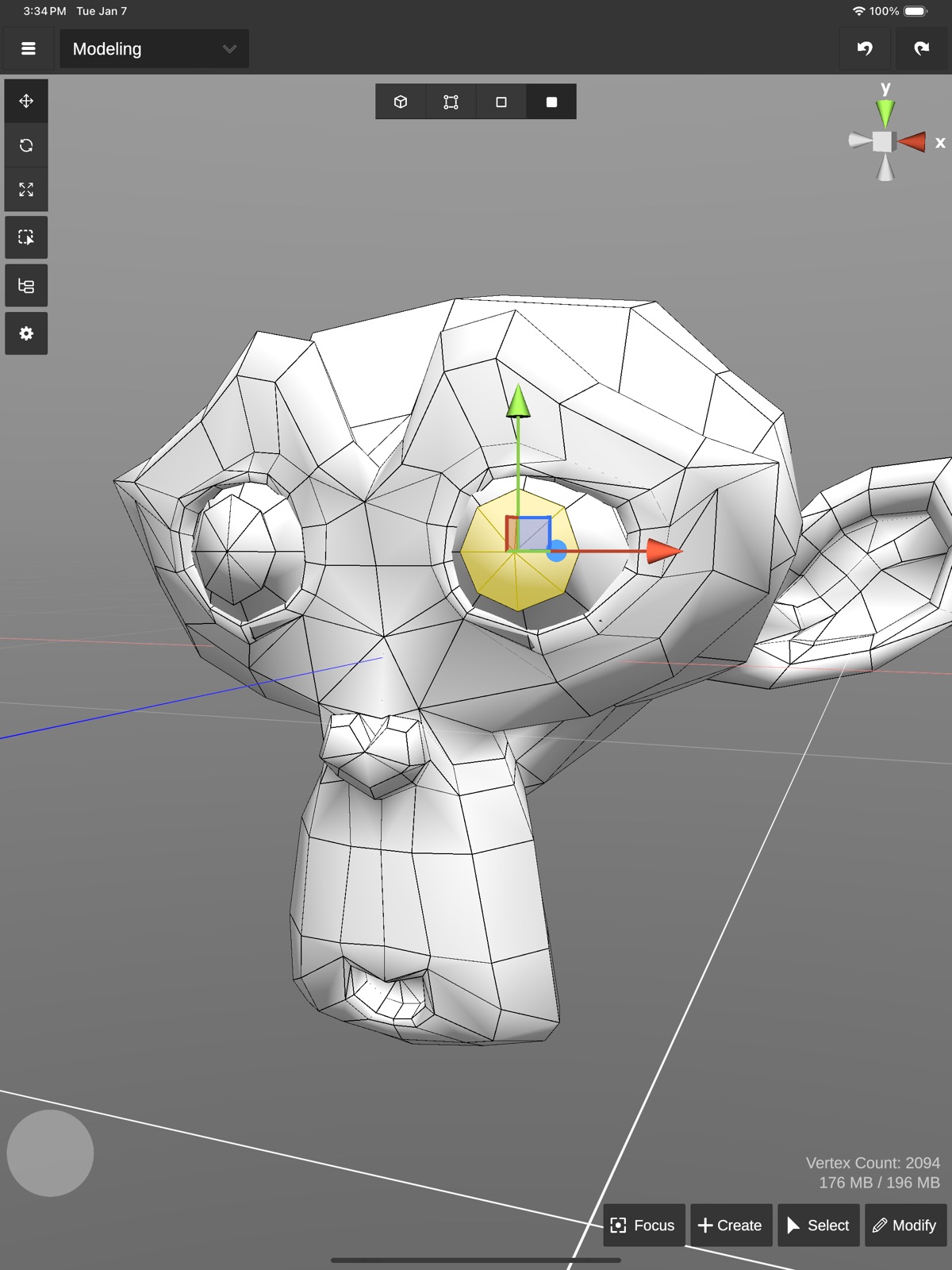
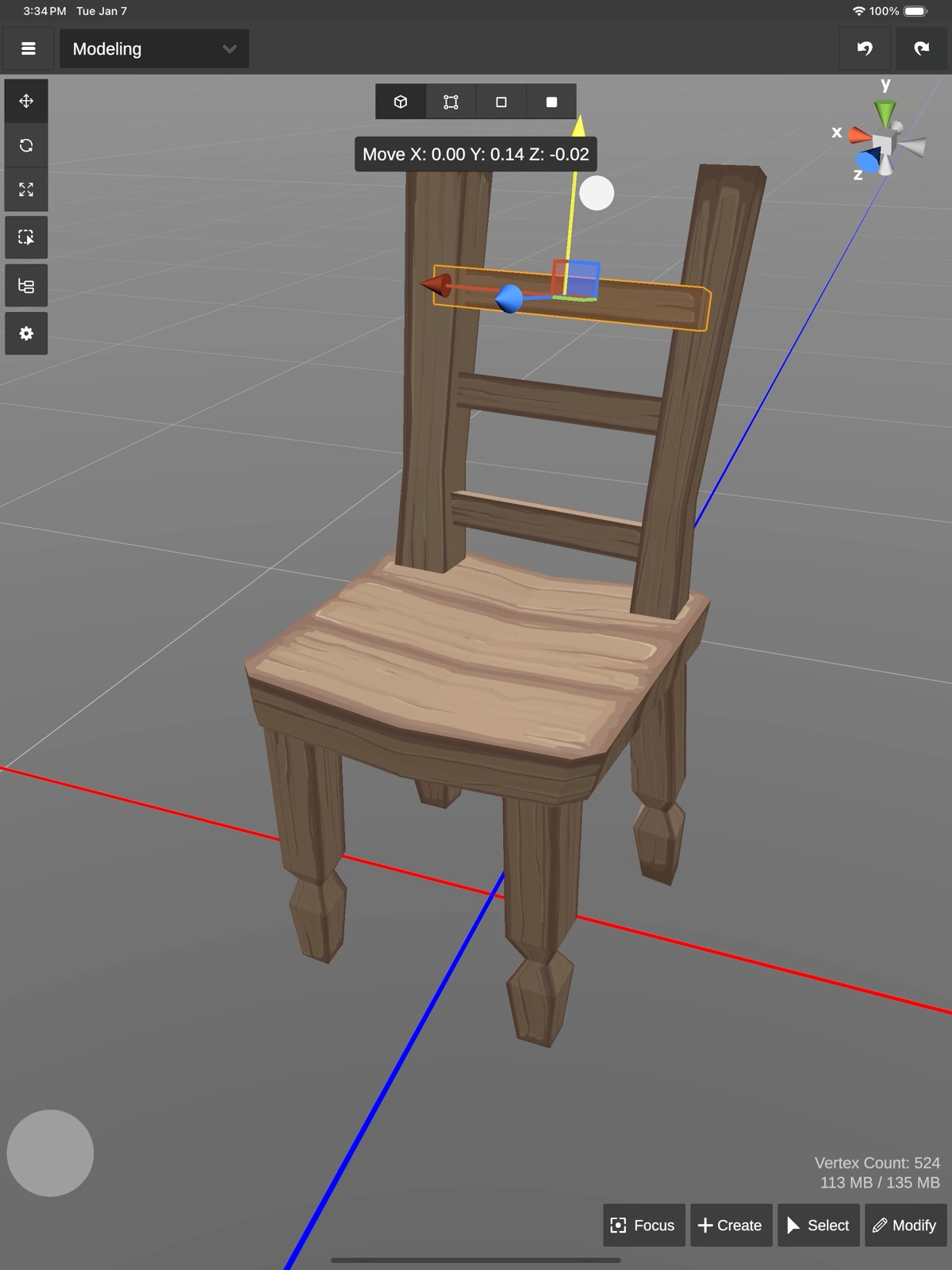
AppCorpus MCP gives your agent current app data, prices, screens, features and sources.
View JSON
GET /api/v3/apps/6478023236
{
  "app_id": 6478023236,
  "canonical_url": "https://appcorpus.com/apps/3d-modeling-artimesh-6478023236",
  "identity": {
    "name": "3D modeling: ArtiMesh",
    "slug": "3d-modeling-artimesh",
    "developer": {
      "name": "White Bread Games",
      "url": "https://appcorpus.com/developers/white-bread-games-developer_44474726e806374b503051edae490fed"
    },
    "icon_url": "https://is1-ssl.mzstatic.com/image/thumb/Purple221/v4/9d/20/c1/9d20c1c2-c10f-afe7-8025-b2196a493164/AppIcon-0-0-1x_U007emarketing-0-8-0-85-220.png/512x512bb.jpg",
    "stores": [
      "apple"
    ],
    "platforms": [
      "iphone",
      "ipad"
    ],
    "status": {
      "state": "active",
      "label": "Active",
      "last_checked": "2026-07-31",
      "last_checked_label": "31 Jul 2026",
      "banner": null,
      "region_note": null
    }
  },
  "listings": [
    {
      "store": "apple",
      "status": "ACTIVE",
      "url": "https://apps.apple.com/us/app/3d-modeling-artimesh/id6478023236?uo=4",
      "rating": 4.9,
      "rating_count": 7,
      "formatted_price": "$12.99",
      "is_free": false,
      "has_iap": false,
      "has_subscription": false,
      "version": "1.0.20",
      "updated": "2026-05-03",
      "currency": "USD"
    }
  ],
  "summary": {
    "one_liner": null,
    "summary": null,
    "best_for": [],
    "not_for": [],
    "status": "fallback",
    "at_a_glance": [
      "$12.99"
    ]
  },
  "categories": {
    "official": [
      "Graphics & Design",
      "Productivity"
    ],
    "appcorpus": [
      {
        "category_id": "graphics-design",
        "label": "Graphics & design",
        "url": "https://appcorpus.com/categories/graphics-design"
      },
      {
        "category_id": "productivity",
        "label": "Productivity",
        "url": "https://appcorpus.com/categories/productivity"
      }
    ]
  },
  "use_cases": [],
  "features": [
    {
      "capability_id": "family_sharing",
      "label": "Family Sharing",
      "availability": "yes",
      "access_level": "unknown",
      "scope": "App Store",
      "evidence": "Store published"
    }
  ],
  "pricing": [
    {
      "store": "apple",
      "formatted_price": "$12.99",
      "is_free": false,
      "has_iap": false,
      "has_subscription": false,
      "currency": "USD",
      "market": "us",
      "last_verified": "2026-07-31",
      "rows": [
        "Price: $12.99"
      ]
    }
  ],
  "screens": [
    {
      "url": "https://is1-ssl.mzstatic.com/image/thumb/PurpleSource211/v4/fa/cd/d7/facdd7e0-c2d8-6643-e712-64e6a93097a2/ipad_1.png/1600x1600bb.jpg",
      "store": "apple",
      "platform": "ipad",
      "alt": "3D modeling: ArtiMesh ipad screenshot 1"
    },
    {
      "url": "https://is1-ssl.mzstatic.com/image/thumb/PurpleSource211/v4/fd/43/0c/fd430cc1-4d84-f5f8-10bb-dcd16a4ae24e/ipad_2.png/1600x1600bb.jpg",
      "store": "apple",
      "platform": "ipad",
      "alt": "3D modeling: ArtiMesh ipad screenshot 2"
    },
    {
      "url": "https://is1-ssl.mzstatic.com/image/thumb/PurpleSource211/v4/2b/ed/e9/2bede9dc-c4c0-e834-3008-9ed03f210e59/ipad_3.png/1600x1600bb.jpg",
      "store": "apple",
      "platform": "ipad",
      "alt": "3D modeling: ArtiMesh ipad screenshot 3"
    },
    {
      "url": "https://is1-ssl.mzstatic.com/image/thumb/PurpleSource211/v4/87/7d/5e/877d5e8e-0b4d-a0a4-03bd-f1fcccab69f0/ipad_4.png/1600x1600bb.jpg",
      "store": "apple",
      "platform": "ipad",
      "alt": "3D modeling: ArtiMesh ipad screenshot 4"
    },
    {
      "url": "https://is1-ssl.mzstatic.com/image/thumb/PurpleSource211/v4/fb/6a/d7/fb6ad76a-fc03-80da-a479-69ae4d2047f4/ipad_5.png/1600x1600bb.jpg",
      "store": "apple",
      "platform": "ipad",
      "alt": "3D modeling: ArtiMesh ipad screenshot 5"
    },
    {
      "url": "https://is1-ssl.mzstatic.com/image/thumb/PurpleSource221/v4/e6/88/56/e6885662-b3cd-d07f-0017-0af65ca65da1/ipad_6.png/1600x1600bb.jpg",
      "store": "apple",
      "platform": "ipad",
      "alt": "3D modeling: ArtiMesh ipad screenshot 6"
    },
    {
      "url": "https://is1-ssl.mzstatic.com/image/thumb/PurpleSource211/v4/a5/9c/35/a59c3594-a0eb-6f48-0098-f39d5640c50c/ipad_7.png/1600x1600bb.jpg",
      "store": "apple",
      "platform": "ipad",
      "alt": "3D modeling: ArtiMesh ipad screenshot 7"
    },
    {
      "url": "https://is1-ssl.mzstatic.com/image/thumb/PurpleSource221/v4/d1/13/56/d1135610-38af-7290-6928-ad066dc27749/ipad_8.png/1600x1600bb.jpg",
      "store": "apple",
      "platform": "ipad",
      "alt": "3D modeling: ArtiMesh ipad screenshot 8"
    },
    {
      "url": "https://is1-ssl.mzstatic.com/image/thumb/PurpleSource221/v4/cf/2f/6a/cf2f6a30-fa5d-d182-54a1-822000d6bef2/iphone_1.png/1320x1600bb.jpg",
      "store": "apple",
      "platform": "iphone",
      "alt": "3D modeling: ArtiMesh iphone screenshot 9"
    },
    {
      "url": "https://is1-ssl.mzstatic.com/image/thumb/PurpleSource221/v4/51/6c/49/516c49af-83f4-7e5f-b6c9-3d6988412e2e/iphone_2.png/1320x1600bb.jpg",
      "store": "apple",
      "platform": "iphone",
      "alt": "3D modeling: ArtiMesh iphone screenshot 10"
    },
    {
      "url": "https://is1-ssl.mzstatic.com/image/thumb/PurpleSource221/v4/62/e7/0e/62e70e5a-2e7d-1fa9-afdf-8bfa712cc567/iphone_3.png/1320x1600bb.jpg",
      "store": "apple",
      "platform": "iphone",
      "alt": "3D modeling: ArtiMesh iphone screenshot 11"
    },
    {
      "url": "https://is1-ssl.mzstatic.com/image/thumb/PurpleSource221/v4/c2/f3/8b/c2f38bfd-37e5-c7f6-4946-f61ed8446953/iphone_4.png/1320x1600bb.jpg",
      "store": "apple",
      "platform": "iphone",
      "alt": "3D modeling: ArtiMesh iphone screenshot 12"
    },
    {
      "url": "https://is1-ssl.mzstatic.com/image/thumb/PurpleSource211/v4/57/01/28/57012878-060d-5fd6-d866-2e3899ea4a87/iphone_5.png/1320x1600bb.jpg",
      "store": "apple",
      "platform": "iphone",
      "alt": "3D modeling: ArtiMesh iphone screenshot 13"
    },
    {
      "url": "https://is1-ssl.mzstatic.com/image/thumb/PurpleSource221/v4/6a/be/89/6abe891c-9247-320f-033a-c8e9f549d466/iphone_6.png/1320x1600bb.jpg",
      "store": "apple",
      "platform": "iphone",
      "alt": "3D modeling: ArtiMesh iphone screenshot 14"
    },
    {
      "url": "https://is1-ssl.mzstatic.com/image/thumb/PurpleSource211/v4/c4/3e/59/c43e591a-186b-f72f-d4cc-335315ce5d20/iphone_7.png/1320x1600bb.jpg",
      "store": "apple",
      "platform": "iphone",
      "alt": "3D modeling: ArtiMesh iphone screenshot 15"
    },
    {
      "url": "https://is1-ssl.mzstatic.com/image/thumb/PurpleSource221/v4/1e/42/6f/1e426fb1-aa05-8ad9-5740-911cd5a9c92a/iphone_8.png/1320x1600bb.jpg",
      "store": "apple",
      "platform": "iphone",
      "alt": "3D modeling: ArtiMesh iphone screenshot 16"
    }
  ],
  "ratings": [
    {
      "store": "apple",
      "average": 4.9,
      "count": 7,
      "market": "us",
      "observed_at": "2026-07-31",
      "reviews": [
        {
          "rating": 5,
          "title": "Works with Unreal Engine",
          "body": "Made a pick axe as a small test. Took about 4 minutes to figure it out at first. Got it imported easily to ue5. Materials transferred over well. Had it import each object as its own mesh. Merged them re imported and saw it was too small, scaled it up and reimported and it was perfect. All in all took maybe 10 minutes from start to finish. Very nice and easy to use out of the gate. Had some issues with reflective materials not rendering properly in select mode but if you go into materials they look fine, render looks fine as well with some loss but other then that it’s good. Very nice to use. Easy to poke around with and get to know it.",
          "author": "Blau ghost",
          "date": "31 Jul 2026"
        },
        {
          "rating": 5,
          "title": "Just what I was looking for",
          "body": "If you’re a box modeler, you’ll feel right at home. Great for low poly game dev on the couch. My only request? The same way that button + arrow drag does extrude, button + scale drag should do inset. Looking forward to sinking more hours into this.",
          "author": "OlGimpy",
          "date": "31 Jul 2026"
        },
        {
          "rating": 4,
          "title": "Basic but efficient",
          "body": "Worth the price. I think it's solid but it's missing a fair amount of quality of life features like being able to lock individual objects so you can't select them. Also needs better mirroring features so it manipulates the same vertices parallel symmetrically instead of just duplicating the mesh. Subdivide could have more options. Also the sculpting mode needs a ton of work; the pressure on brushes does not work as it should for example. But honestly other than that it's reliable.",
          "author": "Mysty Draco",
          "date": "31 Jul 2026"
        }
      ]
    }
  ],
  "privacy": [
    {
      "store": "apple",
      "declarations": [
        {
          "title": "Data Not Collected",
          "detail": "",
          "source": "Developer declared"
        }
      ],
      "accessibility": []
    }
  ],
  "changes": [
    {
      "store": "apple",
      "version": "1.0",
      "released_at": null,
      "notes": ""
    },
    {
      "store": "apple",
      "version": "1.0.1",
      "released_at": null,
      "notes": "-Fixing issue that new objects wouldn't be created -Fixing issue where scaling was based on previous object rotation instead of current"
    },
    {
      "store": "apple",
      "version": "1.0.10",
      "released_at": null,
      "notes": "-Bug fixes for sculpt, export, and vertex commands"
    },
    {
      "store": "apple",
      "version": "1.0.11",
      "released_at": null,
      "notes": "-Fixed touch handles when switching pivot/rotation mode"
    },
    {
      "store": "apple",
      "version": "1.0.12",
      "released_at": null,
      "notes": "-Fixed issue where zooming too close would break move/scale handles"
    },
    {
      "store": "apple",
      "version": "1.0.13",
      "released_at": null,
      "notes": "-Fixed texture paint color picker memory leak. -Fixed texture paint color picker from picking a darker color."
    },
    {
      "store": "apple",
      "version": "1.0.14",
      "released_at": null,
      "notes": "-Holding the shortcut button while scaling faces/edges will extrude and scale (similar to inset). -Fixing issues with displaying selected edges at the end of objects"
    },
    {
      "store": "apple",
      "version": "1.0.15",
      "released_at": null,
      "notes": "-Fixing OBJ import when file ends with null char"
    },
    {
      "store": "apple",
      "version": "1.0.16",
      "released_at": null,
      "notes": "-Upgraded Boolean modifiers. They're completely rewritten! They are still experimental, slow, and create noisy models, but fixed many cases where faces would disappear."
    },
    {
      "store": "apple",
      "version": "1.0.17",
      "released_at": null,
      "notes": "-Fixing error caused by exiting sculpt mode and using face selections -Keyboard Shortcuts! Left Shift: Gesture button Left Cmd + Z: Undo Left Cmd + Y: Redo Q: Box Select W: Transform E: Rotate R: Scale F: Focus Z: Toggle Pivot Center/Last Active Element X: Toggle Orientation Local/Global Left Cmd + S: Save Left Cmd + E: Export Left Cmd + I: Import 1: Object Selection Mode 2: Vertex Selection Mode 3: Edge Selection Mode 4: Face Selection Mode Left Cmd + 1: Modeling Mode, Left Cmd + 2: Sculpt Mode, Left Cmd + 3: Material Mode Left Cmd + 4: UV Mapping Mode Left Cmd + 5: Paint Mode Left Cmd + 6: Rendering Mode Ctrl + Mouse Drag: Zoom Alt + Mouse Drag: Pan"
    },
    {
      "store": "apple",
      "version": "1.0.2",
      "released_at": null,
      "notes": "-Stopped texture paint from hitting invisible objects -Refresh UV editor texture when switching modes"
    },
    {
      "store": "apple",
      "version": "1.0.20",
      "released_at": "2026-05-03",
      "notes": "-The beginning of new live preview features. When creating a new shape, a preview of the new object is visible behind the modal. -Upgraded to patched version Unity."
    },
    {
      "store": "apple",
      "version": "1.0.3",
      "released_at": null,
      "notes": "-Fixed issue where handles could not moved after a new selection."
    },
    {
      "store": "apple",
      "version": "1.0.4",
      "released_at": null,
      "notes": "-Fixing render resolution not saving. -Fixing Ambient Occlusion not saving to render preview or export"
    },
    {
      "store": "apple",
      "version": "1.0.5",
      "released_at": null,
      "notes": "-In local mode and face mode, handles use face normal if all normals match"
    },
    {
      "store": "apple",
      "version": "1.0.6",
      "released_at": null,
      "notes": "-Stop rotate handle from selecting after completing a rotation."
    },
    {
      "store": "apple",
      "version": "1.0.7",
      "released_at": null,
      "notes": "-Create prisms now allows you to specify the number of sides. -Allowing minimum height subdivisions on Cylinder to be 0. -Making scale handles easier to use -Fixing issue where low quality material was showing on mirrored objects in render mode. -Fixing mirrored objects getting cut off in render mode -Fixing X Ray for mirrored objects."
    },
    {
      "store": "apple",
      "version": "1.0.8",
      "released_at": null,
      "notes": "-Fixing normals on prisms"
    },
    {
      "store": "apple",
      "version": "1.0.9",
      "released_at": null,
      "notes": "-Speed optimizations"
    }
  ],
  "alternatives": [
    {
      "app_id": 6472727759,
      "name": "Uniform - 3D Editor",
      "url": "https://appcorpus.com/apps/uniform-3d-editor-6472727759",
      "reason": "Same category + similar ratings"
    }
  ],
  "evidence_summary": {
    "index_state": "S1",
    "evidence_level": 1,
    "level_label": "Live store listing",
    "indexable": true,
    "last_verified_at": "2026-07-31",
    "unknown_fields": [
      "Independent summary has not been published yet."
    ],
    "sources": [
      "App Store"
    ]
  },
  "availability_markets": {
    "live": [
      "us"
    ],
    "selected": "us",
    "note": null
  },
  "feature_events": {
    "events": []
  },
  "features_slice": {
    "plans": [],
    "features": [],
    "unknown_features": [
      "family_sharing"
    ],
    "data_cutoff": "31 Jul 2026"
  }
}