
Quick verdict
- What it is
- Store information collected; an Apoku editorial summary is not yet published.
- At a glance
-
- From $1.99/mo
- Free to download
- In-app purchases
Categories and search queries
Official categories
- Photo & Video
- Graphics & Design
Apoku categories
Key functions
| Function | Availability | Access | Scope | Evidence |
|---|---|---|---|---|
| Free app | Yes | Free | Context-specific | Store published |
| In-app purchases | Yes | Limited free | Context-specific | Store published |
Screens
App Store
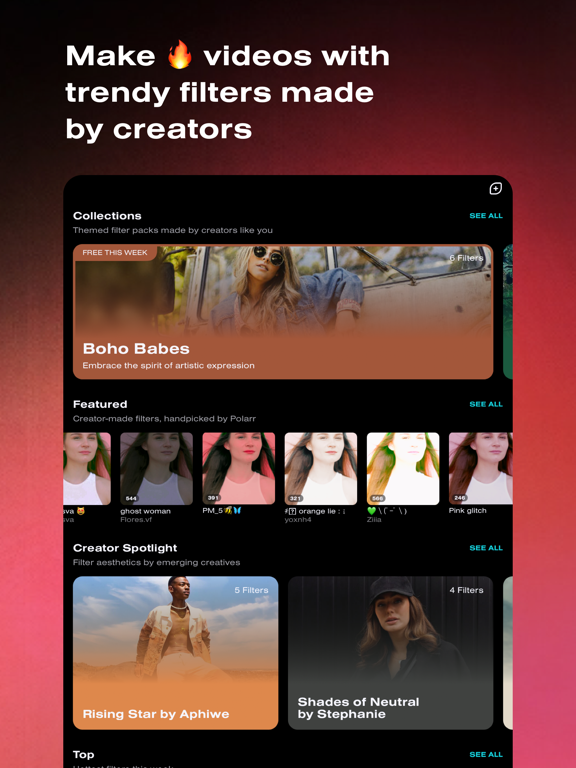
14 store screenshots



Pricing & paywalls
App Store
- Polarr 24FPS Monthly — $3.99/month
- Polarr 24FPS Monthly — $23.99/year ($1.99/mo)
- Polarr 24FPS Studio — $3.99
Ratings & reviews
App Store
-
5/5Wonderful app
I’m in love w this app. As an iPhone cinematographer and a lover of great apps, this is a jewel. First thing, I appreciate that even in the free version, they give you the option of disabling their logo on your video. That alone says a lot about the company and creators of this app and I will definitely be upgrading to premium. 24FPS gives your video a professional quality. So many filters to choose from. I can’t wait to upgrade. This app offers a lot of experimentation and creativity. I feel empowered and it makes me feel like I can achieve any look I want, using my phone! In the past, my videos, shot with my iPhone, were mostly stringing Live Photos give me the look and feel I want. I used Quik a lot to string together my Live Photo’s but, which was nice, but the quality of their final product in that app is not so good and they crash a lot and its disappointing. But—Put that thing in 24fps and boom, you are on a whole ‘nother level. I think the fee 24fps charges for the upkeep of this app is more than reasonable and worth every penny. Thank you to the creators and genius minds behind this app. Your thoughtful work is much appreciated.
iLisaLove · 5 Oct 2026
-
3/5confusing layout, extremely buggy, app needs work.
i use the Polarr app all the time, so when i discovered there was an app that lets you use styles on videos, i was ecstatic— since Polarr does not support video or gif format on their app. however, within the first few moments of using this app, i found myself getting already frustrated with it. the layout is confusing, it isn’t user-friendly at all and i find it quite a hassle to get to my styles after each video i want to import. there’s too many ‘tabs’ to choose from and overall i just want a more simpler user interface to go with, what should be, an app that provides a simple function. i had this same issue with Polarr after the major update. the second thing that frustrates me about this app, and is unique to 24fps in particular, is the amount of bugs. the amount of time this app freezes and crashes, forcing me to restart the app is so frustrating. it really makes me feel like this app was rushed by the developers, like this app was released while still in its beta. it needs more polishing, a simpler layout (that involves a better way to get to your styles) and these bugs have to go. until i see a change, 3 stars is as much as i’m willing to give.
Thermah · 5 Oct 2026
-
5/5Love This App!!
Whenever I’m editing videos, or just making an edit period—i LOVE to use Polarr 24FPS! This app always has influenced me whenever I find edits on Tik Tok or just scrolling through Instagram! It shows me how to make creative projects just by a few clicks! Love how it replays so you’re able to see how your final project will look like! My favorite aspects throughout the app would be the filters, the adjustable features & how you can enhance the quality of your video(s)! Using the filters in the app can really help whenever I want a certain look to go for the the video. Ex: Video collages with different settings! I’d put on a filter so it can still be a video collage; just with a theme to it! What I’m getting to is that you should definitely use this app!
miraculous4Lifes · 5 Oct 2026
-
1/5Glitch After Glitch
I am getting fed up with this app. I sent a complaint in on 1/5/22 and haven’t received anything back, but I’ll just start from the beginning. The only reason I purchased this app was because I had purchased video presets and this was the recommended app to use. I loaded the presets into the app fine, however getting them to apply to my videos is another thing. First off, when I open the app it defaults to a green and purple filter I can’t seem to get rid of. Once I get my video into the app and click my preset it doesn’t apply. I have to close the app and re-open it and then my preset will be there over the video. After that when I export, almost every single time the preset is not on the saved video. I then have to go back into the app and re-save, sometimes up to five times before it finally saves with the preset. I paid for the year for this app because I purchased these presets for my videos and I’m only about a month in and I’m ready to just call it a total loss because this app is so frustrating. I am hoping some of these issues fix with an update but for now, I’m just really disappointed I paid money for this to not work correctly.
KendraGW · 5 Oct 2026
-
4/5Great editor overall
I’ve tried several video editors from the App Store, and this is a very good free one. Having full control of light and color is unusual in a free editor. This includes HSL control of individual colors, and the ability to adjust whites, blacks, shadows and highlights. You can split/trim/add clips fairly easily. However it would be nice to see all your folders. Currently it only has recent and a couple other basic categories to choose from. The selection of free filters is nice, and the ability to add your own LUTs or filters from Polarr is awesome. I would like the filters much more if you could control their intensity more precisely. Currently you can choose from low, medium, or high, and to me low is still a big change from the original. Videos take a little longer to save than some other apps I’ve used. Other cool features include choosing which frame rate to use, saving without a watermark, and a stabilized zoom. Great addition to the App Store, which with a couple of tweaks could be one of the best.
Georgiadoglove · 5 Oct 2026
Privacy & accessibility
App Store
Privacy
- Data Not Linked to You — Analytics — Diagnostics — Crash Data Developer declared
- Data Not Linked to You — Analytics — Diagnostics — Other Diagnostic Data Developer declared
- Data Not Linked to You — Analytics — Diagnostics — Performance Data Developer declared
- Data Not Linked to You — Analytics — Identifiers — Device ID Developer declared
- Data Not Linked to You — Analytics — Usage Data — Product Interaction Developer declared
- Data Not Linked to You — App Functionality — Diagnostics — Crash Data Developer declared
- Data Not Linked to You — App Functionality — Diagnostics — Other Diagnostic Data Developer declared
- Data Not Linked to You — App Functionality — Diagnostics — Performance Data Developer declared
- Data Not Linked to You — App Functionality — User Content — Audio Data Developer declared
- Data Not Linked to You — App Functionality — User Content — Photos or Videos Developer declared
- Data Not Linked to You — Diagnostics Developer declared
- Data Not Linked to You — Identifiers Developer declared
- Data Not Linked to You — Usage Data Developer declared
- Data Not Linked to You — User Content Developer declared
Accessibility
No accessibility labels collected yet.
Versions
App Store
-
3.1.10
- Make your profile stand out with our newly updated Creator profile. - Don't miss out on new filters by your favorite creators! You can now follow creator profiles and be notified when they have published new filters. - Discover new filters easily with our new Creator Spotlight which highlights trending creators and their profiles. - Never miss a thing! Find out who published a new filter, who followed you, and stay up to date on 24FPS news with our new Activity Center.
-
3.1.11
- Show some love for your favorite filters! You are now able to like filters by Creators with the new like feature. You can also view all your liked filters in the Profile panel. - Never miss a thing! Filter notifications in our new Activity Center have been updated so you stay up to date with the latest activity on your filters. - New UI improvements and bug fixes to make your editing experience as smooth as can be.
-
3.1.12
- Show some love for your favorite filters! You are now able to like filters by Creators with the new like feature. You can also view all your liked filters in the Profile panel. - Never miss a thing! Filter notifications in our new Activity Center have been updated so you stay up to date with the latest activity on your filters. - New UI improvements and bug fixes to make your editing experience as smooth as can be.
-
3.1.13
- Never lose track of your saved filters with Collections! You are now able to organize your filters into custom Collections. These collections can also be made public to share on your profile. - New UI improvements and bug fixes to make your editing experience as smooth as can be.
-
3.1.14
- Let your videos stand out even more with our new Trending! These video filters add a fresh and unique look to your videos that’ll have everyone hitting replay! - New UI improvements and bug fixes to make your editing experience as smooth as can be.
-
3.1.3
The new Polarr 24FPS is here! In this release, we revamped the entire app to make finding, managing, and using unique Polarr filters easier than ever. - Brand new interface to browse and use filters. - New search function to discover millions of filters made by creators. - Filters with overlays and segmentation are now supported for video (Available for iPhone X devices and higher).
-
3.1.4
- Bug fixes and performance improvements
-
3.1.5
- Bug fixes and performance improvements
-
3.1.6
- UI improvements - Bug fixes
-
3.1.7
- UI improvements - Bug fixes
-
3.1.8
Bug fix and performance improvements.
-
3.1.9
- Make your profile stand out with our newly updated Creator profile. - Don't miss out on new filters by your favorite creators! You can now follow creator profiles and be notified when they have published new filters. - Discover new filters easily with our new Creator Spotlight which highlights trending creators and their profiles. - Never miss a thing! Find out who published a new filter, who followed you, and stay up to date on 24FPS news with our new Activity Center.
-
3.2.0
- Looking to add a nostalgic touch to your videos? Try FILM REEL for an authentic vintage look on your videos. - Travel through cyberspace with CYBERCAR! Bring all the bright and glitchy cyber vibes to your videos. - Celebrate the bloom of a new season with butterflies. BUTTERFLY DREAM adds a lively burst of sparkles and butterflies to your content. - Highlight your videos with our new Cinematic filters! These HDR filters will add a crisp and tender feel to all your videos. - Easily organize your saved Collections with Sort. You are now able to sort your collections by Date Added and Most Popular! - New UI improvements and bug fixes to make your editing experience as smooth as can be.
-
3.3.0
* Easily DISCOVER new video effects by aesthetics with: Cinematic, Kawaii, Solar Vibe, Mood Ring and Retro. * Add a touch of shiny Y2K nostalgia to your videos with Y2K PAPER! Combining chrome colors and a magazine texture, your videos will look fresh out of an editorial. * Transform yourself into a colorful aura with LUNAR SHIFT! A swirling mix of pinks and blues brings a sweet charm to your videos * Sparkle like there’s no tomorrow with BLING! Our newest glitter effect will have your videos shining like a star. * Feel cyberpunk culture with DIGITAL SPACE! This effect shifts between shades of chrome and adds a dope cyber vibe to all your videos.
-
3.4.0
24FPS has a fresh new look! We improved our app experience and added many more unique effects for different vibes. Try out #barbiecore, #weirdcore, #gorecore in the app. More effects will be added in bi-weekly update. Enjoy!
-
3.4.1
- New UI improvements and bug fixes to make your video editing experience as smooth as can be.
-
3.4.2
- Are you in love with the vintage aesthetic? Try our NEW #film effects for an authentic touch of nostalgia! - Add a classy vintage look to your videos with TRI-X. - Get ready for summer and add a touch of warmth to your videos with LOMO HUES. - Four is better than one! Splice your videos into 4 vintage inspired frames with SPLICE FILM. - New UI improvements and bug fixes to make your video editing experience as smooth as can be.
-
3.4.3
- Use your imagination to edit your videos and watch your words turn into aesthetic visuals with 24FPS Copilot! 24FPS Copilot utilizes artificial general intelligence to help apply the edits you would like to see on your videos. The 24FPS Copilot feature is currently only available to United States creators. - New UI improvements and bug fixes to make your video editing experience as smooth as can be.
-
3.4.4
- Use your imagination to edit your videos and watch your words turn into aesthetic visuals with 24FPS Copilot! 24FPS Copilot utilizes artificial general intelligence to help apply the edits you would like to see on your videos. The 24FPS Copilot feature is currently only available to United States creators. - New UI improvements and bug fixes to make your video editing experience as smooth as can be.
-
3.4.5
- Edit your videos with your words! Our Copilot now provides you with up to four variations so you can pick the best edit for your videos. - We included more overlays for your Copilot creations! From neon to grunge to confetti overlays, there is no overlay limits to what you can add to your Copilot edits. The Copilot feature is only available to United States creators. - New UI improvements and bug fixes to make your video editing experience as smooth as can be.
-
3.4.6
- New UI improvements and bug fixes to make your video editing experience as smooth as can be. - Edit your videos with your words! Our Copilot now provides you with up to four variations so you can pick the best edit for your videos. - We included more overlays for your Copilot creations! From neon to grunge to confetti overlays, there is no overlay limits to what you can add to your Copilot edits. The Copilot feature is only available to United States creators.
-
3.4.7
- New UI improvements and bug fixes to make your video editing experience as smooth as can be.
-
3.4.8
- Bug fixes and stability improvements
-
3.4.9
- Bug fixes and stability improvements
-
3.5.0
· 22 Sep 2025
- Bug fixes and stability improvements
Alternatives
- Ultralight: Photo Video Editor — Same category + similar ratings
- Colourtone: Photo Editor — Same category + similar ratings
- Vont - Text on Videos — Same category + similar ratings
- Time Cut: Smooth Slow Motion — Same category + similar ratings
- Gradient: You Look Like — Same category + similar ratings
- Node Video — Same category + similar ratings
Availability by market
- US
Data quality & evidence
- Page completeness
- Live store listing
- Last verified
- 5 Oct 2026
- Sources
- App Store
- Apoku editorial summary has not been published yet.