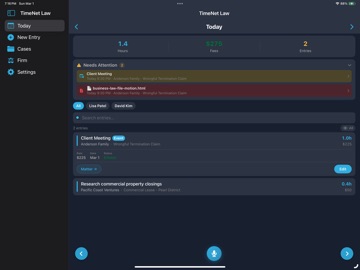
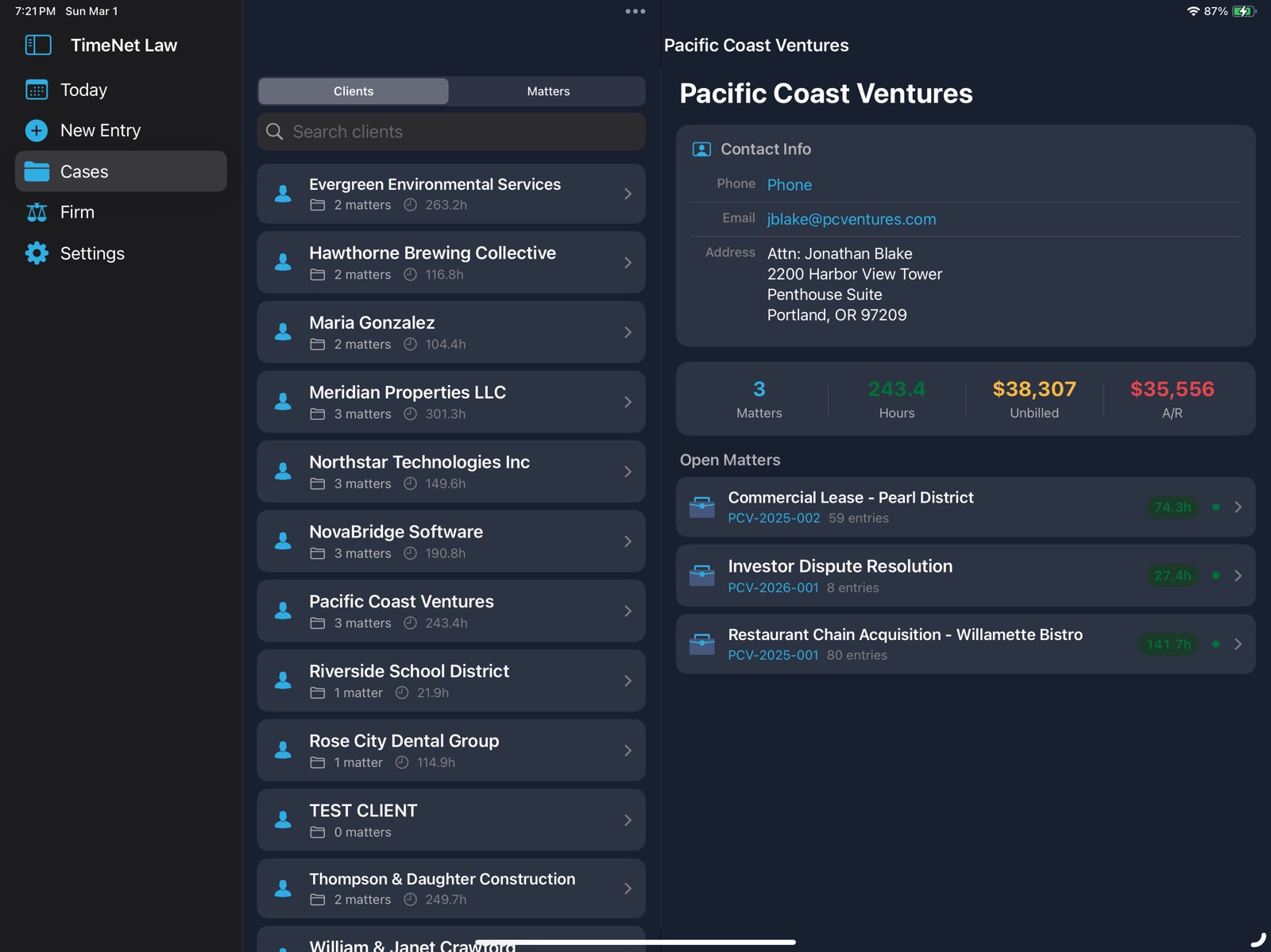
AppCorpus MCP gives your agent current app data, prices, screens, features and sources.
View JSON
GET /api/v3/apps/6759876218
{
  "app_id": 6759876218,
  "canonical_url": "https://appcorpus.com/apps/timenet-law-6759876218",
  "identity": {
    "name": "TimeNet Law",
    "slug": "timenet-law",
    "developer": {
      "name": "Perry Fjellman",
      "url": "https://appcorpus.com/developers/perry-fjellman-developer_6191575502958ec3c2e96e4c3c5a2aea"
    },
    "icon_url": "https://is1-ssl.mzstatic.com/image/thumb/Purple221/v4/d0/fa/f3/d0faf3a5-4d9d-c0f7-b7e1-5a6dda348c37/AppIcon-0-0-1x_U007epad-0-1-0-85-220.jpeg/512x512bb.jpg",
    "stores": [
      "apple"
    ],
    "platforms": [
      "iphone",
      "ipad"
    ],
    "status": {
      "state": "active",
      "label": "Active",
      "last_checked": "2026-08-06",
      "last_checked_label": "6 Aug 2026",
      "banner": null,
      "region_note": null
    }
  },
  "listings": [
    {
      "store": "apple",
      "status": "ACTIVE",
      "url": "https://apps.apple.com/us/app/timenet-law/id6759876218?uo=4",
      "rating": 0.0,
      "rating_count": 0,
      "formatted_price": "Free",
      "is_free": true,
      "has_iap": false,
      "has_subscription": false,
      "version": "1.4.1",
      "updated": "2026-07-21",
      "currency": "USD"
    }
  ],
  "summary": {
    "one_liner": null,
    "summary": null,
    "best_for": [],
    "not_for": [],
    "status": "fallback",
    "at_a_glance": [
      "Free to download"
    ]
  },
  "categories": {
    "official": [
      "Business",
      "Productivity"
    ],
    "appcorpus": [
      {
        "category_id": "business",
        "label": "Business",
        "url": "https://appcorpus.com/categories/business"
      },
      {
        "category_id": "productivity",
        "label": "Productivity",
        "url": "https://appcorpus.com/categories/productivity"
      }
    ]
  },
  "use_cases": [],
  "features": [
    {
      "capability_id": "free_app",
      "label": "Free app",
      "availability": "yes",
      "access_level": "free",
      "scope": null,
      "evidence": "Store published"
    }
  ],
  "pricing": [
    {
      "store": "apple",
      "formatted_price": "Free",
      "is_free": true,
      "has_iap": false,
      "has_subscription": false,
      "currency": "USD",
      "market": "de",
      "last_verified": "2026-08-06",
      "rows": [
        "Free"
      ]
    }
  ],
  "screens": [
    {
      "url": "https://is1-ssl.mzstatic.com/image/thumb/PurpleSource211/v4/14/5d/07/145d073b-2adf-3361-febe-07f33350e078/IMG_0291.PNG/1600x1600bb.jpg",
      "store": "apple",
      "platform": "ipad",
      "alt": "TimeNet Law ipad screenshot 1"
    },
    {
      "url": "https://is1-ssl.mzstatic.com/image/thumb/PurpleSource211/v4/14/5d/07/145d073b-2adf-3361-febe-07f33350e078/IMG_0291.PNG/360x480bb.jpg",
      "store": "apple",
      "platform": "ipad",
      "alt": "TimeNet Law ipad screenshot 2"
    },
    {
      "url": "https://is1-ssl.mzstatic.com/image/thumb/PurpleSource221/v4/1b/a1/14/1ba11490-efaa-ea1f-27d0-e9b099541f18/IMG_0293.PNG/1600x1600bb.jpg",
      "store": "apple",
      "platform": "ipad",
      "alt": "TimeNet Law ipad screenshot 3"
    },
    {
      "url": "https://is1-ssl.mzstatic.com/image/thumb/PurpleSource221/v4/1b/a1/14/1ba11490-efaa-ea1f-27d0-e9b099541f18/IMG_0293.PNG/360x480bb.jpg",
      "store": "apple",
      "platform": "ipad",
      "alt": "TimeNet Law ipad screenshot 4"
    },
    {
      "url": "https://is1-ssl.mzstatic.com/image/thumb/PurpleSource221/v4/dc/2e/00/dc2e00d6-48e0-58e1-5cd8-8aa325bc3e18/IMG_0285.PNG/1600x1600bb.jpg",
      "store": "apple",
      "platform": "ipad",
      "alt": "TimeNet Law ipad screenshot 5"
    },
    {
      "url": "https://is1-ssl.mzstatic.com/image/thumb/PurpleSource221/v4/dc/2e/00/dc2e00d6-48e0-58e1-5cd8-8aa325bc3e18/IMG_0285.PNG/360x480bb.jpg",
      "store": "apple",
      "platform": "ipad",
      "alt": "TimeNet Law ipad screenshot 6"
    },
    {
      "url": "https://is1-ssl.mzstatic.com/image/thumb/PurpleSource211/v4/c4/18/ff/c418ffeb-706e-a0c3-874c-a3f0d54d6567/IMG_0294.PNG/1600x1600bb.jpg",
      "store": "apple",
      "platform": "ipad",
      "alt": "TimeNet Law ipad screenshot 7"
    },
    {
      "url": "https://is1-ssl.mzstatic.com/image/thumb/PurpleSource211/v4/c4/18/ff/c418ffeb-706e-a0c3-874c-a3f0d54d6567/IMG_0294.PNG/360x480bb.jpg",
      "store": "apple",
      "platform": "ipad",
      "alt": "TimeNet Law ipad screenshot 8"
    },
    {
      "url": "https://is1-ssl.mzstatic.com/image/thumb/PurpleSource211/v4/1a/0f/06/1a0f06c4-8477-e058-7082-bbd7be255b53/IMG_0290.PNG/1600x1600bb.jpg",
      "store": "apple",
      "platform": "ipad",
      "alt": "TimeNet Law ipad screenshot 9"
    },
    {
      "url": "https://is1-ssl.mzstatic.com/image/thumb/PurpleSource211/v4/1a/0f/06/1a0f06c4-8477-e058-7082-bbd7be255b53/IMG_0290.PNG/360x480bb.jpg",
      "store": "apple",
      "platform": "ipad",
      "alt": "TimeNet Law ipad screenshot 10"
    },
    {
      "url": "https://is1-ssl.mzstatic.com/image/thumb/PurpleSource211/v4/58/56/46/58564645-bda4-40cb-4d0f-28ed929b7b41/IMG_0292.PNG/1600x1600bb.jpg",
      "store": "apple",
      "platform": "ipad",
      "alt": "TimeNet Law ipad screenshot 11"
    },
    {
      "url": "https://is1-ssl.mzstatic.com/image/thumb/PurpleSource211/v4/58/56/46/58564645-bda4-40cb-4d0f-28ed929b7b41/IMG_0292.PNG/360x480bb.jpg",
      "store": "apple",
      "platform": "ipad",
      "alt": "TimeNet Law ipad screenshot 12"
    },
    {
      "url": "https://is1-ssl.mzstatic.com/image/thumb/PurpleSource211/v4/97/1b/13/971b13cc-6c11-c47f-0a32-f3d12f665fe6/IMG_8362_2.PNG/1320x1600bb.jpg",
      "store": "apple",
      "platform": "iphone",
      "alt": "TimeNet Law iphone screenshot 13"
    },
    {
      "url": "https://is1-ssl.mzstatic.com/image/thumb/PurpleSource221/v4/65/3e/92/653e92cb-0c47-153a-b655-9d995fc50cec/IMG_8365.PNG/1320x1600bb.jpg",
      "store": "apple",
      "platform": "iphone",
      "alt": "TimeNet Law iphone screenshot 14"
    },
    {
      "url": "https://is1-ssl.mzstatic.com/image/thumb/PurpleSource211/v4/7f/e3/c4/7fe3c46d-bb06-d702-a0c5-4c925d1f3c00/IMG_8366.PNG/1320x1600bb.jpg",
      "store": "apple",
      "platform": "iphone",
      "alt": "TimeNet Law iphone screenshot 15"
    },
    {
      "url": "https://is1-ssl.mzstatic.com/image/thumb/PurpleSource221/v4/2d/d6/de/2dd6de2a-091b-96da-8a74-0fb20001ccea/IMG_8363.PNG/1320x1600bb.jpg",
      "store": "apple",
      "platform": "iphone",
      "alt": "TimeNet Law iphone screenshot 16"
    },
    {
      "url": "https://is1-ssl.mzstatic.com/image/thumb/PurpleSource221/v4/2c/df/6a/2cdf6ad9-8eea-9664-52d9-9129e03c5225/IMG_8364.PNG/1320x1600bb.jpg",
      "store": "apple",
      "platform": "iphone",
      "alt": "TimeNet Law iphone screenshot 17"
    }
  ],
  "ratings": [
    {
      "store": "apple",
      "average": 0.0,
      "count": 0,
      "market": "de",
      "observed_at": "2026-08-06",
      "reviews": []
    }
  ],
  "privacy": [
    {
      "store": "apple",
      "declarations": [
        {
          "title": "Data Not Collected",
          "detail": "",
          "source": "Developer declared"
        }
      ],
      "accessibility": []
    }
  ],
  "changes": [
    {
      "store": "apple",
      "version": "1.0",
      "released_at": null,
      "notes": ""
    },
    {
      "store": "apple",
      "version": "1.1",
      "released_at": null,
      "notes": "IMPORTANT NOTE: TimeNet Law 6 for Mac Required • Bug Fixes • Compatibility with TimeNet Law 6"
    },
    {
      "store": "apple",
      "version": "1.2",
      "released_at": null,
      "notes": "8x concurrent Dropbox sync — initial sync is dramatically faster with parallel downloads Documents Browser — browse matter files on the go with search, sort, QuickLook preview, share, and document reminder badges Subfolder navigation — drill into Contracts, Letters, etc. with full drill-down Timekeeper badge — Edit Entry shows who owns the entry instead of the slip ID Fixed a rare crash when loading document reminders"
    },
    {
      "store": "apple",
      "version": "1.3",
      "released_at": null,
      "notes": "• Fixed an issue where Active Timekeeper setting might not save between app launches • Fixed an issue where creating or editing an entry wouldn't enable the Save button if there was text in the Notes field but not the Description field • Fixed an issue on iPad where the Firm icon wouldn't show • Fixed an issue on iPad where the sidebar sometimes wouldn't show when opening TimeNet Law"
    },
    {
      "store": "apple",
      "version": "1.4",
      "released_at": null,
      "notes": "NEW • Create new matters from your iPhone or iPad. Numbering, rates, and folders stay in perfect sync with your Mac. • Create clients too, with auto-suggested client codes and contact details. • Slipstream payment links. Long-press any unpaid invoice to copy a credit card/Apple Pay or eCheck payment link. Text it to your client and get paid, or open it in your own browser to key in the card details when a client calls in to pay over the phone. • Live Activities. Your running timer now lives on the lock screen and Dynamic Island, showing the task, matter, and client at a glance. Never stops just because your iPhone or iPad locked. • Apple Calendar sync. Pick a calendar in Settings and your time entries appear as events automatically. • Tasks and events. Manage any entry as a task with due dates, priorities, and reminders, in full sync with task management on the Mac version of TimeNet Law. • Set the time of day on new and edited entries. • Document tags now appear in the Documents view, color dot and all. IMPROVED • Rebuilt iPad layout with sidebar navigation and proper columns. • International date support. Every date now follows your firm's date format, whatever region your device is set to. • Durations display cleanly in 0:00:00 format. FIXED • Entries created on your phone now flow straight into One Click Billing on the Mac. • The timer keeps running when your screen locks. • Timers resume from actual elapsed time, so billing-increment rounding never compounds. • Document reminders cleared on the Mac now clear on iOS under all conditions. • Files deleted on your Mac are now removed from the phone during sync."
    },
    {
      "store": "apple",
      "version": "1.4.1",
      "released_at": "2026-07-21",
      "notes": "1.4.1: • Fixed a bug that could cause the TimeNet Law 6 Required error to appear even when using TimeNet Law 6 on your Mac 1.4: NEW • Create new matters from your iPhone or iPad. Numbering, rates, and folders stay in perfect sync with your Mac. • Create clients too, with auto-suggested client codes and contact details. • Slipstream payment links. Long-press any unpaid invoice to copy a credit card/Apple Pay or eCheck payment link. Text it to your client and get paid, or open it in your own browser to key in the card details when a client calls in to pay over the phone. • Live Activities. Your running timer now lives on the lock screen and Dynamic Island, showing the task, matter, and client at a glance. Never stops just because your iPhone or iPad locked. • Apple Calendar sync. Pick a calendar in Settings and your time entries appear as events automatically. • Tasks and events. Manage any entry as a task with due dates, priorities, and reminders, in full sync with task management on the Mac version of TimeNet Law. • Set the time of day on new and edited entries. • Document tags now appear in the Documents view, color dot and all. IMPROVED • Rebuilt iPad layout with sidebar navigation and proper columns. • International date support. Every date now follows your firm's date format, whatever region your device is set to. • Durations display cleanly in 0:00:00 format. FIXED • Entries created on your phone now flow straight into One Click Billing on the Mac. • The timer keeps running when your screen locks. • Timers resume from actual elapsed time, so billing-increment rounding never compounds. • Document reminders cleared on the Mac now clear on iOS under all conditions. • Files deleted on your Mac are now removed from the phone during sync."
    }
  ],
  "alternatives": [
    {
      "app_id": 372347918,
      "name": "Court Objections",
      "url": "https://appcorpus.com/apps/court-objections-372347918",
      "reason": "Same category + similar ratings"
    }
  ],
  "evidence_summary": {
    "index_state": "S1",
    "evidence_level": 1,
    "level_label": "Live store listing",
    "indexable": true,
    "last_verified_at": "2026-08-06",
    "unknown_fields": [
      "Independent summary has not been published yet."
    ],
    "sources": [
      "App Store"
    ]
  },
  "availability_markets": {
    "live": [
      "us"
    ],
    "selected": "de",
    "note": "No LIVE observation for DE yet."
  },
  "feature_events": {
    "events": []
  },
  "features_slice": {
    "plans": [
      {
        "code": "free",
        "label": "Free",
        "kind": "free",
        "status": "inferred",
        "prices": [],
        "trial": null
      }
    ],
    "features": [],
    "unknown_features": [],
    "data_cutoff": "6 Aug 2026"
  }
}