AppCorpus MCP gives your agent current app data, prices, screens, features and sources.
View JSON
GET /api/v3/apps/6761729679
{
  "app_id": 6761729679,
  "canonical_url": "https://appcorpus.com/apps/password-manager-securekit-6761729679",
  "identity": {
    "name": "Password Manager - SecureKit",
    "slug": "password-manager-securekit",
    "developer": {
      "name": "Niko Inas",
      "url": "https://appcorpus.com/developers/niko-inas-developer_f5e8426b984015bf7eca6d800b072dc4"
    },
    "icon_url": "https://is1-ssl.mzstatic.com/image/thumb/Purple221/v4/6a/c7/2a/6ac72a55-9ba8-72f3-f2d1-27b4262d7dcf/AppIcon-0-0-1x_U007emarketing-0-7-0-85-220.png/512x512bb.jpg",
    "stores": [
      "apple"
    ],
    "platforms": [
      "iphone"
    ],
    "status": {
      "state": "active",
      "label": "Active",
      "last_checked": "2026-08-06",
      "last_checked_label": "6 Aug 2026",
      "banner": null,
      "region_note": null
    }
  },
  "listings": [
    {
      "store": "apple",
      "status": "ACTIVE",
      "url": "https://apps.apple.com/us/app/password-manager-securekit/id6761729679?uo=4",
      "rating": 5.0,
      "rating_count": 1,
      "formatted_price": "Free",
      "is_free": true,
      "has_iap": false,
      "has_subscription": false,
      "version": "1.2.0",
      "updated": "2026-07-14",
      "currency": "USD"
    }
  ],
  "summary": {
    "one_liner": null,
    "summary": null,
    "best_for": [],
    "not_for": [],
    "status": "fallback",
    "at_a_glance": [
      "Free to download"
    ]
  },
  "categories": {
    "official": [
      "Utilities",
      "Productivity"
    ],
    "appcorpus": [
      {
        "category_id": "utilities",
        "label": "Utilities",
        "url": "https://appcorpus.com/categories/utilities"
      },
      {
        "category_id": "productivity",
        "label": "Productivity",
        "url": "https://appcorpus.com/categories/productivity"
      }
    ]
  },
  "use_cases": [],
  "features": [
    {
      "capability_id": "free_app",
      "label": "Free app",
      "availability": "yes",
      "access_level": "free",
      "scope": null,
      "evidence": "Store published"
    }
  ],
  "pricing": [
    {
      "store": "apple",
      "formatted_price": "Free",
      "is_free": true,
      "has_iap": false,
      "has_subscription": false,
      "currency": "USD",
      "market": "gb",
      "last_verified": "2026-08-06",
      "rows": [
        "Free"
      ]
    }
  ],
  "screens": [
    {
      "url": "https://is1-ssl.mzstatic.com/image/thumb/PurpleSource221/v4/65/e2/a8/65e2a852-2006-ab22-9a93-53addd46ffb5/01-hero.png/1320x1600bb.jpg",
      "store": "apple",
      "platform": "iphone",
      "alt": "Password Manager - SecureKit iphone screenshot 1"
    },
    {
      "url": "https://is1-ssl.mzstatic.com/image/thumb/PurpleSource211/v4/7a/da/4e/7ada4e7b-ef90-5be2-77d4-9c4c5060f2e0/02-passwords.png/1320x1600bb.jpg",
      "store": "apple",
      "platform": "iphone",
      "alt": "Password Manager - SecureKit iphone screenshot 2"
    },
    {
      "url": "https://is1-ssl.mzstatic.com/image/thumb/PurpleSource221/v4/19/dd/d5/19ddd525-27d8-cd35-000a-84d59ca049a1/03-password-detail.png/1320x1600bb.jpg",
      "store": "apple",
      "platform": "iphone",
      "alt": "Password Manager - SecureKit iphone screenshot 3"
    },
    {
      "url": "https://is1-ssl.mzstatic.com/image/thumb/PurpleSource211/v4/ed/47/60/ed476059-08e7-bc46-b0db-9481f80aede9/04-documents.png/1320x1600bb.jpg",
      "store": "apple",
      "platform": "iphone",
      "alt": "Password Manager - SecureKit iphone screenshot 4"
    },
    {
      "url": "https://is1-ssl.mzstatic.com/image/thumb/PurpleSource221/v4/29/ed/9a/29ed9a1a-7613-a54e-7288-043bb2559182/05-notes.png/1320x1600bb.jpg",
      "store": "apple",
      "platform": "iphone",
      "alt": "Password Manager - SecureKit iphone screenshot 5"
    },
    {
      "url": "https://is1-ssl.mzstatic.com/image/thumb/PurpleSource221/v4/71/6d/a4/716da475-7f4a-d97d-b80e-3a39e72bbf3d/06-audio.png/1320x1600bb.jpg",
      "store": "apple",
      "platform": "iphone",
      "alt": "Password Manager - SecureKit iphone screenshot 6"
    },
    {
      "url": "https://is1-ssl.mzstatic.com/image/thumb/PurpleSource221/v4/33/f4/bf/33f4bf71-4ab7-d4d1-6074-cb0bd8569458/07-menu.png/1320x1600bb.jpg",
      "store": "apple",
      "platform": "iphone",
      "alt": "Password Manager - SecureKit iphone screenshot 7"
    },
    {
      "url": "https://is1-ssl.mzstatic.com/image/thumb/PurpleSource211/v4/1d/b2/28/1db228aa-1354-7a67-5d33-5e64aa6e15ff/08-settings.png/1320x1600bb.jpg",
      "store": "apple",
      "platform": "iphone",
      "alt": "Password Manager - SecureKit iphone screenshot 8"
    },
    {
      "url": "https://is1-ssl.mzstatic.com/image/thumb/PurpleSource211/v4/63/bb/e0/63bbe070-63b4-dbb1-f39f-87a900db95d9/09-onboarding.png/1320x1600bb.jpg",
      "store": "apple",
      "platform": "iphone",
      "alt": "Password Manager - SecureKit iphone screenshot 9"
    },
    {
      "url": "https://is1-ssl.mzstatic.com/image/thumb/PurpleSource211/v4/d5/eb/75/d5eb75fd-d305-4268-d7c3-aac955e99eec/10-closer.png/1320x1600bb.jpg",
      "store": "apple",
      "platform": "iphone",
      "alt": "Password Manager - SecureKit iphone screenshot 10"
    }
  ],
  "ratings": [
    {
      "store": "apple",
      "average": 5.0,
      "count": 1,
      "market": "gb",
      "observed_at": "2026-08-06",
      "reviews": [
        {
          "rating": 5,
          "title": "Secure and easy to use",
          "body": "Simple, clean, and easy to set up. The app feels secure and works well for keeping private files and passwords protected.",
          "author": "andria-inasaridze",
          "date": "6 Aug 2026"
        }
      ]
    }
  ],
  "privacy": [
    {
      "store": "apple",
      "declarations": [
        {
          "title": "Data Not Collected",
          "detail": "",
          "source": "Developer declared"
        }
      ],
      "accessibility": []
    }
  ],
  "changes": [
    {
      "store": "apple",
      "version": "1.0",
      "released_at": null,
      "notes": ""
    },
    {
      "store": "apple",
      "version": "1.0.1",
      "released_at": null,
      "notes": "This update includes bug fixes and stability improvements to enhance your experience."
    },
    {
      "store": "apple",
      "version": "1.1.0",
      "released_at": null,
      "notes": "This update introduces safer item management and a smoother overall experience across the app. What’s new: • Added Recently Deleted for passwords, notes, documents, and audio • Deleted items can now be restored before permanent removal • Improved password service selection with search for faster access to supported services • Expanded the list of popular service icons and names in the password section • Improved validation when saving items to help prevent incomplete entries • Refined localization across the app for a more consistent experience in supported languages • Improved settings layout and cleaned up non-functional or unnecessary options • Fixed multiple bugs and polished interface details across core screens"
    },
    {
      "store": "apple",
      "version": "1.1.1",
      "released_at": null,
      "notes": "• Edit document scans without recreating the document • Replace pages with a new scan or a photo from your library • Add or remove pages as needed (up to 10)"
    },
    {
      "store": "apple",
      "version": "1.2.0",
      "released_at": "2026-07-14",
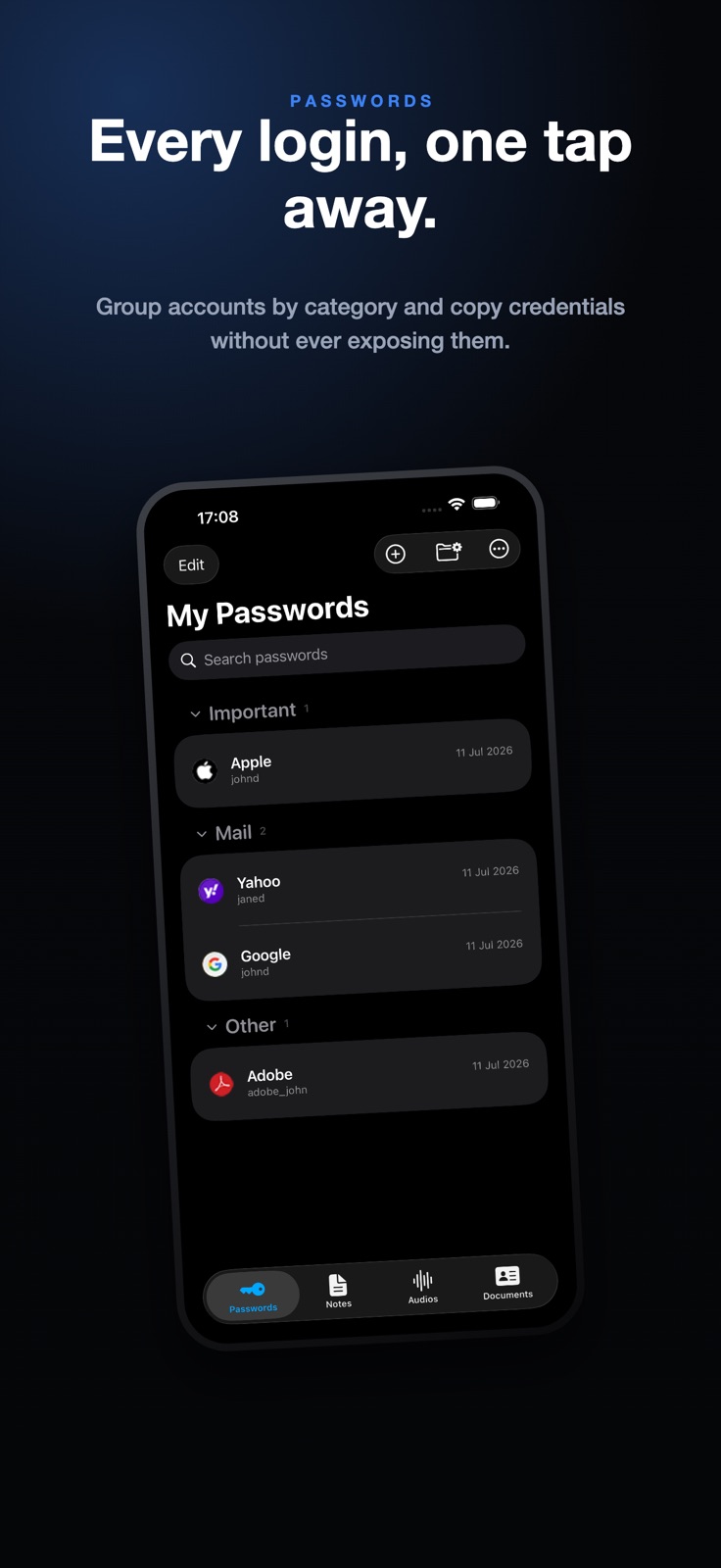
      "notes": "• Create custom groups for Passwords, Notes, Audios, and Documents. • Collapse and expand groups to keep long lists easier to browse. • Move items between groups, or leave them in Other. • Manage groups with rename, delete, and reorder options. • Choose a group while creating or editing saved items. • Improved toolbar menus for cleaner navigation. • Updated app naming and localization across the app. • General UI and stability improvements."
    }
  ],
  "alternatives": [],
  "evidence_summary": {
    "index_state": "S1",
    "evidence_level": 1,
    "level_label": "Live store listing",
    "indexable": true,
    "last_verified_at": "2026-08-06",
    "unknown_fields": [
      "Independent summary has not been published yet."
    ],
    "sources": [
      "App Store"
    ]
  },
  "availability_markets": {
    "live": [
      "us"
    ],
    "selected": "gb",
    "note": "No LIVE observation for GB yet."
  },
  "feature_events": {
    "events": []
  },
  "features_slice": {
    "plans": [
      {
        "code": "free",
        "label": "Free",
        "kind": "free",
        "status": "inferred",
        "prices": [],
        "trial": null
      }
    ],
    "features": [],
    "unknown_features": [],
    "data_cutoff": "6 Aug 2026"
  }
}