
Microsoft OneDrive
Cloud storage and file sharing app
iPhone · iPad · Android
Quick verdict
- What it is
- Microsoft OneDrive is a cloud storage and file sharing app that allows users to access their files across devices, collaborate on documents, and share files with others.
- Best for
-
- someone who needs to access files across devices
- someone who wants to collaborate on documents
- Not ideal for
-
- someone who needs offline maps
- At a glance
-
- Free to download
- In-app purchases
Categories and search queries
Official categories
- Productivity
- Photo & Video
Apoku categories
Key functions
| Function | Availability | Access | Scope | Evidence |
|---|---|---|---|---|
| Document scanning | Yes | Unknown | Context-specific |
From listing
|
| Free app | Yes | Free | Context-specific | Store published |
| In-app purchases | Yes | Limited free | Context-specific | Store published |
Screens
19 store screenshots


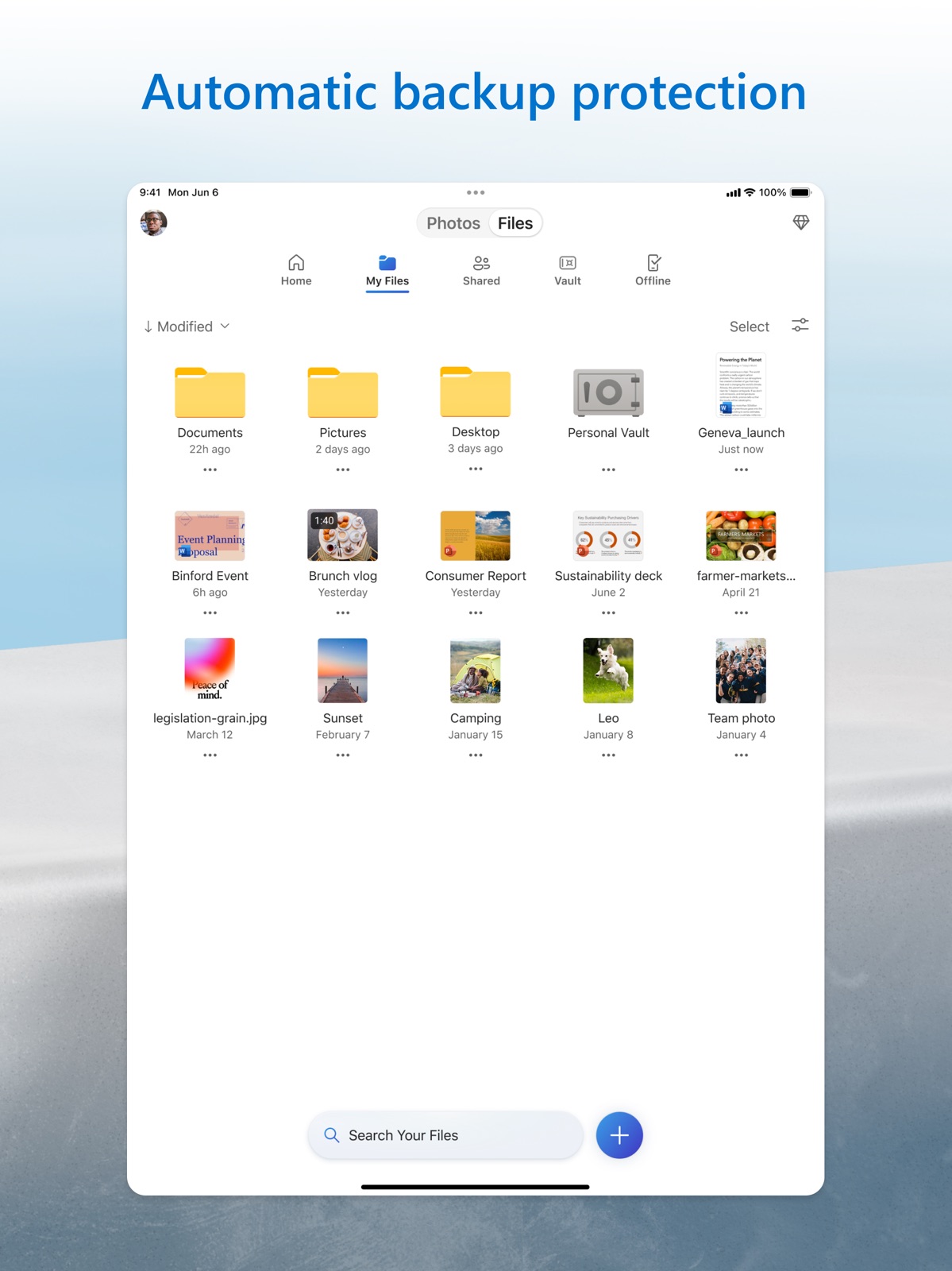
8 store screenshots
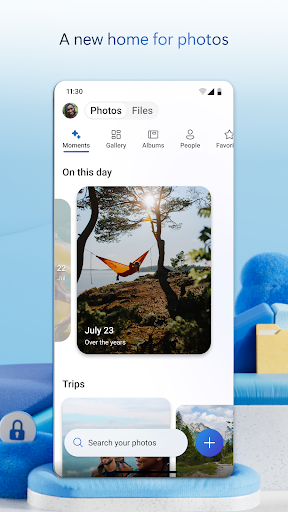


Pricing & paywalls
Shown for US
- Microsoft 365 Basic
- Microsoft 365 Family
- Microsoft 365 Personal
- Microsoft 365 Storage 50 GB
- OneDrive + 100
Shown for US
- Free to download
- In-app purchases: $0.99 - $129.99 per item
Ratings & reviews
Shown for US
-
4/5One Drive is ok but could be much better
Since One Drive is included in MS Office, one should/have to use it if one has MS Office. The app is stable, but could be much better. So please MS look at these simple ideas to improve the app 1. The Folder path/hierarchy is shown in the top bar as to give an idea where one is currently and not just ‚Files’ as is now the case. 2. The same goes for files. Once a file is open the top line shows the path and the file name. If one has 20 files in one folder one knows emidiatly what file one was in before closing the file to go to the next file and possibly opening the same file again because one does not recollect the previous file name. 3. Please ad the function that one can work on a office document and then safe it to an existing shared folder. For example one team member creat‘s a doc and places it into a shared folder. I then edit this doc and can not directly safe it back into the shared folder. It would be great if all folders shared or not are treated like folders that people who have the permission can use the folder like it would be their own folder. 4. The same as above goes for a new doc one person creates and then what’s to place it into a shared folder. Even so I have found a work around this could be solved much easier through the ‚Move‘ function. Workaround: you have to create on the web interface of one drive a shortcut link of any shared folder to your home folder. Then in the one drive app you can drag any file into the shared folder, depending on your folder complexity this can take a little time, but it works PLEASE look at these simple improvements.
afvf · 29 Sep 2026
-
4/5The Best For Online Storage and Sync Files
I can’t praise enough OneDrive. I had been using it since the SkyDrive days. Those days were storage heaven. I was able to rack up to 50 gigabytes of free storage. Well, OneDrive came to life and changed things. Some improved and some got canned like the amount of free storage. That is the only reason it I take one star from it. The good stuff it’s what in my opinion, makes OneDrive the number one app for online storage. Easy to sync files across Windows PC and IOS mobile devices. The integration of OneDrive with Windows Personal files can be somehow problematic since by default makes OneDrive upload everything you put on those folders. If you don’t want every file on those folders getting uploaded and take precious space just change the settings on Windows to stop OneDrive to upload the content on those folders. I found less complicated to just create a new folder on the system Desktop and name it “My OneDrive” then create sub-folders for E-books, Pictures, spreadsheets and so on... then drop there everything I want to sync across mobile devices. That way I have more control over what goes into One Drive instead of letting Windows do it for me. Also makes me be more organized with the content I own.
Kedna78 · 29 Sep 2026
-
1/5This literally destroys the workflow
This app has always had its faults, but this latest redesign takes the cake for the worst redesign I’ve ever had to use. There’s no longer an option to just take a picture and upload to whatever folder or sharepoint library you’re in. You have to tap +, then tap scan, then swipe over 3 times to photo, then take a picture. On your second picture, the first one finishes uploading, and then blocks you with a permanent stupid blue notification that prevents you from actually tapping the button to finish. You have to X out, take your picture again, then since the notification isn’t there, you can click finish. This is fully interrupting my workflow and a change this drastic should never have been approved! Please give us setup options or preferences so we can eliminate all these stupid options! Including the insane and very easy-to-choose-option to share something you upload with whatever meeting you have on your schedule, regardless if you’re in that meeting or not! These notifications are pointless, seemingly permanent until you change the screen to something else, and are extremely annoying to use! Nobody uses onedrive to interact with meetings or other apps like you’re trying to push because there are other less stupid ways to do all that! We use it for access to storage or uploading files to sharepoint! That’s it! Stop trying to overcomplicate and annoy your users! Whoever approved this should be fired!
frojoe2003 · 29 Sep 2026
-
3/5Good but needs to be MUCH better
It does what it needs to in terms of cloud storage on the iPad. It’s best if you have an office 365 subscription so that you get the 1TB of storage, which is great for me because it allows me to store all my files easily. It could be A LOT BETTER though. First, it does have files app integration which for some reason only allows you to copy files from the iPad to OneDrive, not to simply move them. Second, they say it has multi window support for iPadOS 13 but not really. Each time you try to add another window, you get an error message saying that you can only open a file in another window, not another file browser. Also you are very limited in terms of sort and view options, you can only view files in a list or as icons. When viewing photos and videos with the icon view, you can’t see the file name and can only do so by clicking the info button for each individual file. It would be much better if you had other view options like some sort of cover flow type view or something else. Also, the scan option is nice but it would be really nice if it had an option to scan book/textbook pages.
jme360 · 29 Sep 2026
-
1/5I will not trust this service with my documents anymore
I had been having no problems with OneDrive for years. I have it installed on my iMac, iPad, and iPhone so I can have the files on all of them and any work done on one appears on all. Since I have retired, I have not been using it as much, but recently I needed a document that I had put in my Personal Vault. I went to OneDrive on my iPad and there was no Personal Vault. I logged out and logged back in and got the message that my subscription had expired almost a year ago. I know that isn't true and I use OneNote regularly without any subscription issues. So I went to my iMac and used the little icon on the menu bar to go online, still no luck. So I used Safari and logged in online (no issues with subscription when I did this), went to OneDrive and there was my Personal Vault, thank goodness because I had things in there I need. But wait, half of the files were either corrupted or I got a message that I did not have permission to open them. I tried to download them to my computer so I could at least have them in one place. When I tried to open them on my computer the same issues arouse. I could only open about half of them. Needless to say, I wiill not trust this service with my documents anymore. If I weren't so heavily invested in OneNote with recipes and such, I would dump it completely. And I did try to download some of my OneNote files just to see if I could switch to something else. The PDF formating was so jumbled as to make them next to useless. Oh, and if there little help bot can't help, which it couldn't, I could find no way to actually get help from a person.
MKB58 · 29 Sep 2026
Shown for US
-
5/5
fabb
Aj Walsh · 1 Aug 2026
-
5/5
Very easy to use and great for backing up files
Peter Le Gros · 1 Aug 2026
-
5/5
love it
Donald Phillips · 1 Aug 2026
-
5/5
thank God you take the time to create this program people with my disability
Maurizio Gidillini · 1 Aug 2026
-
1/5
not what I was told about space
Bill Henry · 1 Aug 2026
Privacy & accessibility
Privacy
- Data Linked to You — Analytics — Identifiers — Device ID Developer declared
- Data Linked to You — Analytics — Identifiers — User ID Developer declared
- Data Linked to You — Analytics — Usage Data — Other Usage Data Developer declared
- Data Linked to You — Analytics — Usage Data — Product Interaction Developer declared
- Data Linked to You — Analytics — User Content — Audio Data Developer declared
- Data Linked to You — Analytics — User Content — Other User Content Developer declared
- Data Linked to You — Analytics — User Content — Photos or Videos Developer declared
- Data Linked to You — App Functionality — Contact Info — Email Address Developer declared
- Data Linked to You — App Functionality — Contact Info — Name Developer declared
- Data Linked to You — App Functionality — Contact Info — Phone Number Developer declared
- Data Linked to You — App Functionality — Diagnostics — Crash Data Developer declared
- Data Linked to You — App Functionality — Diagnostics — Other Diagnostic Data Developer declared
- Data Linked to You — App Functionality — Diagnostics — Performance Data Developer declared
- Data Linked to You — App Functionality — Identifiers — Device ID Developer declared
- Data Linked to You — App Functionality — Identifiers — User ID Developer declared
- Data Linked to You — App Functionality — Usage Data — Other Usage Data Developer declared
- Data Linked to You — App Functionality — Usage Data — Product Interaction Developer declared
- Data Linked to You — App Functionality — User Content — Audio Data Developer declared
- Data Linked to You — App Functionality — User Content — Customer Support Developer declared
- Data Linked to You — App Functionality — User Content — Other User Content Developer declared
- Data Linked to You — App Functionality — User Content — Photos or Videos Developer declared
- Data Linked to You — Contact Info Developer declared
- Data Linked to You — Diagnostics Developer declared
- Data Linked to You — Identifiers Developer declared
- Data Linked to You — Usage Data Developer declared
- Data Linked to You — User Content Developer declared
- Data Not Linked to You — Analytics — Diagnostics — Other Diagnostic Data Developer declared
- Data Not Linked to You — Diagnostics Developer declared
Accessibility
- Dark Interface — SUPPORTED Store published
- Differentiate Without Color Alone — SUPPORTED Store published
- Larger Text — SUPPORTED Store published
- Sufficient Contrast — SUPPORTED Store published
- VoiceOver — SUPPORTED Store published
Privacy
- Data collected — App functionality — Audio — Music files Developer declared
- Data collected — App functionality — Audio — Other audio files Developer declared
- Data collected — App functionality — Files and docs Developer declared
- Data collected — App functionality — Messages — Other in-app messages Developer declared
- Data collected — App functionality — Personal info — Other info Developer declared
- Data collected — App functionality, Account management — Personal info — Phone number Developer declared
- Data collected — App functionality, Analytics — App info and performance — Crash logs Developer declared
- Data collected — App functionality, Analytics — App info and performance — Diagnostics Developer declared
- Data collected — App functionality, Analytics — App info and performance — Other app performance data Developer declared
- Data collected — App functionality, Analytics, Account management — Financial info — Purchase history Developer declared
- Data collected — App functionality, Analytics, Developer communications — Photos and videos — Photos Developer declared
- Data collected — App functionality, Analytics, Developer communications — Photos and videos — Videos Developer declared
- Data collected — App functionality, Analytics, Developer communications, Fraud prevention, security, and compliance, Personalization, Account management — Personal info — Name Developer declared
- Data collected — App functionality, Analytics, Fraud prevention, security, and compliance, Account management — Location — Approximate location Developer declared
- Data collected — App functionality, Developer communications, Account management — Personal info — Email address Developer declared
- Security practices — Your data is transferred over a secure connection — Data is encrypted in transit Developer declared
- Security practices — The developer provides a way for you to request that your data be deleted — You can request that data be deleted Developer declared
Accessibility
No accessibility labels collected yet.
Versions
App Store
-
16.26.3
This update contains bug fixes and stability improvements.
-
16.27.3
This update contains bug fixes and stability improvements.
-
16.28.2
We’ve been busy behind the scenes making OneDrive even better. Here’s what’s new and improved: New - Update album covers: Personalize your photo albums by choosing the perfect cover image. - Sync status in settings: Quickly check your sync status right from account settings — no more guessing. Fixed & Improved We’ve made a number of behind-the-scenes improvements to keep things running smoothly: - Drag and drop and sort by date: Enhanced drag-and-drop experience and made sort by date consistent across all environments. - Gallery and albums: Updated empty state when filtering to the Pictures folder and fixed various album UI bugs. - Live photos: Resolved playback issues and download errors for a smoother experience. - Folder picker: Improved default selection, fixed crashes, and enhanced folder creation flows. - Error handling: Clearer alerts when moving files with duplicate names or to read-only folders. - Uploads and sync: Fixed manual photo upload failures, refreshed service endpoints, and enabled Vroom multiformat uploader for OneDrive Business. - Shared with me and vault: Fixed vault sync root issues. - General performance and stability improvements across the app. Thanks for using OneDrive! We’re always working to improve your experience. If you run into any issues, just shake your device and tap “Send Feedback.“ /** These notes were generated using Copilot
-
16.28.3
We’ve been busy behind the scenes making OneDrive even better. Here’s what’s new and improved: New - Update album covers: Personalize your photo albums by choosing the perfect cover image. - Sync status in settings: Quickly check your sync status right from account settings — no more guessing. Fixed & Improved We’ve made a number of behind-the-scenes improvements to keep things running smoothly: - Drag and drop and sort by date: Enhanced drag-and-drop experience and made sort by date consistent across all environments. - Gallery and albums: Updated empty state when filtering to the Pictures folder and fixed various album UI bugs. - Live photos: Resolved playback issues and download errors for a smoother experience. - Folder picker: Improved default selection, fixed crashes, and enhanced folder creation flows. - Error handling: Clearer alerts when moving files with duplicate names or to read-only folders. - Uploads and sync: Fixed manual photo upload failures, refreshed service endpoints, and enabled Vroom multiformat uploader for OneDrive Business. - Shared with me and vault: Fixed vault sync root issues. - General performance and stability improvements across the app. Thanks for using OneDrive! We’re always working to improve your experience. If you run into any issues, just shake your device and tap “Send Feedback.“ /** These notes were generated using Copilot
-
16.29.2
This update contains bug fixes and stability improvements.
-
16.30.6
This update contains bug fixes and stability improvements.
-
16.31.1
This update contains bug fixes and stability improvements.
-
16.32.4
This update contains bug fixes and stability improvements.
-
16.33.2
This update contains bug fixes and stability improvements.
-
16.34.3
This update contains bug fixes and stability improvements.
-
16.35.2
We've been busy behind the scenes making OneDrive even better. Here's what's new and improved: New - Blended gallery: Personal OneDrive users can now view photos shared by others directly in their Photos gallery alongside their own. A guided setup and sharer selection let you choose whose photos appear. - AI-powered Memories titles: Your Memories now feature AI-generated titles for a more personal touch (English only). - Photo stacks: Similar photos are now grouped into stacks by default, making your gallery easier to browse. Improvements & Fixes - RAW and Live photo badges: Spot your RAW and Live Photos at a glance with new badge indicators in the gallery and photo viewer. - Breadcrumb navigation for albums: Albums now show a breadcrumb trail so you always know where you are. Shared items also display "Shared" as the top-level breadcrumb when browsing from My Files, Shared, and Offline. - Open in Loop: Open Loop documents directly in the Microsoft Loop app, or get a prompt to download it if it's not installed. - GIF playback: GIF images now play automatically when you open them in the photo viewer. - Sharer's name in shared folders: When you browse into a folder someone shared with you, their name now appears in the header so you always know whose content you're viewing. - File type icons in grid view: Non-photo files now display their file type icon in the grid layout, making it easier to find what you're looking for. - Sharing controls for albums: Managing access to your shared albums now features a refreshed experience. - Notifications for shared photos and albums: When someone shares a photo or album with you, the push notification now shows a thumbnail preview. - In-app purchases: Clearer error messages for common purchase issues. - General performance and bug fixes. Thanks for using OneDrive! We're always working to improve your experience. If you run into any issues, just shake your device and tap "Send Feedback."
-
16.36.4
We would like to let our users know that we are planning on dropping support for the OneDrive app on iOS 17 and iPadOS 17 versions soon. Please ensure you're on one of the later versions of iOS/iPadOS (18 or 26) to make sure you're still able to access the latest version of the OneDrive app.
-
16.36.5
We would like to let our users know that we are planning on dropping support for the OneDrive app on iOS 17 and iPadOS 17 versions soon. Please ensure you're on one of the later versions of iOS/iPadOS (18 or 26) to make sure you're still able to access the latest version of the OneDrive app.
-
16.37.3
This is the last version of the OneDrive iOS and iPadOS apps that can be installed on devices with iOS 17 or iPadOS 17. The next one will only support iOS 18 and 26 and iPadOS 18 and 26.
-
16.37.4
This is the last version of the OneDrive iOS and iPadOS apps that can be installed on devices with iOS 17 or iPadOS 17. The next one will only support iOS 18 and 26 and iPadOS 18 and 26.
-
18.0.2
This version of OneDrive supports iOS/iPadOS versions 18 or newer iCloud optimized photo backup is now available to all OneDrive consumer users, including free tier. Previously limited to Microsoft 365 premium subscribers, users can now back up iCloud-optimized photos and Live Photos via Camera Backup to access them across devices and Microsoft 365 apps. Turn on Camera Backup today to get started!
-
18.10.2
· 14 Sep 2026
This update contains bug fixes and stability improvements.
-
18.11.2
· 28 Sep 2026
We would like to let our users know that we are planning on dropping support for the OneDrive app on iOS 18 and iPadOS 18 versions soon. Please ensure you're on one of the later versions of iOS/iPadOS (26 or 27) to make sure you're still able to access the latest version of the OneDrive app.
-
18.1.4
We've been busy behind the scenes making OneDrive even better. Here's what's new and improved: New - GIF playback for everyone: Animated GIFs now play automatically in the photo viewer. - Photo type badges: Spot Live, RAW, and GIF photos at a glance, with a new setting to turn the badges on or off. - Smarter Memories: Save a Memory as an album in one tap and friendlier AI titles. - Sensitivity labels for business photos and videos: Spot the Microsoft Sensitivity Label directly in the viewer. - Camera Backup on iOS 26.1+: Detects new photos while app is in the background. - Select All: Tap Select All when picking multiple items in photo and file lists across the app. Improvements & Fixes - Accessibility: VoiceOver and keyboard improvements across the app. - Office previewer: Dark mode, updates Recent Files, refreshes the title after rename, and respects the "Preview Office Documents" setting. - Photos: New colored folder icons; smart-cropped covers in widgets so faces aren't clipped; offline state shown on photos in offline folders. - Camera Backup starts instantly: Your latest photos begin uploading right away, without waiting for an initial sync. - Vault: See your file count and jump to Suggested Files from the overflow menu. - Sharing: Share photos and videos to LINE Messenger; the share menu now uses the correct dark mode for enterprise accounts. - Selection sheet: Smooth slide-up on iPad, sized to its contents, and no longer blocks taps when first appearing. - Video: Buffering spinner during network stalls, no more timeline flicker when scrubbing, and fixed full-screen playback for offline videos. - Albums: Faster create, edit, and create-from-folder, with a 255-character name limit and live counter. - Refreshed Send Feedback experience, with thumbs up/down on search results. - General performance and bug fixes. Thanks for using OneDrive! We're always working to improve your experience. If you run into any issues, just shake your device and tap "Send Feedback."
-
18.2.3
This update contains bug fixes and stability improvements.
-
18.2.4
This update contains bug fixes and stability improvements.
-
18.3.3
This version of OneDrive no longer supports SharePoint Server on-premises accounts. SharePoint Server 2016 and 2019 reach end of support on July 14, 2026. Personal Microsoft accounts and Microsoft 365 work or school accounts are unaffected.
-
18.4.2
This update contains bug fixes and stability improvements.
-
18.5.3
This update contains bug fixes and stability improvements.
-
18.5.4
This update contains bug fixes and stability improvements.
-
18.6.5
This update contains bug fixes and stability improvements.
-
18.6.6
· 24 Jul 2026
This update contains bug fixes and stability improvements.
-
18.6.7
This update contains bug fixes and stability improvements.
-
18.7.3
This update contains bug fixes and stability improvements.
-
18.8.2
After scanning, you can now save photos to your device's photo library or save photos and documents to your device's files storage—while still having the option to save a copy to OneDrive.
-
18.8.3
· 22 Aug 2026
After scanning, you can now save photos to your device's photo library or save photos and documents to your device's files storage—while still having the option to save a copy to OneDrive.
-
18.9.3
This update contains bug fixes and stability improvements.
-
18.9.4
This update contains bug fixes and stability improvements.
Alternatives
- Google Drive — Same category + similar ratings
- Box: The power of Content + AI — Same category + similar ratings
- Google One — Same category + similar ratings
- Dropbox: Cloud Storage Backup — Same category + similar ratings
- Google Keep - Notes and lists — Same category + similar ratings
- Google Calendar: Get Organized — Same category + similar ratings
Availability by market
- US
Data quality & evidence
- Page completeness
- Apoku summary published
- Last verified
- 30 Sep 2026
- Sources
- App Store, Google Play