
Quick verdict
- What it is
- Store information collected; an Apoku editorial summary is not yet published.
- At a glance
-
- Free to download
Categories and search queries
Official categories
- Developer Tools
- Productivity
Apoku categories
Key functions
| Function | Availability | Access | Scope | Evidence |
|---|---|---|---|---|
| Free app | Yes | Free | Context-specific | Store published |
Screens
App Store
14 store screenshots

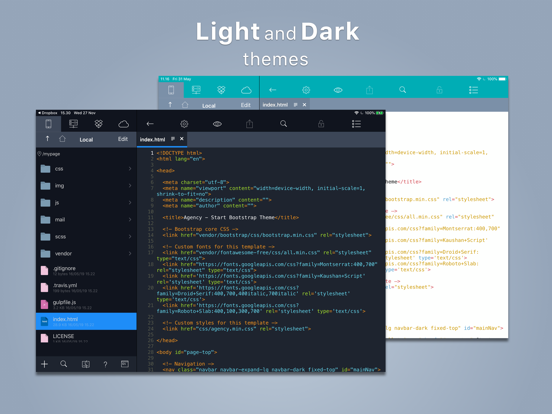

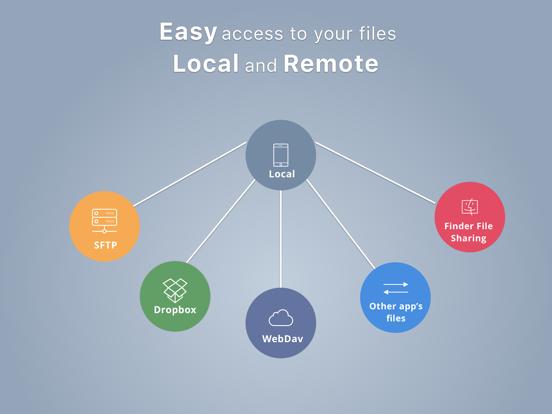
Pricing & paywalls
App Store
Shown for US
- Free to download
Ratings & reviews
App Store
Shown for US
-
5/5Best HTML5 Editor for iPhone
I’ve only been using Koder for a short time now but so far I am extremely impressed by its wide range of features, capabilities and its well-designed user interface. While I prefer to do the majority of my web design on my computer using mainstream apps, I like to have a tool on my iPhone where I can access the same files and make small edits to tweak as needed. Until I ran across Koder, I was unable to find any decent iPhone app for doing this which wasn’t already too expensive right out-of-the-gate simply to evaluate. On the other hand, my first time using the free version of Koder gave me an immediate, “now that’s what I’m talking about” reaction. I like the fact that it has native Dropbox support as well support for FTP and other cloud services. Great tool that I highly recommend and hope to continue doing so as I get more familiar with its details.
ArcanusCdk · 29 Sep 2026
-
4/5Almost a 5 star app, but...
I was initially going to give this app 3 stars. That wasn’t a fair assessment, as most everything about the app is pretty good. There are two pain points that stand out to me. One of them would be a work around for the other: 1) Git integration would be fantastic! The repo could be saved as a working/local folder for Koder, with a simple terminal built in to run git commands. I understand this feature would be an undertaking. However, the second feature would suffice... 2) Allow the ability to open a folder from another app instead of just a single file. Then developers could use something like the Working Copy app to manage git while the entire cloned folder could be visible in the Koder file manager. I believe Working Copy allows some level of integration for other apps, but the the ability to open a cloned folder would be excellent all by itself. Considering Koder can already open its own local folder, this doesn’t seem like a huge undertaking at all. It would probably mean a permissions change on that folder by the user, but that’s easy.
JabariHunt · 29 Sep 2026
-
4/5A few bugs, but pretty good
Can’t put a path in on an sftp connection (app crashes), and can’t move up a folder from home or type a path when you connect, so... not possible to get to the files I need. Also very awkward to load an ssh key. EDIT: Finally figured out I could edit existing entries and was able to add the path after the fact successfully without the app crashing. Now I’m exploring more. The app seems nice and mostly works well. I would like to be able to change the word wrap though. It seemed to have broken some html comments when I opened a file. It changed the double dash to a single longer dash for some reason. Overall, I do think I’ll try to use the app more often to do quick edits on they fly. UPDATE: To dev, thanks for the reply and thanks for the info about the keyboard. I just got the iPad (and am not otherwise Apple) and didn't know about that! It's been disabled now. +1 star for responsiveness and because other than the path bug which I'm able to work around, most other annoyances are Apple's fault.
User18473 · 29 Sep 2026
-
5/5Great App for the Price!
I can't believe this app is free with no ads. I’m also surprised at the breadth of the language support (e.g., batch, PowerShell, XML) as well as the app privacy (no data collected except some anonymous diagnostics data). Is this a full featured IDE? No. Does it cover the basics? Yes, and then some, such as previewing your HTML pages in-app and allowing you to easily upload them. For an app that appears to have been abandoned 2+ years ago, it still works very well. If it really is abandoned, I thank the author for leaving it in the app store. The app does have some shortcomings, such as no auto-indent and not having many configuration options. It also has a few bugs, but the ones I've experienced are easy to avoid or work around. For example: - When trying to copy or move a file to a folder that already contains a file by that name, the "File already exist" dialog box can't be seen until switching to another app then back to Koder, which still doesn't allow Yes or No to be chosen, requiring a forced close. - When browsing into an empty folder and holding a finger down on the screen (out of habit), Koder closes. - The + often requires multiple taps before the "Create New" menu comes up. It would be great if these bugs were fixed but, for the price (free), I can live with them.
Victor-S · 29 Sep 2026
-
5/5Great editor for iPad!
This is my favorite editor for the iPad! I've tried quite a few others, but this one has a lot of the features I require — automatic FTP/SFTP, WebDAV, and Dropbox integration; light/dark schemes; previewer; Apple keyboard support; and more. I do wish it had a Git client built in, though. Right now I have a tangled mess of Working Copy + Koder to edit files in a Git repo and they don't exactly play nicely. I'm considering put the repo on my web site and using WebDAV to edit the files. I would still need to use an SSH client (I use Termius) to interact with Git (add, commit, push, pull, and branch management). Maybe I could find a way to automate those things by visiting certain WebDAV URLs, but I'd rather have an interface for Git inside the editor. PS: How do I delineate paragraphs in these reviews? I've seen other people do it, but my blank lines get eaten up.
Azhrei_FJE · 29 Sep 2026
Privacy & accessibility
App Store
Privacy
- Data Not Linked to You — Other Purposes — Diagnostics — Crash Data Developer declared
- Data Not Linked to You — Diagnostics Developer declared
Accessibility
No accessibility labels collected yet.
Versions
App Store
- 3.8
-
3.8.1
- Fixed SFTP Connection - Fixed Editing - Fixed File Properties
-
3.8.2
- Syntax highlight for Arduino & Phyton - Fixed crashing when open file - Fixed dropbox connection
-
4.0
- New dark themes settings - Compatibility with iOS 13 - Enhancement in UI/UX - Share file - Inspect HTML page from Safari in Mac - Fixed some bugs in editing and FTP/SFTP Connection
-
4.0.1
1. Fixed selected text in autocomplete 2. Fixed adding connection
-
4.0.2
-Fixed adding new connection for iOS below version 13 -Fixed Finder Files Sharing
-
4.0.3
- iPhone : Fixed editing when landscape condition - iPhone : Fixed auto save for others app's file which is edited in Koder - WebDav : Fixed getting list files/folders(NutStore)
-
4.0.4
1. iPhone : fixed auto saving 2. Fixed smart quote and smart dash 3. Fixed Webdav when getting lis files/folders 4. Fixed SFTP when creating new connection
-
4.1
-Export Folder / Files -Import Files -Support Open in Place -Access Local Files From Files App -Keyboard Shortcut for Editing -Keeping the files that you open -Keep last SSH settings
-
4.1.1
-Fixed saving new file
-
4.2
- Menu Interaction for Files - Sync with iOS 14 - Fixed crash in SFTP Connection when uploading file after editing. - Support .inc file as php file - Fixed pointer(from mouse / touch pad) when selecting connection tab on Files Navigation - Fixed crash when forcing open non-text file. - Fixed editing external files
-
4.2.1
- Fixed selection in file list table
-
4.2.2
· 19 Apr 2022
- Fixed problem when opening file - Fixed some file operations - Fixed crash when copy - paste text - Fixed Dropbox Authentication issue
Alternatives
- Runestone Text Editor — Same category + similar ratings
- Kodex — Same category + similar ratings
Availability by market
- US
Data quality & evidence
- Page completeness
- Live store listing
- Last verified
- 29 Sep 2026
- Sources
- App Store
- Apoku editorial summary has not been published yet.