
Quick verdict
- What it is
- Store information collected; independent summary not yet available.
- At a glance
-
- Free to download
Categories and search queries
Official categories
- Music
- Lifestyle
AppCorpus categories
Key functions
| Function | Availability | Access | Scope | Evidence |
|---|---|---|---|---|
| Free app | Yes | Free | — | Store published |
Screens
App Store
13 store screenshots

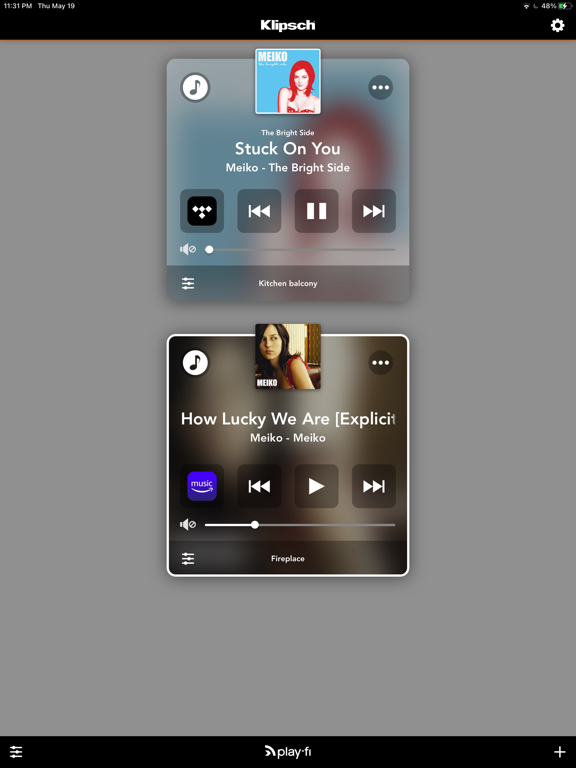

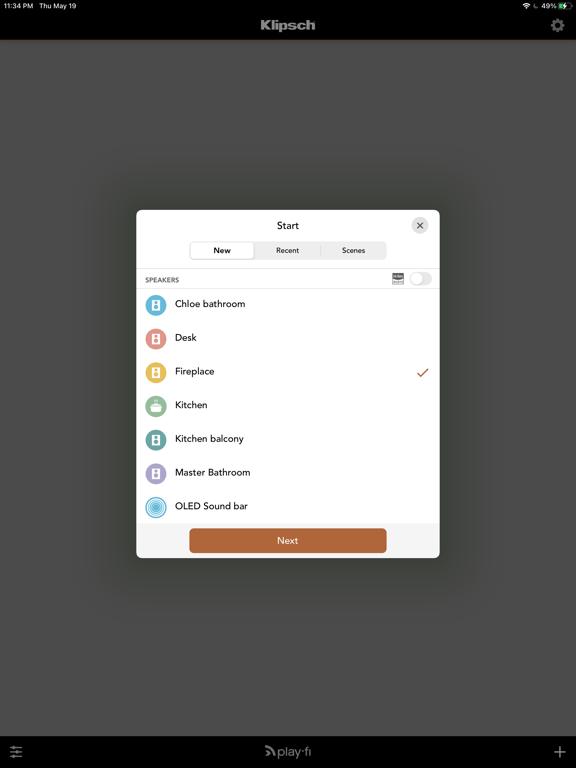
Pricing & paywalls
App Store
Shown for US
- Free
Ratings & reviews
App Store
Shown for US
-
4/5Last update made it better
The app used to not work and take a series of closing it out and reopening before it would stream internet radio. Now it seems to be fixed, so I’m giving it 4 stars.
cnomadic · 7 Aug 2026
-
3/5Inconsistent
The app doesn’t perform consistently. I sometimes have to open and close it multiple times before it connects to my Klipsch 3. It’s not my internet. I would have given it two stars, but it got a little better after I installed an update a while back. Plus, when it works, it’s great. I would think with all the competing play-fi products out there, Klipsch would really try to get it right.
iluvklipschbut... · 7 Aug 2026
-
2/5Great hardware; very weak software
They call it the future of streaming music cause it sure ain’t the present. Even freshly updated I have to reboot the PowerBridge multiple times a day to keep it paired with my phone, and even then it sometimes can’t find the device. Very frustrating, to say the least. I love that I can stream local radio, though, that is a plus when it works. Now, about incorporating Apple Music into the app... never mind.
markhlong · 7 Aug 2026
-
5/5All day good!
Out
TripleA74! · 7 Aug 2026
-
1/5Doesn’t like to connect via wi-fi
Always having connectivity issues through wi-fi which causes me to divert to another product most of the time. The sound quality of these speakers are fantastic; software is terrible. Lots of potential to compete with Sonos but the software/app is just not good
ASknownow · 7 Aug 2026
Privacy & accessibility
App Store
Privacy
- Data Linked to You — Analytics — Usage Data — Product Interaction Developer declared
- Data Linked to You — App Functionality — Contact Info — Email Address Developer declared
- Data Linked to You — App Functionality — Identifiers — User ID Developer declared
- Data Linked to You — App Functionality — Location — Coarse Location Developer declared
- Data Linked to You — App Functionality — Search History Developer declared
- Data Linked to You — Product Personalization — Contact Info — Email Address Developer declared
- Data Linked to You — Product Personalization — Location — Coarse Location Developer declared
- Data Linked to You — Product Personalization — Usage Data — Product Interaction Developer declared
- Data Linked to You — Third-Party Advertising — Contact Info — Email Address Developer declared
- Data Linked to You — Third-Party Advertising — Identifiers — User ID Developer declared
- Data Linked to You — Third-Party Advertising — Location — Coarse Location Developer declared
- Data Linked to You — Third-Party Advertising — Search History Developer declared
- Data Linked to You — Third-Party Advertising — Usage Data — Product Interaction Developer declared
- Data Linked to You — Contact Info Developer declared
- Data Linked to You — Identifiers Developer declared
- Data Linked to You — Location Developer declared
- Data Linked to You — Search History Developer declared
- Data Linked to You — Usage Data Developer declared
- Data Not Linked to You — Analytics — Diagnostics — Crash Data Developer declared
- Data Not Linked to You — App Functionality — Diagnostics — Crash Data Developer declared
- Data Not Linked to You — Diagnostics Developer declared
- Data Used to Track You — Contact Info — Email Address Developer declared
- Data Used to Track You — Contact Info Developer declared
- Data Used to Track You — Identifiers — User ID Developer declared
- Data Used to Track You — Identifiers Developer declared
- Data Used to Track You — Location — Coarse Location Developer declared
- Data Used to Track You — Location Developer declared
- Data Used to Track You — Search History Developer declared
- Data Used to Track You — Usage Data — Product Interaction Developer declared
- Data Used to Track You — Usage Data Developer declared
Accessibility
No accessibility labels collected yet.
Versions
App Store
-
3.70.10015
• Single speaker surround • Remote zone control and metadata • Critical Listening native support of 24 bit / 192 kHz • Control Play-Fi playback via Apple Watch
-
3.71.10080
Fixes a crash when using Spotify Connect.
-
3.81.170502
• Qobuz • Configure surround sound audio using a Play-Fi receiver
-
4.1.170726
• Amazon Music now supports listening to your purchased or uploaded music • iHeartRadio now supports On Demand content for All Access subscribers • Critical Listening mode now displays file information with bit depth and sampling frequency • Improved Auto Reconnect: resumes faster, and now also recalls what was last playing • Lots and lots of fixes and improvements
-
4.38.171201
• Amazon Music Search: You can now search through the entire Amazon Music Catalog for purchased, uploaded, and subscribed content • Amazon music is now available in the EU and Japan! • Auto-connect will preserve critical listening state • Bug fixes and performance improvements
-
4.41.180122
• New TV Audio mode available for Line In broadcasting. Stream audio from the big game to stay in sync with the action as you move from room to room • iHeartRadio playlist editing now available for premium subscribers • Multi-zone auto connect • Lots of fixes
-
4.43.180201
• New TV Audio mode available for Line In broadcasting. Stream audio from the big game to stay in sync with the action as you move from room to room • iHeartRadio playlist editing now available for premium subscribers • Multi-zone auto connect • Text color issue fixed on Line-In screen • Lots of fixes
-
4.60.180430
• A selection of DTS Play-Fi products now work with Amazon Alexa devices like the Echo and Dot. To find out more, go to the Play-Fi website, and also look for the Play-Fi skill on the Amazon Alexa app store • Added support for Tidal and iHeartRadio in Presets (for compatible Play-Fi products) • Improved Media Server track listing and rendering • Added more playback options and searching for KKBox, and improved performance • Lots of other software fixes and improvements
-
4.84.181121
• A selection of DTS Play-Fi products now work with Amazon Alexa devices like the Echo and Dot. To find out more, go to the Play-Fi website, and also look for the Play-Fi skill on the Amazon Alexa app store • Alexa Cast: DTS Play-Fi products that support “Works with Alexa” can now use the Cast functionality in supported apps, like Amazon Music • Sling: The above products can now have the audio playback transferred to them from the phone/tablet when streaming from Deezer, iHeartRadio, Internet Radio, Napster, Pandora, Qobuz, SoundMachine, or Tidal • Play-Fi Playlists: Save any queue of songs from any of our music services as a Play-Fi Playlist to easily recall your custom track lists • App Presets & Recents: View and recall your most recent streaming sessions, and manually save any to a Preset in the app • Global Play Queue: Create and edit a queue across multiple sources • New Music Service: SOUNDMACHINE – Music for Business • Added support for Tidal and iHeartRadio in Presets (for compatible Play-Fi products) • Improved Media Server track listing and rendering • Added more playback options and searching for KKBox, and improved performance • Lots of other software fixes and improvements
-
5.11.190918
• Preset Widget: You can now add presets to the new Play-Fi widget on the iOS Home Screen • US Residents can enjoy Radio.com, a free new music service and listen to exclusive local and national radio stations, such as KROQ, Jack FM, and more! • Residents of Australia, Canada, and New Zealand can now enjoy their favorite iHeartRadio stations and podcasts through DTS Play-Fi. • Transfer Button: For certain Play-Fi products, you will now find a new button on the Now Playing screen to transfer playback from the app directly to the product. • Transfer Preset: A new option for presets allows you to automatically start playback from the Play-Fi product when recalling the preset. Great for parties!
-
5.22.200131
• Updated SiriusXM: Station playback is now more responsive • QPlay 2: Stream directly from the QQMusic app • Media Server (DLNA) compatibility and playback improvements • And lots of other fixes and improvements based on your feedback
-
6.00.200526
• Compatibility for upcoming release of DTS Play-Fi for Philips TVs • Added quality settings for Amazon Music • Improved browsing and stability for Amazon Music, iHeartRadio, and Pandora. • Other fixes and enhancements based on user feedback
-
6.10.200714
• Compatibility for upcoming release of DTS Play-Fi for Philips TVs • Added quality settings for Amazon Music • Improved browsing and stability for Amazon Music, iHeartRadio, and Pandora. • Other fixes and enhancements based on user feedback
-
6.11.200720
• Compatibility for upcoming release of DTS Play-Fi for Philips TVs • Added quality settings for Amazon Music • Improved browsing and stability for Amazon Music, iHeartRadio, and Pandora. • Other fixes and enhancements based on user feedback
-
6.22.201026
• Philips TV and speaker products now support Pandora and AirPlay • SiriusXM now supports Presets and Transfer • Amazon Music content can now be saved as hardware Presets for certain Audiolab, McIntosh, Phorus, Rotel, and SVS products • “Line-In Streaming” is now “Stream From” • New login method for Tidal to support their service update (Transfer feature temporarily disabled) • New languages: Indonesian, Korean, Malay, and Thai • General improvements to the music service and media server browsing experience
-
6.23.201109
• Philips TV and speaker products now support Pandora and AirPlay • SiriusXM now supports Presets and Transfer • Amazon Music content can now be saved as hardware Presets for certain Audiolab, McIntosh, Phorus, Rotel, and SVS products • “Line-In Streaming” is now “Stream From” • New login method for Tidal to support their service update (Transfer feature temporarily disabled) • New languages: Indonesian, Korean, Malay, and Thai • General improvements to the music service and media server browsing experience
-
6.30.210108
• Amazon Music, Tidal, and Media Server now support Transfer from Now Playing and Presets • Additional options for Amazon Music Hi-Res quality setting • Fixed Napster server error • Improved SXM playback • App Settings page now has sections for better navigation
-
6.31.210202
• Amazon Music, Tidal, and Media Server now support Transfer from Now Playing and Presets • Additional options for Amazon Music Hi-Res quality setting • Fixed Napster server error • Improved SXM playback • App Settings page now has sections for better navigation
-
6.32.210327
• New speaker software. • AIFF playback crash fixes. • Bug fixes and tweaks.
-
7.21.1
• Now Playing screen updated! An enhanced look with improved controls for a better music listening experience • When browsing tracks in Amazon Music, Qobuz, and TIDAL, you can now see the audio quality prior to playback • Amazon Music now supports Shuffle and Play Queue • Tidal menu and browsing has been updated • Transfers and Presets now support Critical Listening mode • Various fixes and improvements for Stream From, iHeartRadio, and more
-
8.21.1
• Gapless playback for newer Play-Fi products • Improvements for Media Server playback • Additional product fixes
-
8.30.13
• Gapless playback now available for all Transferred playback • Faster start of playback for most music services • Improvements for Spotify, Airplay, and Google Cast, where supported • Many fixes based on user feedback
-
8.60.7
• TuneIn is now available for all Play-Fi users. Stream radio and podcasts the world over! • Napster updated to the latest and greatest streaming experience. • Additional UI updates, such as for “Stream From”. • Various fixes and improvements.
-
8.61.2
• TuneIn is now available for all Play-Fi users. Stream radio and podcasts the world over! • Napster updated to the latest and greatest streaming experience. • Additional UI updates, such as for “Stream From”. • Various fixes and improvements.
-
8.62.1
· 5 Nov 2024
• TuneIn is now available for all Play-Fi users. Stream radio and podcasts the world over! • Napster updated to the latest and greatest streaming experience. • Additional UI updates, such as for “Stream From”. • Various fixes and improvements.
Alternatives
- Roon — Same category + similar ratings
Availability by market
- US
Data quality & evidence
- Page completeness
- Live store listing
- Last verified
- 7 Aug 2026
- Sources
- App Store
- Independent summary has not been published yet.